


Category: Tutorials
- views: 181
- date: 9 July 2026
- posted by: 0nelove
 [/img]
Mastering KYC essentials - Name and Adverse Media Screening
Published 7/2026
Created by FCE Edtech LLP
MP4 | Video: h264, 1920x1080 | Audio: AAC, 44.1 KHz, 2 Ch
Level: All Levels | Genre: eLearning | Language: English | Duration: 26 Lectures ( 1h 26m ) | Size: 1.1 GB
# Mastering KYC Essentials – Name and Adverse Media Screening
**Level:** Beginner to Intermediate
**Duration:** 6–8 Hours (Self-paced)
## Course Overview
This course introduces one of the most important components of **Know Your Customer (KYC)** and **Anti-Money Laundering (AML)** compliance: **Name Screening** and **Adverse Media Screening**. These processes help financial institutions identify potential risks associated with customers, ensuring compliance with regulations and reducing exposure to financial crime.
---
# Learning Objectives
By the end of this course, you will be able to:
* Understand the purpose of KYC and AML.
* Perform customer name screening.
* Understand sanctions, watchlists, and politically exposed persons (PEPs).
* Conduct adverse media screening.
* Evaluate screening results using a risk-based approach.
* Document findings for compliance purposes.
---
# Module 1: Introduction to KYC
### Topics
* What is KYC?
* Why KYC matters
* Customer Due Diligence (CDD)
* Enhanced Due Diligence (EDD)
* Ongoing monitoring
### Learning Outcome
Understand how KYC helps prevent financial crime while supporting regulatory compliance.
 |
Download |  |
Post Comment [0] |
Category: Tutorials
- views: 501
- date: 9 July 2026
- posted by: 0nelove
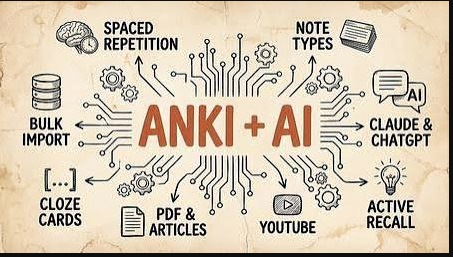
Anki + Claude Code For Learning and Memorization
Released 7/2026
MP4 | Video: h264, 1920x1080 | Audio: AAC, 44.1 KHz, 2 Ch
Genre: eLearning | Language: English | Duration: 18 Lessons ( 2h 3m ) | Size: 708.4 MB
# Anki + Claude Code for Learning and Memorization
**Level:** Beginner to Advanced
**Duration:** Self-paced
## Course Overview
This workflow combines **Anki**, a spaced repetition flashcard application, with **Claude Code**, an AI coding assistant from **Anthropic**, to help you learn technical subjects more efficiently. Claude Code can generate study materials, summarize concepts, create quizzes, and even produce flashcards that you can import into Anki.
> **Note:** Claude Code is primarily designed for software development tasks. While it can be adapted for learning workflows, general-purpose AI assistants can also perform many of these study-related tasks.
---
# Why Combine AI with Anki?
Anki excels at **long-term retention** through spaced repetition.
AI helps you:
* Summarize books and documentation
* Generate high-quality flashcards
* Explain difficult concepts
* Create practice questions
* Produce examples and mnemonics
* Identify gaps in your understanding
Together they reduce the time needed to create effective study material.
---
# Module 1: Learn the Anki Basics
Topics:
* Installing Anki
* Creating decks
* Creating note types
* Card templates
* Tags
* Media
* Synchronization
* Scheduling
Learn:
* Basic cards
* Cloze deletion cards
* Image occlusion (with add-ons if needed)
---
# Module 2: Understanding Spaced Repetition
Topics:
* Forgetting curve
* Active recall
* Ease factor
* Review intervals
* Daily limits
Goal:
Understand why reviewing a small number of cards consistently is more effective than cramming.
---
# Module 3: Setting Up Claude Code
Install Claude Code.
Learn:
* Working with repositories
* Reading documentation
* Prompt engineering
* Using Markdown
* Exporting structured text
---
# Module 4: AI-Assisted Note Taking
Instead of copying documentation, ask AI to produce:
* Concise summaries
* Key concepts
* Definitions
* Comparison tables
* Step-by-step explanations
Example prompt:
> "Summarize this C++ chapter into concise bullet points suitable for flashcards."
---
# Module 5: Generating Flashcards
Good flashcards are:
* Short
* Atomic (one fact per card)
* Clear
* Test understanding rather than recognition
Example:
**Front**
```
What does RAII stand for?
```
**Back**
```
Resource Acquisition Is Initialization
```
---
# Module 6: Cloze Deletion Cards
Example:
```
RAII stands for {{c1::Resource Acquisition Is Initialization}}.
```
These cards help reinforce terminology and definitions.
|
Download | |
Post Comment [0] |
Category: Tutorials
- views: 342
- date: 9 July 2026
- posted by: 0nelove

Dometrain - Mastering: C#
Released 7/2026
By Sergey Teplyakov
MP4 | Video: h264, 1920x1080 | Audio: AAC, 44.1 KHz, 2 Ch
Level: Mastering | Genre: eLearning | Language: English | Duration: 3h 25m | Size: 1.3 GB
# Dometrain – Mastering C#
**Mastering C#** is an advanced C# course from **Dometrain**, designed for developers who already know the basics of C# and want to write high-quality, modern, and maintainable code. It focuses on language features, best practices, performance, and real-world development rather than introductory programming.
## Prerequisites
Before starting, you should be comfortable with:
* Variables and data types
* Control flow (`if`, `switch`, loops)
* Methods
* Classes and objects
* Basic inheritance and interfaces
* Exception handling
* Basic use of the .NET CLI or Visual Studio
---
# Course Outline
## Module 1: Advanced C# Fundamentals
* Value types vs reference types
* Memory management
* Garbage Collection (GC)
* Stack vs Heap
* Nullable reference types
**Skills gained:**
* Understand how C# stores and manages memory.
* Write safer code using nullable reference types.
---
## Module 2: Object-Oriented Programming Deep Dive
* Encapsulation
* Inheritance
* Polymorphism
* Abstraction
* Composition vs inheritance
* SOLID principles
**Project:** Build a modular order processing system.
---
## Module 3: Modern C# Features
* Records
* Init-only properties
* Pattern matching
* Switch expressions
* Target-typed `new`
* Top-level statements
* Required members
* File-scoped namespaces
**Skills gained:**
* Write concise, modern C# code.
* Improve readability and maintainability.
---
## Module 4: Generics
* Generic classes
* Generic methods
* Constraints
* Covariance and contravariance
**Project:** Create a reusable generic repository.
---
## Module 5: LINQ
* Query syntax
* Method syntax
* Filtering
* Projection
* Grouping
* Aggregation
* Joins
* Deferred execution
**Project:** Analyze and report on sales data.
---
## Module 6: Delegates and Events
* Delegates
* Multicast delegates
* Lambda expressions
* Events
* Event handlers
**Project:** Build an event-driven notification system.
---
## Module 7: Asynchronous Programming
|
Download | |
Post Comment [0] |
Category: Tutorials
- views: 169
- date: 9 July 2026
- posted by: 0nelove

Learn Microsoft Word from scratch for Beginners + AI
Published 7/2026
Created by Emmanuel Udoh
MP4 | Video: h264, 1920x1080 | Audio: AAC, 44.1 KHz, 2 Ch
Level: All Levels | Genre: eLearning | Language: English | Duration: 13 Lectures ( 2h 56m ) | Size: 1.4 GB
# Learn Microsoft Word from Scratch for Beginners + AI
**Level:** Beginner
**Duration:** 4–6 Weeks (20–30 Hours)
**Prerequisites:** Basic computer skills
## Course Overview
This course teaches you how to use **Microsoft Word** from the ground up while introducing modern **AI-powered features** that can help you write, edit, summarize, and format documents more efficiently. By the end, you'll be able to create professional documents such as letters, reports, resumes, newsletters, and business proposals.
---
# Module 1: Getting Started with Microsoft Word
### Topics
* What is Microsoft Word?
* Installing Microsoft 365
* Understanding the Word interface
* Ribbon and tabs
* Quick Access Toolbar
* Creating, opening, and saving documents
* AutoSave and OneDrive basics
### Hands-on Exercise
|
Download | |
Post Comment [0] |
Category: Tutorials
- views: 275
- date: 9 July 2026
- posted by: 0nelove

Course 1: Model-In-The-Loop (Mil) For Robotics
MP4 | Video: h264, 1920x1080 | Audio: AAC, 44.1 KHz
Language: English | Size: 1016.20 MB | Duration: 0h 53m
# Course 1: Model-in-the-Loop (MIL) for Robotics
**Level:** Beginner to Intermediate
**Duration:** 4–6 weeks (20–30 hours)
**Prerequisites:**
* Basic robotics concepts
* Basic control systems
* Elementary C++ or Python
* High school mathematics (algebra, trigonometry, basic calculus)
## Course Overview
Model-in-the-Loop (MIL) is the first stage of model-based design. In MIL, both the plant (robot) and the controller are simulated as mathematical models before any code is generated or deployed to hardware. This allows engineers to validate algorithms early, reduce development costs, and identify design issues before testing on physical robots.
---
## Learning Objectives
By the end of this course, you will be able to:
* Explain the Model-Based Design (MBD) workflow.
* Understand the role of MIL in robotics development.
* Build mathematical models of robotic systems.
* Design and tune controllers in simulation.
* Validate controller performance using simulation results.
* Prepare models for later Software-in-the-Loop (SIL) and Hardware-in-the-Loop (HIL) testing.
---
# Module 1: Introduction to Model-Based Design
|
Download | |
Post Comment [0] |
Category: Tutorials
- views: 288
- date: 9 July 2026
- posted by: 0nelove

Third-Party Risk Management: The Partnership Playbook
MP4 | Video: h264, 1920x1080 | Audio: AAC, 44.1 KHz
Language: English | Size: 1.19 GB | Duration: 0h 30m
**Third-Party Risk Management: The Partnership Playbook** is a framework for managing the risks that arise when an organization works with external vendors, suppliers, contractors, cloud providers, consultants, or other business partners. The goal is to build productive partnerships while protecting the organization from financial, operational, legal, cybersecurity, and reputational risks.
## What Is Third-Party Risk Management (TPRM)?
Third-Party Risk Management is the process of identifying, assessing, monitoring, and reducing risks associated with external organizations that provide products or services.
Common third parties include:
* Cloud service providers
* Software vendors
* Payment processors
* Logistics companies
* Manufacturing suppliers
* Marketing agencies
* Professional consultants
* Managed service providers (MSPs)
---
## Why TPRM Matters
Organizations rely heavily on external partners, but those relationships can introduce risks such as:
* Data breaches
* Cyberattacks
* Regulatory non-compliance
* Financial instability of a vendor
* Supply chain disruptions
* Service outages
* Intellectual property theft
* Reputational damage
Effective TPRM helps organizations:
* Improve security
* Meet regulatory requirements
* Strengthen business continuity
* Reduce financial losses
* Build stronger vendor relationships
---
|
Download | |
Post Comment [0] |
Category: Tutorials
- views: 192
- date: 9 July 2026
- posted by: 0nelove

Complete C++ Programming Course
MP4 | Video: h264, 1920x1080 | Audio: AAC, 44.1 KHz
Language: English | Size: 7.89 GB | Duration: 14h 39m
A **Complete C++ Programming Course** should take you from the fundamentals to advanced topics with hands-on projects. Here's a comprehensive roadmap.
## Module 1: Introduction to C++
* What is C++?
* Installing a compiler (GCC, Clang, MSVC)
* Setting up an IDE (Visual Studio, VS Code, CLion)
* Writing your first program
* Compilation process
* Comments and coding style
**Project:** Hello World and Calculator
---
## Module 2: C++ Basics
* Variables and constants
* Data types
* Input and output (`cin`, `cout`)
* Operators
* Type conversion
* Scope and lifetime
**Practice:**
* Temperature converter
* BMI calculator
---
## Module 3: Control Flow
* `if`, `else if`, `else`
* `switch`
* `for`
* `while`
* `do-while`
* `break`
* `continue`
**Project:**
* Number guessing game
---
|
Download | |
Post Comment [0] |
Category: Tutorials
- views: 431
- date: 9 July 2026
- posted by: 0nelove

Confident Conversations That Tackle Conflict With Ease
MP4 | Video: h264, 1920x1080 | Audio: AAC, 44.1 KHz
Language: English | Size: 330.42 MB | Duration: 1h 10m
**Confident Conversations That Tackle Conflict With Ease** is about communicating calmly, clearly, and respectfully when disagreements arise. The goal isn't to "win" an argument—it's to understand the issue, express your perspective, and work toward a constructive solution.
Here are some practical principles:
### 1. Prepare Before the Conversation
* Clarify the specific issue you want to discuss.
* Focus on facts rather than assumptions.
* Decide what outcome you're hoping for.
### 2. Start Positively
Begin with a respectful tone that signals collaboration.
Example:
> "I'd like to talk about something that's been on my mind. I think we can work through it together."
### 3. Use "I" Statements
Describe your experience instead of assigning blame.
Instead of:
> "You never listen to me."
Try:
> "I feel overlooked when I don't have a chance to finish my thoughts."
### 4. Listen Actively
Show you're trying to understand.
* Maintain eye contact (if appropriate).
* Avoid interrupting.
* Summarize what you heard.
Example:
> "So you're saying the deadline felt unrealistic. Is that right?"
### 5. Stay Calm Under Pressure
* Speak slowly.
* Keep your voice steady.
* If emotions become overwhelming, suggest taking a short break and returning to the discus
|
Download | |
Post Comment [0] |
Category: Tutorials
- views: 194
- date: 9 July 2026
- posted by: 0nelove
If you want to build an **AI Chatbot** using **Apple Foundation Models + SwiftUI + SwiftData**, the recommended architecture is:
```text
SwiftUI (UI)
│
▼
ChatViewModel (@Observable)
│
▼
Foundation Models
(LanguageModelSession)
│
▼
SwiftData
(ChatMessage, Conversation)
```
### Tech Stack
* **SwiftUI** – Chat interface
* **Foundation Models Framework** – Apple Intelligence on-device LLM
* **SwiftData** – Store chat history
* **MVVM Architecture**
* **Async/Await**
* **Streaming Responses** (optional)
Apple's Foundation Models framework lets apps access the same on-device language model used by Apple Intelligence. It runs locally, preserving privacy and avoiding API costs, but requires supported hardware and Apple Intelligence to be enabled. ([SwiftyPlace][1])
---
## Project Structure
```
AIChatBot
│
├── Models
│ ├── ChatMessage.swift
│ └── Conversation.swift
│
├── ViewModels
│ └── ChatViewModel.swift
│
├── Views
│ ├── ChatView.swift
│ ├── MessageBubble.swift
│ └── InputBar.swift
│
├── Services
│ └── AIService.swift
│
└── AIChatBotApp.swift
```
---
## SwiftData Model
```swift
import SwiftData
@Model
final class ChatMessage {
var text: String
var isUser: Bool
var createdAt: Date
init(text: String,
isUser: Bool,
createdAt: Date = .now) {
self.text = text
self.isUser = isUser
self.createdAt = createdAt
}
}
```
SwiftData uses `@Model` classes and `ModelContext` to persist data automatically within your app. ([Apple Developer][2])
---
## AI Service
```swift
import FoundationModels
class AIService {
private let session = LanguageModelSession()
func ask(_ prompt: String) async throws -> String {
let response = try await session.respond(to: prompt)
return response.content
}
}
```
---
## ViewModel
```swift
@Observable
class ChatViewModel {
var messages: [ChatMessage] = []
let ai = AIService()
func send(text: String) async {
let user = ChatMessage(
text: text,
isUser: true
)
messages.append(user)
do {
let reply = try await ai.ask(text)
let bot = ChatMessage(
text: reply,
isUser: false
)
messages.append(bot)
} catch {
messages.append(
ChatMessage(
text: error.localizedDescription,
isUser: false
)
)
}
}
}
```
---
## SwiftUI Chat Screen
```swift
ScrollView {
LazyVStack {
ForEach(messages) { message in
MessageBubble(message: message)
}
}
}
InputBar()
```
---
## Store Messages
```swift
@Environment(\.modelContext)
private var context
context.insert(message)
try? context.save()
```
---
## Foundation Models Features
You can also implement:
* ✅ Multi-turn conversation
* ✅ Streaming responses
* ✅ Tool Calling
* ✅ Structured JSON output
* ✅ Custom prompts
* ✅ System instructions
* ✅ Local inference
* ✅ Offline chatbot
The framework supports session-based conversations, guided generation, streaming output, and tool-calling for more advanced assistants. ([Conor Luddy][3])
---
## Suggested Folder Architecture
```
AIChatBot
│
├── App
│
├── Models
│
├── Services
│ AIService.swift
│
├── Database
│ SwiftDataManager.swift
│
├── ViewModels
│ ChatViewModel.swift
│
├── Views
│ ChatView.swift
│ BubbleView.swift
│ InputView.swift
│
├── Components
│
├── Extensions
│
└── Resources
```
## Device Requirements
Apple Foundation Models are available only on devices that support Apple Intelligence. In practice, this means recent Apple Silicon Macs and supported iPhones/iPads (for example, iPhone 15 Pro or newer with the appropriate OS version and Apple Intelligence enabled). ([Conor Luddy][3])
## Learning Resources
If your goal is to build a production-quality chatbot, I can also provide a complete **Xcode project** with:
* SwiftUI chat UI (similar to ChatGPT)
* Apple Foundation Models integration
* SwiftData conversation history
* Streaming AI responses
* Markdown rendering
* Dark/Light mode
* Clean MVVM architecture
* Ready to run in Xcode 26 on iOS 26/macOS Tahoe.
https://rapidgator.net/file/714e1ae813d2aad22148883dbc681026/Ai_Chatbot_With_Apple_Foundation_Models_Swiftui_Swiftdata.part1.rar.html
https://rapidgator.net/file/750988a0bfd0647ecdad74ca709cbf93/Ai_Chatbot_With_Apple_Foundation_Models_Swiftui_Swiftdata.part2.rar.html
https://rapidgator.net/file/072048285b89f1458ca73372ef2171d6/Ai_Chatbot_With_Apple_Foundation_Models_Swiftui_Swiftdata.part3.rar.html
https://www.uploadcloud.pro/vpmrl608y7qd/Ai_Chatbot_With_Apple_Foundation_Models_Swiftui_Swiftdata.part1.rar.html
https://www.uploadcloud.pro/i49wd44722vu/Ai_Chatbot_With_Apple_Foundation_Models_Swiftui_Swiftdata.part2.rar.html
https://www.uploadcloud.pro/h0rya3kbz6wx/Ai_Chatbot_With_Apple_Foundation_Models_Swiftui_Swiftdata.part3.rar.html
https://rapidgator.net/file/750988a0bfd0647ecdad74ca709cbf93/Ai_Chatbot_With_Apple_Foundation_Models_Swiftui_Swiftdata.part2.rar.html
https://rapidgator.net/file/072048285b89f1458ca73372ef2171d6/Ai_Chatbot_With_Apple_Foundation_Models_Swiftui_Swiftdata.part3.rar.html
https://www.uploadcloud.pro/vpmrl608y7qd/Ai_Chatbot_With_Apple_Foundation_Models_Swiftui_Swiftdata.part1.rar.html
https://www.uploadcloud.pro/i49wd44722vu/Ai_Chatbot_With_Apple_Foundation_Models_Swiftui_Swiftdata.part2.rar.html
https://www.uploadcloud.pro/h0rya3kbz6wx/Ai_Chatbot_With_Apple_Foundation_Models_Swiftui_Swiftdata.part3.rar.html
|
Download | |
Post Comment [0] |
Category: Tutorials
- views: 232
- date: 5 July 2026
- posted by: 0nelove

Design A Kinetic Sculpture Using Fusion 360
Last updated 2/2019
Created by Mahmoud Shehata
MP4 | Video: h264, 1280x720 | Audio: AAC, 44.1 KHz, 2 Ch
Level: Beginner | Genre: eLearning | Language: English + subtitle | Duration: 28 Lectures ( 3h 34m ) | Size: 815.9 MB
Kinetic Sculpture Project: Orbital Rings
Design a desktop kinetic sculpture consisting of three concentric rings that rotate independently around different axes, creating a mesmerizing orbital motion similar to a gyroscope.
Design Concept
The sculpture consists of:
A circular base
Three nested rings of decreasing diameter
A central sphere suspended inside the rings
Revolute joints allowing each ring to rotate on a different axis
Suggested Dimensions
Component Size
Base Diameter 180 mm
Base Thickness 20 mm
Outer Ring Ø140 mm x 6 mm
Middle Ring Ø110 mm x 6 mm
Inner Ring Ø80 mm x 6 mm
Center Sphere Ø35 mm
Shaft Pins Ø6 mm
Step 1: Create Parameters
In Modify → Change Parameters, define:
Parameter Value
baseDia 180 mm
ringThickness 6 mm
outerRingDia 140 mm
middleRingDia 110 mm
innerRingDia 80 mm
sphereDia 35 mm
pinDia 6 mm
Using parameters makes resizing the sculpture easy later.
Step 2: Create the Base
Start a sketch on the XY plane.
Draw a circle with diameter baseDia.
Extrude 20 mm.
Add a central support arm rising approximately 100 mm.
Step 3: Create the Outer Ring
Sketch two concentric circles:
Outside: outerRingDia
Inside: outerRingDia - 12 mm
Extrude by ringThickness.
Create pin holes on opposite sides.
|
Download | |
Post Comment [0] |
Category: Tutorials
- views: 298
- date: 30 June 2026
- posted by: 0nelove

Master 20+ AI Tools for Architecture & Interior Design
Published 6/2026
Created by Naman Mehta
MP4 | Video: h264, 1920x1080 | Audio: AAC, 44.1 KHz, 2 Ch
Level: All Levels | Genre: eLearning | Language: English | Duration: 17 Lectures ( 35h 3m ) | Size: 37.7 GB
Build AI workflows for visualization, documentation, agents & delivery using ChatGPT, Midjourney, Claude & 20+ AEC tools
What you'll learn
⚡ Generate photorealistic architectural renders and interior visuals using Midjourney, xFigura, Flora AI, and xFigura with multi-angle consistency system
⚡ Build AI-powered agentic workflows using Claude, Notion AI, and MCP to automate documentation, BOQ generation, and project management tasks in AEC
⚡ Train custom LoRA models on architectural datasets for brand-consistent visualization outputs across projects and client deliverables
⚡ Automate compliance checks, by-law research, and technical documentation using ChatGPT, Gemini, Perplexity, and NotebookLM
⚡ Design and deploy AI micro-apps and workflow automations for AEC using Google AI Studio, Glyph Copilot, Ideatura AI, and Notion
⚡ Set up repeatable prompt libraries, QA grids, and visualization consistency systems to eliminate manual rework and reduce iteration time by 5–10x
⚡ Package and deliver client-ready project narratives, SOPs, and handoff bundles using Gamma, Napkin AI, and Canva AI
⚡ Apply WASP, RCIS, and Big LLM frameworks to integrate AI tools strategically across the full AEC project lifecycle
Requirements
❗ No prior AI experience needed — all tools and workflows are taught from scratch with live demonstrations
❗ A laptop or desktop with internet access; no expensive software or subscriptions required to get started
❗ Basic familiarity with architectural or interior design concepts is helpful but not mandatory
❗ An open mindset to learn new AI tools — curiosity and willingness to experiment is all you need
|
Download | |
Post Comment [0] |
Category: Tutorials
- views: 334
- date: 30 June 2026
- posted by: 0nelove

Running AI Locally: Tools, Assistants, and Coding on Your Own Hardware
Released 6/2026
With Ronnie Sheer
MP4 | Video: h264, 1280x720 | Audio: AAC, 44.1 KHz, 2 Ch
Skill level: Intermediate | Genre: eLearning | Language: English + subtitle | Duration: 31m | Size: 67 MB
Discover how to run AI models locally on your own hardware and transform them into powerful assistants, coding tools, and on-device applications. Learn how to deploy feature-rich AI systems.
Course details
Explore the process of running AI models locally to establish control over your solutions with regards to privacy, latency, and cost. Learn how to set up a local AI stack, including understanding models, runtimes, and integration with your hardware. Discover ways to deploy feature-rich AI assistants and tools that enhance your coding workflows. Evaluate practical scenarios for using offline language models on mobile devices. This course is designed with developers, software engineers, and IT professionals in mind, offering intermediate-level insights suitable for technical professionals eager to experiment with AI-powered tools. By applying the knowledge gained, you can effectively incorporate AI into personal or professional workflows without cloud dependencies. This hands-on approach to local AI enhances understanding and skill in deploying systems tailored to specific needs.
|
Download | |
Post Comment [0] |
Category: Tutorials
- views: 296
- date: 30 June 2026
- posted by: 0nelove

Resolving Conflict with Emotional Intelligence
Released 6/2026
With Kwame Christian
MP4 | Video: h264, 1280x720 | Audio: AAC, 44.1 KHz, 2 Ch
Skill level: Beginner | Genre: eLearning | Language: English + subtitle | Duration: 1h 28m | Size: 378.1 MB
Learn effective skills for navigating and resolving workplace conflicts. Strategies include negotiation under pressure, interpersonal communication, and structured conflict resolution.
Course details
Learn how to resolve conflicts in professional environments. Explore strategies to negotiate under pressure. Find out how to frame persuasive arguments and manage challenging conversations. Understand the psychology of conflict and develop skills to create mutually beneficial outcomes in high-stakes interactions. Discover how to unravel the complexities of workplace dynamics and improve your ability to lead effective communication with clarity and influence. Learn how to prepare for and conduct critical discussions using evidence-based frameworks and persuasive techniques. Designed for managers, team leads, and professionals involved in decision-making and stakeholder alignment, this course empowers you to facilitate positive workplace interactions. Whether you're an individual contributor or an emerging leader, you will strengthen your core competencies in conflict management and leadership communication, leading to greater personal and professional growth.
|
Download | |
Post Comment [0] |
Category: Tutorials
- views: 148
- date: 30 June 2026
- posted by: 0nelove
[center]

The Complete Diploma in Building & Facilities Management
Published 6/2026
Created by ElevateU Academy
MP4 | Video: h264, 1920x1080 | Audio: AAC, 44.1 KHz, 2 Ch
Level: All Levels | Genre: eLearning | Language: English | Duration: 61 Lectures ( 3h 15m ) | Size: 3.9 GB
|
Download | |
Post Comment [0] |
Category: Tutorials
- views: 134
- date: 30 June 2026
- posted by: 0nelove

Practical Negotiation Techniques
Released 6/2026
With Kwame Christian
MP4 | Video: h264, 1280x720 | Audio: AAC, 44.1 KHz, 2 Ch
Skill level: Beginner | Genre: eLearning | Language: English + subtitle | Duration: 55m | Size: 242.3 MB
Learn essential negotiation strategies that help you to build trust, influence outcomes, and effectively resolve conflicts. Explore techniques used by world-class negotiators.
Course details
Are you well-versed in these core aspects of negotiation: building trust, influencing outcomes, and managing difficult conversations with ease? In this course, discover how creative deal-making, strategic preparations, and empathetic assertiveness can be leveraged to achieve optimal agreements. Explore how to anchor negotiations with sound rationale, manage objections gracefully, and develop negotiation plans that maximize value for all parties involved. Review real-world examples and gain insights from globally recognized negotiation expert, Kwame Christian. This course is designed to provide you with practical skills through interactive scenarios and role-plays that simulate real negotiation experiences. It's ideal for managers, team leads, HR professionals, and anyone involved in client-facing roles who desires to improve their negotiation skills. By the end of this course, you will be more prepared and equipped to successfully achieve outcomes in any negotiation setting.
|
Download | |
Post Comment [0] |
Category: Tutorials
- views: 220
- date: 30 June 2026
- posted by: 0nelove
Microsoft Excel 365: Full Beginner Excel Training Course
Published 6/2026
Created by Tutorials by Manizha and Ryan
MP4 | Video: h264, 1920x1080 | Audio: AAC, 44.1 KHz, 2 Ch
Level: All Levels | Genre: eLearning | Language: English | Duration: 39 Lectures ( 3h 52m ) | Size: 1.9 GB
Build practical Excel 365 skills for work, school, business, data organization, reports, charts, and productivity.
What you'll learn
⚡ Learn Excel 365 basics, formulas, formatting, charts, pivot tables, dashboards, printing, exporting, and sharing.
⚡ Use Excel 365 for data entry, formulas, charts, pivot tables, dashboards, file formats, sharing, and productivity.
⚡ Build Excel skills from scratch, including formulas, formatting, data tools, charts, pivot tables, dashboards, and sharing.
⚡ Learn how to organize data, use formulas, create charts, build pivot tables, make dashboards, and work confidently in Excel 365.
Requirements
❗ No prior Excel experience is required.
❗ A computer with Microsoft Excel 365 installed or access to Excel online.
❗ Basic computer skills, such as using a keyboard, mouse, and opening files.
❗ A willingness to practice with spreadsheets and follow the lessons step by step.
|
Download | |
Post Comment [0] |
Category: Tutorials
- views: 234
- date: 30 June 2026
- posted by: 0nelove

Microsoft Agent Framework: Design, Orchestrate, and Scale Agentic AI
Released 6/2026
With Jose Latorre
MP4 | Video: h264, 1280x720 | Audio: AAC, 44.1 KHz, 2 Ch
Skill level: Intermediate | Genre: eLearning | Language: English + subtitle | Duration: 1h 37m | Size: 260.5 MB
From your first agent to a full feature-design team: build it, give it tools and memory, debug it with DevUI, and orchestrate agentic AI — all with the Microsoft Agent Framework.
Course details
Build production-grade agents with the Microsoft Agent Framework — the evolution of Semantic Kernel and AutoGen, redesigned for real agentic systems. Start by building a foundational "feature design" agent that turns rough product ideas into structured specifications, using DevUI from day one to visually trace exactly what your agent is doing. Then, give it memory and local functions and connect it to the GitHub MCP server for real-world capability. From there, orchestrate a full feature-design team — planner, architect, QA, and executor — collaborating through a structured, more deterministic multi-agent workflow. This course is for developers ready to move past single-prompt demos and build agents that actually behave in production. By the end, you'll be able to design, build, debug, and orchestrate complete multi-agent pipelines that automate real work — measurable, not magical.
Skills covered
Artificial Intelligence (AI), Agentic Automation, GitHub Model Context Protocol (MCP), Agentic AI Development
|
Download | |
Post Comment [0] |
Category: Tutorials
- views: 191
- date: 30 June 2026
- posted by: 0nelove

Listening to Customers (2026)
Released 6/2026
With Noah Fleming
MP4 | Video: h264, 1280x720 | Audio: AAC, 44.1 KHz, 2 Ch
Skill level: Intermediate | Genre: eLearning | Language: English + subtitle | Duration: 42m | Size: 126.4 MB
Build listening skills that help you connect with customers, ask better questions, show empathy, and deliver solutions across in-person, phone, chat, and social channels.
Course details
Listening is one of the most powerful skills in customer service—yet it's often the area where professionals lack specific training. With AI handling more customer interactions than ever, the ability to truly hear and connect with a customer is what sets you apart.In this course, customer strategy expert Noah Fleming helps you build the listening skills that drive real results. Noah covers how to avoid prejudging customers, adopt a questioning mindset, and ask better questions to get to the root of an issue. He walks you through showing empathy and reading signals across high-pressure in-person interactions, phone calls, chat, and social media. Noah also explores techniques like verify, clarify, and follow up, along with the bad news/good news approach, so you can deliver solutions that actually fit what the customer told you.This course includes AI-powered Role Play. Role Play allows you to practice what you've learned in interactive simulations of real-world conversations.
|
Download | |
Post Comment [0] |
Category: Tutorials
- views: 231
- date: 30 June 2026
- posted by: 0nelove
[center]

Introduction to Career Skills in Data Analytics (2026)
Released 6/2026
With Robin Hunt
MP4 | Video: h264, 1280x720 | Audio: AAC, 44.1 KHz, 2 Ch
Skill level: Beginner | Genre: eLearning | Language: English + subtitle | Duration: 2h 48m | Size: 528.7 MB
|
Download | |
Post Comment [0] |
Category: Tutorials
- views: 162
- date: 30 June 2026
- posted by: 0nelove

jаvascript Interview Preparation for Junior Developers
Published 6/2026
Created by Matthew Widestack
MP4 | Video: h264, 1920x1080 | Audio: AAC, 44.1 KHz, 2 Ch
Level: Beginner | Genre: eLearning | Language: English | Duration: 52 Lectures ( 1h 20m ) | Size: 407.8 MB
Master jаvascript fundamentals, interview questions, coding exercises and real-world concepts for junior developers.
What you'll learn
⚡ Understand core jаvascript concepts and explain how the language works behind the scenes.
⚡ Master functions, scope, closures, objects and other fundamental jаvascript mechanisms.
⚡ Develop a deeper understanding of jаvascript behavior instead of simply memorizing syntax.
⚡ Improve debugging and problem-solving skills by understanding why jаvascript code behaves the way it does.
⚡ Gain the confidence to explain jаvascript concepts and answer common junior developer interview questions.
Requirements
❗ Some familiarity with jаvascript basics is recommended, but no prior experience with advanced concepts is required.
❗ A desire to understand how jаvascript works instead of just memorizing syntax.
|
Download | |
Post Comment [0] |
Category: Tutorials
- views: 202
- date: 30 June 2026
- posted by: 0nelove

AI Prototyping with Claude Design
Released 6/2026
With Denys Linkov
MP4 | Video: h264, 1280x720 | Audio: AAC, 44.1 KHz, 2 Ch
Skill level: Beginner | Genre: eLearning | Language: English + subtitle | Duration: 34m | Size: 92.1 MB
Discover how to use Claude Design to build high-fidelity app prototypes fast. Learn AI workflows for visual consistency, animation, and promotional assets.
Course details
Build high-fidelity app prototypes using Claude Design and AI-assisted workflows. In this hands-on course, Denys Linkov shows you how to brainstorm ideas, generate multiple design directions, and create interactive layouts from scratch. Learn how to apply design systems for visual consistency, iterate using markup and edits, and enhance your prototype with animations and a promotional landing page to gather user feedback.After completing this course, you'll have a complete, shareable prototype and a repeatable workflow for rapid prototyping—ideal for product managers, designers, and nontechnical creators.
|
Download | |
Post Comment [0] |
Category: Tutorials
- views: 379
- date: 30 June 2026
- posted by: 0nelove

Hermes Agent Overview: Deploying High-Efficiency AI Agents
Published 6/2026
Created by Stuart Wesselby
MP4 | Video: h264, 1920x1080 | Audio: AAC, 44.1 KHz, 2 Ch
Level: All Levels | Genre: eLearning | Language: English | Duration: 27 Lectures ( 1h 8m ) | Size: 786.1 MB
Stop asking AI. Start owning it.
What you'll learn
⚡ Install and configure Hermes from scratch
⚡ Navigate and master the full interface
⚡ Control your AI costs with confidence
⚡ Automate tasks with scheduled cron jobs
⚡ Connect Hermes to Telegram and other messaging apps
⚡ Put Hermes to work on real business problems
Requirements
❗ No experience of Hermes required
Description
"This course contains the use of artificial intelligence."
The Problem with Most AI Tools
You open a chat window, type a question, get an answer, and start over tomorrow. There is no memory. No automation. No compound value. Every session begins at zero.
Hermes AI Agent is different. It remembers your preferences, develops new skills as it learns what you need, runs scheduled tasks while you sleep, and connects directly to the messaging apps you already use. This is not a chat tool. It is a personal AI assistant you actually own.
|
Download | |
Post Comment [0] |
Category: Tutorials
- views: 222
- date: 30 June 2026
- posted by: 0nelove

Industry 5.0 Data Science & AI Professional Program
Published 6/2026
Created by Priya S, Shoba L.K, Jesline Daniel, Anilet Bala A
MP4 | Video: h264, 1920x1080 | Audio: AAC, 44.1 KHz, 2 Ch
Level: Intermediate | Genre: eLearning | Language: English | Duration: 8 Lectures ( 5h 14m ) | Size: 2.4 GB
Complete Data Science Career Program: Python, SQL, Statistics, Machine Learning, Generative AI and Data Visualization
What you'll learn
⚡ Master Python, NumPy, Pandas, and SQL to acquire, clean, transform, and analyze real-world datasets for data science applications.
⚡ Create impactful visualizations, dashboards, and data stories using Matplotlib, Seaborn, Power BI, and Tableau for business insights.
⚡ Build, evaluate, and optimize machine learning models using Scikit-learn for prediction, classification, clustering, and analytics.
⚡ Apply Generative AI, LLMs, Prompt Engineering, and RAG to enhance data analysis, automation, and AI-powered decision-making.
⚡ Complete industry projects by integrating Python, SQL, visualization, machine learning, and AI to develop end-to-end data science solutions.
|
Download | |
Post Comment [0] |
Category: Tutorials
- views: 133
- date: 30 June 2026
- posted by: 0nelove

Learn Python Fast with ChatGPT: Build 4 Projects
Published 6/2026
Created by Rustam Rustamov
MP4 | Video: h264, 1920x1080 | Audio: AAC, 44.1 KHz, 2 Ch
Level: All Levels | Genre: eLearning | Language: English | Duration: 22 Lectures ( 6h 28m ) | Size: 3.8 GB
Learn Python fundamentals, build 4 projects, and use ChatGPT to code, debug, and learn faster.
What you'll learn
⚡ Understand Python fundamentals including variables, data types, input/output, loops, functions, and conditional statements.
⚡ Build 4 practical Python projects from scratch: Smart Calculator, Password Generator, Number Guessing Game, and Expense Tracker.
⚡ Use ChatGPT effectively to learn Python faster, generate code, solve problems, and improve programming skills.
⚡ Debug Python programs, identify common errors, and fix bugs using AI-assisted development techniques.
⚡ Review and improve Python code by applying best practices, code organization, and feature enhancements.
⚡ Write and understand beginner-friendly Python programs with confidence and continue learning independently after the course.
Requirements
❗ No prior programming or Python experience is required.
❗ A computer (Windows, macOS, or Linux) with internet access.
❗ Willingness to learn, practice, and build projects.
❗ Basic computer skills such as creating files and installing software.
❗ Python and Visual Studio Code (VS Code) can be installed during the course.
❗ A free ChatGPT account is recommended to follow the AI-assisted coding lessons.
|
Download | |
Post Comment [0] |
Category: Tutorials
- views: 184
- date: 30 June 2026
- posted by: 0nelove

Maximize Your Claude Code Programming Productivity
Released 6/2026
With Denys Linkov
MP4 | Video: h264, 1280x720 | Audio: AAC, 44.1 KHz, 2 Ch
Skill level: Advanced | Genre: eLearning | Language: English + subtitle | Duration: 3h 52m | Size: 704.2 MB
Discover practical strategies to maximize your productivity by planning, testing, building, and debugging with Claude Code.
Course details
Claude Code is exploding across the development landscape. What began as a model optimized for developers has sprouted an ever-expanding set of tools for creating, managing, integrating, and deploying software. Learn to plan and implement sophisticated, AI-driven workflows that go beyond basic code prompting. Discover the essential skills to set up an optimized UI design system, effortlessly incorporating Figma designs into your projects. Hone your skills in test-driven development to ensure code quality and robustness in any development pipeline. Delve into developer-focused environments, setting up MCP servers for seamless integration across platforms like GitHub and Jira. Elevate your coding with the creation of automated, intelligent agents designed to enhance your development ecosystem. Perfect for developers already familiar with Claude Code, this course is tailored to boost productivity and innovation within your existing workflows.
Skills covered
Programming, AI Productivity, Anthropic Claude, Artificial Intelligence (AI)
|
Download | |
Post Comment [0] |
Category: Tutorials
- views: 221
- date: 30 June 2026
- posted by: 0nelove

An Introduction to Data
Published 6/2026
Created by Henry Pedro
MP4 | Video: h264, 1920x1080 | Audio: AAC, 44.1 KHz, 2 Ch
Level: Beginner | Genre: eLearning | Language: English | Duration: 8 Lectures ( 31m ) | Size: 469.1 MB
Data, Data Management, Data Visualisation, DPA and GDPR
What you'll learn
⚡ Have a basic understanding of data, data management and its presentations
⚡ Understanding why data is important and the challenges that comes with data
⚡ Understand the governance of data and the legal frameworks that protect it
⚡ How to explore the power of data and how organisations can use data to identify trends, gain insights, and make informed predictions.
Requirements
❗ No prerequisites. As an introduction course, it's an opportunity for learners to take their first steps into the world of data
Description
Data is everywhere. From the apps we use and the services we access to the decisions organisations make every day, data plays a vital role in shaping the world around us. This course provides a practical and easy-to-understand introduction to the fundamentals of data and data management.
Designed for beginners, the course explores what data is, why it is important, and how it can support informed decision-making. Learners will gain an understanding of different types of data, how data is collected and managed, and the challenges organisations face in maintaining data quality. Also, the need to engage with data on three levels.
|
Download | |
Post Comment [0] |
Category: Tutorials
- views: 304
- date: 30 June 2026
- posted by: 0nelove

Cbrcor 350-201 V1.2 Cisco Cyberops Professional Video Course
MP4 | Video: h264, 1920x1080 | Audio: AAC, 44.1 KHz
Language: English | Size: 2.73 GB | Duration: 6h 58m
Performing Cybersecurity Using Cisco Security Technologies v1.2: A structured study guide for the CCNP Cybersecurity
What you'll learn
Confidently prepare for every domain of the Cisco CBRCOR 350-201 exam, mapped one-to-one to the official blueprint weighting.
Interpret security playbooks and choose the right tool — SIEM, SOAR, EDR, or a Threat Intelligence Platform — for a given scenario.
Identify the industry behind major compliance standards (PCI, GDPR, SOC, SOX, FedRAMP, ISO 27001) and explain cyber risk insurance.
Apply the NIST incident-response lifecycle and read IR metrics (MTTD, MTTR, dwell time) to find a SOC's weak point.
Harden systems and networks, evaluate security posture and controls, and apply DevSecOps practices and segmentation.
Protect data in all three states and design layered DLP across host, network, application, and cloud.
Tune and troubleshoot SIEM detection rules, and determine where to apply automation, orchestration, and machine learning in SOAR.
Read and modify Python, recognize JSON/XML/CSV/HTML, and consume REST APIs including status codes, rate limits, and authentication.
Requirements
No prior security-operations experience is required — every concept is taught from the ground up.
Basic computer literacy and comfort using a laptop; familiarity with networking basics is helpful but not essential.
A computer that can run Python 3 and a Bash shell to follow the optional hands-on labs (any Windows, macOS, or Linux laptop works).
Curiosity and a willingness to read, run, break, and fix small scripts.
|
Download | |
Post Comment [0] |
Category: Tutorials
- views: 278
- date: 30 June 2026
- posted by: 0nelove

P&Id And Engineering Drawings Interpretation
MP4 | Video: h264, 1920x1080 | Audio: AAC, 44.1 KHz
Language: English | Size: 4.42 GB | Duration: 5h 34m
Learn how to read and understand P&IDs and most other common engineering drawings used in various process industries
What you'll learn
Understand purpose and content of common engineering drawings
Understand how to interpret the information on P&IDs, including the valves, equipment, control/safety systems
Understand how to keep drawings current and accurate throughout the lifecycle of the facility
Understand how are current and accurate drawings critical to a Process Safety Management Plan
Requirements
There are no requirements or prerequisites for taking this course
Description
Learn how to read and interpret P&IDs (piping and instrumentation diagrams) and the wider set of engineering drawings used across the process industries, and how to apply that skill in practice. The course works from the fundamentals up to real-world interpretation using real project P&IDs rather than simplified examples, so you can take part in a PHA, HAZOP, design review, or safety investigation and understand the drawings under discussion.The course is well established. David Clarke has taught it at Risk Alive, in person in Calgary, AB and live online, for around a decade, to hundreds of engineers. The instructor is rated 4.88/5, the course materials are rated 4.74/5.What you will be able to doThe objective is not only to read a drawing but to contribute. You will be able to participate in PHAs and HAZOPs, follow the discussion in design reviews and management of change (MOC), identify
|
Download | |
Post Comment [0] |
Category: Tutorials
- views: 110
- date: 30 June 2026
- posted by: 0nelove

Maximize Your Claude Code Programming Productivity
Released 6/2026
With Denys Linkov
MP4 | Video: h264, 1280x720 | Audio: AAC, 44.1 KHz, 2 Ch
Skill level: Advanced | Genre: eLearning | Language: English + subtitle | Duration: 3h 52m | Size: 704.2 MB
Discover practical strategies to maximize your productivity by planning, testing, building, and debugging with Claude Code.
Course details
Claude Code is exploding across the development landscape. What began as a model optimized for developers has sprouted an ever-expanding set of tools for creating, managing, integrating, and deploying software. Learn to plan and implement sophisticated, AI-driven workflows that go beyond basic code prompting. Discover the essential skills to set up an optimized UI design system, effortlessly incorporating Figma designs into your projects. Hone your skills in test-driven development to ensure code quality and robustness in any development pipeline. Delve into developer-focused environments, setting up MCP servers for seamless integration across platforms like GitHub and Jira. Elevate your coding with the creation of automated, intelligent agents designed to enhance your development ecosystem. Perfect for developers already familiar with Claude Code, this course is tailored to boost productivity and innovation within your existing workflows.
|
Download | |
Post Comment [0] |
Category: Tutorials
- views: 108
- date: 30 June 2026
- posted by: 0nelove

Energy Measurement And Verification (M&V) Fundamentals
MP4 | Video: h264, 1920x1080 | Audio: AAC, 44.1 KHz
Language: English | Size: 1.23 GB | Duration: 1h 46m
Learn Measurement & Verification (M&V), Baseline Modeling, Energy Savings Verification, and IPMVP Principles
What you'll learn
Understand the fundamentals of energy efficiency projects and their impact on energy performance and cost reduction.
Understand the principles of Measurement and Verification (M&V) and the role of the IPMVP framework in energy projects.
Develop energy baselines, reporting periods, and identify independent variables and static factors.
Apply routine and non-routine adjustments to ensure fair and accurate energy performance comparisons.
Follow the complete M&V process from project implementation to verified savings determination.
Differentiate between the IPMVP verification options and select appropriate approaches for different project types.
Calculate and interpret verified energy savings using practical M&V methodologies.
Requirements
No prior Measurement and Verification (M&V) experience is required. A basic understanding of energy systems, building operations, or engineering concepts is helpful but not mandatory.
|
Download | |
Post Comment [0] |