


From Canva To Creator: Affinity Essentials
Category: Tutorials
- views: 96
- date: 18 May 2026
- posted by: 0nelove
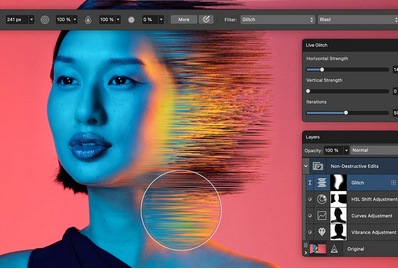
From Canva To Creator: Affinity Essentials
Published 5/2026
Created by Jeremy Hazel
MP4 | Video: h264, 1920x1080 | Audio: AAC, 44.1 KHz, 2 Ch
Level: Beginner | Genre: eLearning | Language: English | Duration: 59 Lectures ( 7h 31m ) | Size: 4 GB
Learn the fundamentals of the affinity suite by Canva
What you'll learn
⚡ Navigate Affinity with confidence and be able to read what the system is telling you
⚡ Understand The fundamentals of layers, shapes, text, and images — the building blocks of everything
⚡ Remember and apply Universal digital art concepts that apply no matter what you create
⚡ Demonstrate Vector art essentials — clean, scalable graphics you can use anywhere
⚡ Render Pixel art basic photo editing — destructive and non-destructive techniques
⚡ Apply these techniques to bring it all together in a real final project
Requirements
❗ None, simply downloading Affinity by Canva and being ready to learn
Description
From Canva to Creator: Affinity Essentials is built for the creative who is done watching and ready to make. Not every tool. Not every technique. Just the right foundation — the one that gets you creating real work, in real time, with confidence.
This is not a course that teaches you to copy what I do. This is a course that teaches you how the app thinks, so you can make whatever YOU want to make.
What will learn
· How to navigate and set up Affinity like a working artist — not a tourist
· The fundamentals of layers, shapes, text, and images — the building blocks of everything
· Universal digital art concepts that apply no matter what you create
· Vector art essentials — clean, scalable graphics you can use anywhere
· Pixel art and photo editing — destructive and non-destructive techniques
· How to bring it all together in a real final project
How is this different than other courses on the subject?
Most Affinity courses teach you the tools. This course teaches you how to use them together — so you can walk away and actually create, not just follow along.
We are not here to overwhelm you with every studio and every setting. We are here to give you the essentials you need to move. To build. To call yourself a creator — because after this course, that is exactly what you are.
How do I know if this course is right for me?
· You use Canva but want to go beyond templates
· You discovered Affinity after the Canva acquisition and want to actually learn it
· You are new to digital art and want a structured, honest starting point
· You have tried free YouTube videos but can not figure out how to apply what you watch
· You are ready to stop saying "I wish I could" and start saying I AM a creator
What is included?
· 5 structured sections with 50+ lessons
· Step-by-step projects throughout — including a Smiley Face series, a Vector Car build, and a combination Final Project
· Studio screenshots and practice files
· A real workflow you can use from day one
What will I be able to do by the end?
· Navigate Affinity with confidence
· Create vector and pixel art from scratch
· Edit and composite photos like a working artist
· Build assets for your business, your brand, or your portfolio
· Say — and mean it — I AM a digital artist
Who this course is for
⭐ Individuals who use Canva but want to go beyond templates
⭐ Individuals that discovered Affinity after the Canva acquisition and want to actually learn it
⭐ Individuals new to digital art and want a structured, honest starting point
⭐ Learners who have tried free YouTube videos but can not figure out how to apply what you watch
⭐ learners who are ready to stop saying "I wish I could" and are looking for a way to make it happen
https://rapidgator.net/file/7d5a1dc1c30ede12dda0504b2ab30f35/From_Canva_to_Creator_Affinity_Essentials.part5.rar.html
https://rapidgator.net/file/186110aba995d7155df50fdcea92316a/From_Canva_to_Creator_Affinity_Essentials.part4.rar.html
https://rapidgator.net/file/481d9ac16354bf56c8776d78714cf36e/From_Canva_to_Creator_Affinity_Essentials.part3.rar.html
https://rapidgator.net/file/7ba013ba34c37f1af39255dadcc97368/From_Canva_to_Creator_Affinity_Essentials.part2.rar.html
https://rapidgator.net/file/7976f3c9990f219979ae0cd4989443c1/From_Canva_to_Creator_Affinity_Essentials.part1.rar.html
https://nitroflare.com/view/0F0E0354FA88A76/From_Canva_to_Creator_Affinity_Essentials.part5.rar
https://nitroflare.com/view/454B0932A110239/From_Canva_to_Creator_Affinity_Essentials.part4.rar
https://nitroflare.com/view/03CAD4A81558B30/From_Canva_to_Creator_Affinity_Essentials.part3.rar
https://nitroflare.com/view/FB36EC3E71B6892/From_Canva_to_Creator_Affinity_Essentials.part2.rar
https://nitroflare.com/view/E0A088F340E75BF/From_Canva_to_Creator_Affinity_Essentials.part1.rar
We need your support!
Make a donation to help us stay online

Bitcoin (BTC)
bc1q08g9d22cxkawsjlf8etuek2pc9n2a3hs4cdrld

Bitcoin Cash (BCH)
qqvwexzhvgauxq2apgc4j0ewvcak6hh6lsnzmvtkem

Ethereum (ETH)
0xb55513D2c91A6e3c497621644ec99e206CDaf239

Litecoin (LTC)
ltc1qt6g2trfv9tjs4qj68sqc4uf0ukvc9jpnsyt59u

USDT (ERC20)
0xb55513D2c91A6e3c497621644ec99e206CDaf239

USDT (TRC20)
TYdPNrz7v1P9riWBWZ317oBgJueheGjATm
Information |
|||
 |
Users of GUESTS are not allowed to comment this publication. | ||