


Residential And Commercial Solar Pv Design In Helioscope
Category: Tutorials
- views: 134
- date: 7 February 2026
- posted by: 0nelove
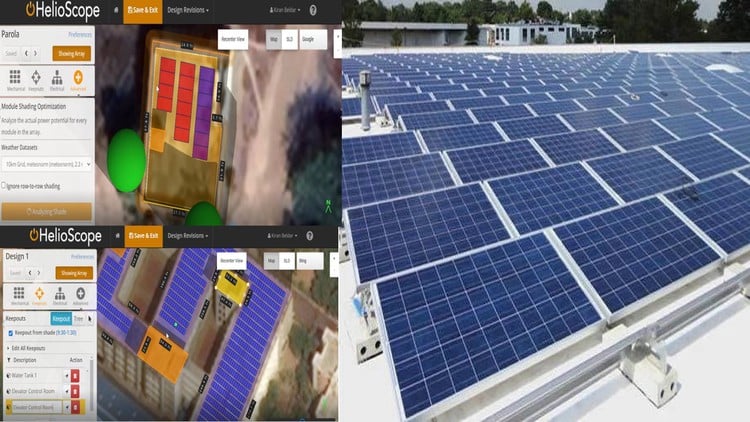
Residential And Commercial Solar Pv Design In Helioscope
Published 2/2026
Created by Jason Morales
MP4 | Video: h264, 1920x1080 | Audio: AAC, 44.1 KHz, 2 Ch
Level: All Levels | Genre: eLearning | Language: English | Duration: 8 Lectures ( 1h 37m ) | Size: 2.81 GB
HelioScope, Solar PV Design. Optimization and performance modeling for residential and commercial solar systems.
What you'll learn
✓ How to create project in helioscope (Project creation page, Project profile, Condition Set, Set Azimuth, Changing racking type, Changing Tilt )
✓ Changing Landscape or portrait layout of panels
✓ Row Spacing, Module Spacing, Frame Spacing, Setback and Alignment
✓ How to Create Keepouts/Obstacle on Building and Shadow analysis
✓ Create straight line keep outs, Create Obstacle like trees, Keep out panels from shade, Calculate shading and Creating parapets walls obstruction
✓ Electrical Part of Helioscope (System Design and Component Selection) like Selecting modules and inverters
✓ Different types of PV system Orientation such Creating Flush mounted roof design, Creating ground mounted design (fixed tilt and single axis orientation)
✓ SLD (SINGLE LINE DIAGRAM) of the helioscope such Navigating the design single line diagram of helioscope
✓ How to generate reports from helioscope and project layout from helioscope
Requirements
● This course is designed to be beginner-friendly, while still valuable for engineers, designers, and solar professionals. Required Knowledge & Skills No advanced technical background is required. However, learners will benefit from: Basic understanding of electricity (voltage, current, power – very basic level) Basic computer skills (using a web browser, downloading files, navigating software) Willingness to learn solar concepts from the ground up Recommended (But Not Required) These are helpful but not mandatory: Background in engineering, architecture, construction, or renewable energy Experience in solar sales, installation, or project development Familiarity with basic electrical diagrams (SLD, wiring diagrams) Tools & Equipment Needed A computer or laptop (Windows or Mac) Stable internet connection A free or trial HelioScope account (you'll be guided on how to set this up) PDF viewer (for handouts and templates) No Barriers for Beginners You do not need: Prior solar design experience Engineering degree Expensive software or paid licenses Field installation experience Everything will be explained step-by-step, starting from fundamentals up to real-world residential and commercial PV design workflows. Ideal For: Complete beginners interested in solar energy Engineers and designers wanting to add HelioScope to their skillset Solar installers transitioning into design roles Freelancers looking to offer solar design services Professionals (like you, coming from a commercial solar background) who want a structured, practical workflow This positioning is perfect for Udemy because it: Lowers the barrier for entry Attracts a large audience Still sounds professional and career-focused
Description
Helioscope stands as a robust software solution widely employed within the solar energy sector for the design, examination, and enhancement of solar photovoltaic (PV) systems. This tool empowers solar experts to construct precise 3D models of potential solar installations, utilizing aerial images, shading analysis, and topographical data. These meticulously crafted models serve the purpose of estimating energy output, evaluating economic feasibility, and refining the design of the proposed solar system.
An eminent feature of Helioscope lies in its advanced shading analysis capabilities, allowing users to pinpoint potential shading obstructions that might compromise the efficiency of a solar PV system. Furthermore, it incorporates an extensive database encompassing specifications for solar panels and inverters, aiding users in the selection of optimal components tailored to specific project requirements.
Beyond its design and analysis functionalities, Helioscope boasts project management tools facilitating users in monitoring the entire lifecycle of a solar PV installation, from inception to completion. These tools encompass scheduling, task management, and progress tracking, providing a comprehensive suite for effective project oversight.
In essence, Helioscope emerges as an exceptionally versatile and potent software tool that has transformed the landscape of solar energy design and management. Through its inclusive set of design, analysis, and management tools, Helioscope has empowered users to develop more precise and efficient solar installations, playing a pivotal role in expediting the global adoption of solar energy.
Who this course is for
■ Electrical Engineers, Design Engineers, PV designer, Entrepreneur, Consultant, Engineers, Architect
■ Complete beginners interested in solar energy Engineers and designers wanting to add HelioScope to their skillset Solar installers transitioning into design roles Freelancers looking to offer solar design services Professionals (like you, coming from a commercial solar background) who want a structured, practical workflow
https://rapidgator.net/file/779bd5c9034b97d82baad0ac4ed2471f/Residential_and_Commercial_Solar_PV_Design_in_helioscope.part3.rar.html
https://rapidgator.net/file/8a51ab246da318f1b606c8b1e5b1833c/Residential_and_Commercial_Solar_PV_Design_in_helioscope.part2.rar.html
https://rapidgator.net/file/f494f26a0124b0e0e7329fd6ac79791b/Residential_and_Commercial_Solar_PV_Design_in_helioscope.part1.rar.html
https://nitroflare.com/view/79D1ADBB9F978E4/Residential_and_Commercial_Solar_PV_Design_in_helioscope.part3.rar
https://nitroflare.com/view/9DD4DCBE256CD8A/Residential_and_Commercial_Solar_PV_Design_in_helioscope.part2.rar
https://nitroflare.com/view/D795EC4BCDFE65A/Residential_and_Commercial_Solar_PV_Design_in_helioscope.part1.rar
We need your support!
Make a donation to help us stay online

Bitcoin (BTC)
bc1q08g9d22cxkawsjlf8etuek2pc9n2a3hs4cdrld

Bitcoin Cash (BCH)
qqvwexzhvgauxq2apgc4j0ewvcak6hh6lsnzmvtkem

Ethereum (ETH)
0xb55513D2c91A6e3c497621644ec99e206CDaf239

Litecoin (LTC)
ltc1qt6g2trfv9tjs4qj68sqc4uf0ukvc9jpnsyt59u

USDT (ERC20)
0xb55513D2c91A6e3c497621644ec99e206CDaf239

USDT (TRC20)
TYdPNrz7v1P9riWBWZ317oBgJueheGjATm
Information |
|||
 |
Users of GUESTS are not allowed to comment this publication. | ||