


BLENDER: Learn how to create old realistic cannon
Category: Tutorials
- views: 103
- date: 14 November 2025
- posted by: AD-TEAM
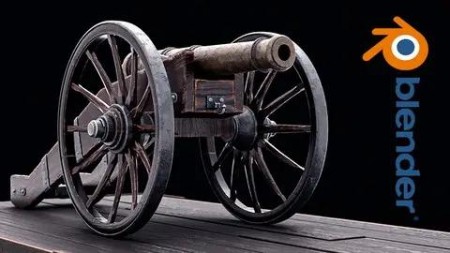
BLENDER: Learn how to create old realistic cannon
Genre: eLearning | MP4 | Video: h264, 1280x720 | Audio: AAC, 44.1 KHz
Language: English | Size: 6.25 GB | Duration: 27 lectures • 7h 26m
In this course step-by-step we will learn how to create old cannon from start to finish
What you'll learn
We will learn how to model the cannon from start to finish
Learn how to unwrap the whole cannon from start to finish
Learn step by step how to create realistic Procedural material
Learn how to use Cycles to make realistic render result
Learn how to use dumped truck to make camera trucking a point
Learn how to use the compositor to post-process the final render result.
Requirements
You need to download Blender
Download PureRef tool
Description
Hello everyone my name is Marwan Hussein Welcome to my new course
Step-by-step we will learn how to create a realistic cannon with Blender I'm not going to use any exterior plugins to create this Cannon everything will be done within Blender
I divided the course into sections We will start with modeling and in the modeling section, we will model the whole Cannon from start to finish.
In the modeling section, we will learn how to model the cannon parts and how to get clean nice shading and we will use a lot of tools Equipped with Blender to achieve that.
After modeling the cannon we will learn step by step how to unwrap it and make it ready to create a texture for it, we will learn how to use the unwrapping seam Technique, and follow the active quad as well, and a lot of things to create nice UV map ready to use.
When we finish with the unwrapping, we will start with materials creation, and step by step we will learn how to create realistic materials to give the cannon a realistic looking.
I will render the cannon using cycles and I will use the compositor to post-process the final render.
This course is not as long as my other courses, we will achieve all of that in a short period of time.
I will leave a section for the resources under the name of the project folder there you should find all the necessary files you need to start the course with me, and don't forget to download the Pure Ref tool to browse the images.
Who this course is for
This course for student likes to create realistic render result, it's best for intermediate

RapidGator
https://rapidgator.net/file/5e3a17abc6f04c423df2ec9cbdb8cbc4/yxusj.Udemy.-.BLENDER.-.Learn.how.to.create.old.realistic.cannon.by.Mrawan.Hussain.2022.part1.rar
https://rapidgator.net/file/5c3601fdbc9e6c36744bbd4a5550489a/yxusj.Udemy.-.BLENDER.-.Learn.how.to.create.old.realistic.cannon.by.Mrawan.Hussain.2022.part2.rar
https://rapidgator.net/file/901148c8d7a313c79ae143be7226cf8d/yxusj.Udemy.-.BLENDER.-.Learn.how.to.create.old.realistic.cannon.by.Mrawan.Hussain.2022.part3.rar
https://rapidgator.net/file/df10fa42a1e713a60bbbf4b4903658c9/yxusj.Udemy.-.BLENDER.-.Learn.how.to.create.old.realistic.cannon.by.Mrawan.Hussain.2022.part4.rar
https://rapidgator.net/file/cedf9330a8161b2a426dff20ac623f84/yxusj.Udemy.-.BLENDER.-.Learn.how.to.create.old.realistic.cannon.by.Mrawan.Hussain.2022.part5.rar
https://rapidgator.net/file/4eb893863c10b693aab7bc309a02cdbb/yxusj.Udemy.-.BLENDER.-.Learn.how.to.create.old.realistic.cannon.by.Mrawan.Hussain.2022.part6.rar
https://rapidgator.net/file/dfbdef7ff7e3d1c78b5da84bc76d87e6/yxusj.Udemy.-.BLENDER.-.Learn.how.to.create.old.realistic.cannon.by.Mrawan.Hussain.2022.part7.rar
NitroFlare
https://nitroflare.com/view/68C7AFD8DB80807/yxusj.Udemy.-.BLENDER.-.Learn.how.to.create.old.realistic.cannon.by.Mrawan.Hussain.2022.part1.rar
https://nitroflare.com/view/9A2A351959393B9/yxusj.Udemy.-.BLENDER.-.Learn.how.to.create.old.realistic.cannon.by.Mrawan.Hussain.2022.part2.rar
https://nitroflare.com/view/62BD5843F4EDC96/yxusj.Udemy.-.BLENDER.-.Learn.how.to.create.old.realistic.cannon.by.Mrawan.Hussain.2022.part3.rar
https://nitroflare.com/view/67681DBC771F592/yxusj.Udemy.-.BLENDER.-.Learn.how.to.create.old.realistic.cannon.by.Mrawan.Hussain.2022.part4.rar
https://nitroflare.com/view/EF9B547994D8221/yxusj.Udemy.-.BLENDER.-.Learn.how.to.create.old.realistic.cannon.by.Mrawan.Hussain.2022.part5.rar
https://nitroflare.com/view/3A011434B15C5FD/yxusj.Udemy.-.BLENDER.-.Learn.how.to.create.old.realistic.cannon.by.Mrawan.Hussain.2022.part6.rar
https://nitroflare.com/view/35EC762FB04F307/yxusj.Udemy.-.BLENDER.-.Learn.how.to.create.old.realistic.cannon.by.Mrawan.Hussain.2022.part7.rar
DDownload
https://ddownload.com/6hhuv6fo2cox/yxusj.Udemy.-.BLENDER.-.Learn.how.to.create.old.realistic.cannon.by.Mrawan.Hussain.2022.part1.rar
https://ddownload.com/ue8q902ahqvh/yxusj.Udemy.-.BLENDER.-.Learn.how.to.create.old.realistic.cannon.by.Mrawan.Hussain.2022.part2.rar
https://ddownload.com/jpqz0c2uml5h/yxusj.Udemy.-.BLENDER.-.Learn.how.to.create.old.realistic.cannon.by.Mrawan.Hussain.2022.part3.rar
https://ddownload.com/c3jbndprolaw/yxusj.Udemy.-.BLENDER.-.Learn.how.to.create.old.realistic.cannon.by.Mrawan.Hussain.2022.part4.rar
https://ddownload.com/zolab55pkrdp/yxusj.Udemy.-.BLENDER.-.Learn.how.to.create.old.realistic.cannon.by.Mrawan.Hussain.2022.part5.rar
https://ddownload.com/wja3vzxc8iyr/yxusj.Udemy.-.BLENDER.-.Learn.how.to.create.old.realistic.cannon.by.Mrawan.Hussain.2022.part6.rar
https://ddownload.com/hjhgjn0gnn4p/yxusj.Udemy.-.BLENDER.-.Learn.how.to.create.old.realistic.cannon.by.Mrawan.Hussain.2022.part7.rar
We need your support!
Make a donation to help us stay online

Bitcoin (BTC)
bc1q08g9d22cxkawsjlf8etuek2pc9n2a3hs4cdrld

Bitcoin Cash (BCH)
qqvwexzhvgauxq2apgc4j0ewvcak6hh6lsnzmvtkem

Ethereum (ETH)
0xb55513D2c91A6e3c497621644ec99e206CDaf239

Litecoin (LTC)
ltc1qt6g2trfv9tjs4qj68sqc4uf0ukvc9jpnsyt59u

USDT (ERC20)
0xb55513D2c91A6e3c497621644ec99e206CDaf239

USDT (TRC20)
TYdPNrz7v1P9riWBWZ317oBgJueheGjATm
Information |
|||
 |
Users of GUESTS are not allowed to comment this publication. | ||