


Digital Portraits: Paint Amazing Faces
Category: Tutorials
- views: 101
- date: 9 July 2025
- posted by: 0nelove
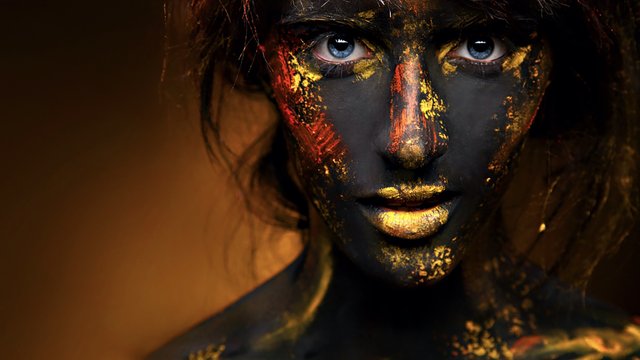
Digital Portraits: Paint Amazing Faces
Published 7/2025
MP4 | Video: h264, 1920x1080 | Audio: AAC, 44.1 KHz
Language: English | Size: 3.87 GB | Duration: 3h 30m
Learn to Paint Stunning Digital Portraits Step by Step
What you'll learn
Master the fundamentals of facial proportions and structure to create accurate and expressive digital portraits.
Learn step-by-step digital painting techniques in Photoshop and/or Procreate, from rough sketch to fully rendered portrait.
Understand how to paint realistic skin tones, lighting, and shading to bring your characters to life.
Gain confidence in creating stylized or semi-realistic portraits using layers, brushes, and color theory for digital art.
Requirements
No prior digital painting experience is required — this course is perfect for beginners and intermediate artists alike.
A basic understanding of drawing or sketching is helpful but not necessary.
You'll need a tablet with a stylus (such as an iPad with Apple Pencil or a drawing tablet with pen input).
Please have Procreate or Adobe Photoshop installed on your device — both are supported in this course.
Most importantly, bring your creativity and willingness to learn!
Description
Unlock the secrets of digital portrait painting and learn how to create stunning, expressive faces even if you're just starting out!In this hands-on course, you'll learn how to paint digital portraits using Procreate or Photoshop, starting from a simple sketch and building up to a fully rendered face. Whether you're a beginner or a traditional artist moving into digital art, this course will guide you step-by-step through the process.You'll explore facial proportions, structure, lighting, skin tones, and blending techniques. You'll also learn how to use layers, custom brushes, and color harmony to give your portraits depth and emotion.What you'll learn:How to draw accurate facial proportions and featuresRendering skin, shadows, and light to achieve a realistic or stylized lookUsing layers, brushes, and textures to enhance your artworkBringing life and personality into your digital portraits Tools you'll need:A tablet and stylus (like iPad with Apple Pencil or any drawing tablet)Procreate or Adobe Photoshop installedNo prior experience needed just your passion for art!By the end of this course, you'll have the skills and confidence to paint beautiful digital portraits and develop your own unique artistic style.Join now and start painting amazing faces today!
Overview
Section 1: Introduction
Lecture 1 Introduction
Section 2: Portrait Practice: Paint Effectively
Lecture 2 Portrait Practice: Paint Effectively
Lecture 3 Portrait Practice: Paint Effectively II
Section 3: Portrait Practice II: Rendering
Lecture 4 Portrait Practice II: Rendering
Section 4: Portrait Practice III: Rendering
Lecture 5 Portrait Practice III: Rendering
Section 5: Portrait Practice: Deep Dive to Render Part I
Lecture 6 Portrait Practice: Deep Dive to Render Part I
Lecture 7 Portrait Practice: Deep Dive to Render Part I
Section 6: Portrait Practice: Deep Dive to Render Part II
Lecture 8 Portrait Practice: Deep Dive to Render Part II
Beginner digital artists who want to learn how to paint expressive and realistic portraits step by step.,Traditional artists transitioning to digital who are curious about using Procreate or Photoshop for portrait painting.,Intermediate illustrators looking to improve their facial anatomy, lighting, and rendering skills.,Character designers, hobbyists, and art students who want to create captivating faces for games, comics, or personal projects.,Anyone who loves drawing people and wants to turn their sketches into polished digital artworks!
Buy Premium From My Links To Get Resumable Support and Max Speed
https://clicknupload.click/7t81304d4hv9/Digital_Portraits_Paint_Amazing_Faces.part1.rar
https://clicknupload.click/hk7jps4g9r03/Digital_Portraits_Paint_Amazing_Faces.part2.rar
https://clicknupload.click/dhtvv3zdh3z0/Digital_Portraits_Paint_Amazing_Faces.part3.rar
https://clicknupload.click/1x9eppy1pmi6/Digital_Portraits_Paint_Amazing_Faces.part4.rar
https://rapidgator.net/file/eda096cbc1ba6df8eaf7c0c7ccbc73e0/Digital_Portraits_Paint_Amazing_Faces.part4.rar.html
https://rapidgator.net/file/8e0e31c0d6a181e0e2cf7b8df4eba27b/Digital_Portraits_Paint_Amazing_Faces.part3.rar.html
https://rapidgator.net/file/6a585237b9786904a188dfeb5cd97bd9/Digital_Portraits_Paint_Amazing_Faces.part2.rar.html
https://rapidgator.net/file/1f34e82aef605ddd1282f539288c776c/Digital_Portraits_Paint_Amazing_Faces.part1.rar.html
We need your support!
Make a donation to help us stay online

Bitcoin (BTC)
bc1q08g9d22cxkawsjlf8etuek2pc9n2a3hs4cdrld

Bitcoin Cash (BCH)
qqvwexzhvgauxq2apgc4j0ewvcak6hh6lsnzmvtkem

Ethereum (ETH)
0xb55513D2c91A6e3c497621644ec99e206CDaf239

Litecoin (LTC)
ltc1qt6g2trfv9tjs4qj68sqc4uf0ukvc9jpnsyt59u

USDT (ERC20)
0xb55513D2c91A6e3c497621644ec99e206CDaf239

USDT (TRC20)
TYdPNrz7v1P9riWBWZ317oBgJueheGjATm
Information |
|||
 |
Users of GUESTS are not allowed to comment this publication. | ||