


Cinematic Lighting Shot Production: Light & Composite a Shot Using Maya, Katana, Arnold & Nuke
Category: Tutorials
- views: 88
- date: 10 November 2024
- posted by: oaxino
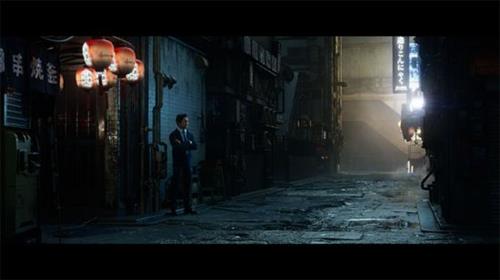
Cinematic Lighting Shot Production: Light & Composite a Shot Using Maya, Katana, Arnold & Nuke
Graham Cunningham | Duration: 4:03 h | Video: H264 1920x1080 | Audio: AAC 44,1 kHz 2ch | 944 MB | Language: English
Graham Cunningham | Duration: 4:03 h | Video: H264 1920x1080 | Audio: AAC 44,1 kHz 2ch | 944 MB | Language: English
In this comprehensive workshop by Graham Cunningham, you will be taken through the entire process of lighting and compositing a cinematic shot using Maya, Katana, Arnold, and Nuke. This is an advanced course that builds on the Introduction to Katana workshop by Taeyoung Kim.
This 4-hour workshop begins with setting up OCIO for ACEScg, importing and preparing assets in Maya and Arnold, creating a layout and shot camera, managing your .tx files and color spaces, and details how to convert materials to MaterialX, and export everything to Arnold USD.
Next, in Katana, you'll discover how to update the shot template, create some new macros, prepare Interactive render filters, and set up AOVs for multi-channel EXR output. You'll see how to import your USD assets, optimize your scene, go through the lighting setup, and create and modify HDRI light textures (in a quick excursion to Nuke).
From there, the workflow proceeds to the creation of render passes, how to manage visibility and sampling, and render image sequences to disk using Katana batch commands. As the last step, Graham jumps into Nuke, where he shows how to assemble the render passes, split out light AOVs, adjust light colors and intensities. You'll also explore how to add atmosphere using volume/fog renders and WorldP data, how to add fog FX using stock footage on 3D cards, as well as how to use cryptomattes to fine-tune results, add glow, lensflare, film grain, and apply a final color grade.
Upon completing this workshop, you will have a thorough understanding of what it takes to be a lighting compositing artist. Although project files and plugins are not provided, a list of the assets used are provided with this workshop.
Graham's scene was built using the Tokyo Back Alley Kit from Big Medium Small. After assembling the scene in Nuke, Graham then utilizes animated Lingering Fog assets from Action VFX to build up the atmosphere.
Homepage:
https://www.thegnomonworkshop.com/tutorials/cinematic-lighting-shot-productionScreenshots
Download link
Say "Thank You"
rapidgator.net:
ddownload.com:
We need your support!
Make a donation to help us stay online

Bitcoin (BTC)
bc1q08g9d22cxkawsjlf8etuek2pc9n2a3hs4cdrld

Bitcoin Cash (BCH)
qqvwexzhvgauxq2apgc4j0ewvcak6hh6lsnzmvtkem

Ethereum (ETH)
0xb55513D2c91A6e3c497621644ec99e206CDaf239

Litecoin (LTC)
ltc1qt6g2trfv9tjs4qj68sqc4uf0ukvc9jpnsyt59u

USDT (ERC20)
0xb55513D2c91A6e3c497621644ec99e206CDaf239

USDT (TRC20)
TYdPNrz7v1P9riWBWZ317oBgJueheGjATm
Information |
|||
 |
Users of GUESTS are not allowed to comment this publication. | ||