


Best Way To Model And Texture Anything In Blender Fast
Category: Tutorials
- views: 85
- date: 24 May 2023
- posted by: voska89
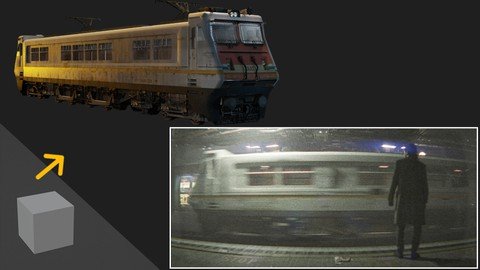
Free Download Best Way To Model And Texture Anything In Blender Fast
Published 5/2023
MP4 | Video: h264, 1280x720 | Audio: AAC, 44.1 KHz
Language: English | Size: 3.22 GB | Duration: 3h 24m
Explained how to quickly and realistically model in Blender
What you'll learn
I will introduce you to the free 3d program Blender
I will introduce you to modeling, texturing, lighting, rendering and more
We will create a train from the intro video from start to finish
I'll show you the best way to quickly model and texture in Blender anything
Requirements
Free software Blender. No previous experience is necessary.
Description
When we Open blender we get default Cube, how to convert this Cube to high detailed realistic train? There are a number of ways you can approach modeling and texturing in Blender. In this tutorial, I will talk about the approach that gives the most realistic results in the shortest time. This is a technique I learned in my 4 years of Blender experience.In this 3 hour long tutorial, we will create a train down to the smallest detail. You can apply the technique you learn in this tutorial to create any realistic model in blender quickly.We'll talk about the steps you need to take before you start modeling to make the process as easy as possible later.How to organize textures and materials in Blender in order to work quickly?What are the most common problems you may encounter and how to solve them?How to use tools for modeling and selection quickly with the help of shortcuts, which modifiers to use and much more....The tutorial is step-by-step and suitable for beginners as well.All resources and links are included in the tutorial + final .blend file, and subtitles with shortcuts are also available.The tutorial is divided into 16 parts with an average duration of 12 minutes in order to make it easier to follow
Overview
Section 1: Introduction
Lecture 1 Introduction
Lecture 2 02 - Import reference and base shape
Lecture 3 03 - Details and main bevel
Lecture 4 04 - Projecting image on model
Lecture 5 05 - Creating windows
Lecture 6 06 - The front of the train
Lecture 7 07 - Materials
Lecture 8 08 - Adding details
Lecture 9 09 - Curves and cables
Lecture 10 10 - Adding more details
Lecture 11 11 - Doors, windows, trumpet
Lecture 12 12 - Creating more details
Lecture 13 13 - Wheels and engine
Lecture 14 14 - Placing greebles on the train
Lecture 15 15 - Graffiti and leaking
Lecture 16 16 - The final part
For blender beginners as well as more advanced users.
Homepage
https://www.udemy.com/course/best-way-to-model-and-texture-anything-in-blender-fast-3d/DOWNLOAD LINK
Rapidgator
pwdzn.B.W.T.M.A.T.A.I.B.F.part2.rar.html
pwdzn.B.W.T.M.A.T.A.I.B.F.part1.rar.html
pwdzn.B.W.T.M.A.T.A.I.B.F.part3.rar.html
pwdzn.B.W.T.M.A.T.A.I.B.F.part4.rar.html
Uploadgig
pwdzn.B.W.T.M.A.T.A.I.B.F.part2.rar
pwdzn.B.W.T.M.A.T.A.I.B.F.part3.rar
pwdzn.B.W.T.M.A.T.A.I.B.F.part4.rar
pwdzn.B.W.T.M.A.T.A.I.B.F.part1.rar
NitroFlare
pwdzn.B.W.T.M.A.T.A.I.B.F.part3.rar
pwdzn.B.W.T.M.A.T.A.I.B.F.part4.rar
pwdzn.B.W.T.M.A.T.A.I.B.F.part1.rar
pwdzn.B.W.T.M.A.T.A.I.B.F.part2.rar
Links are Interchangeable - Single Extraction
We need your support!
Make a donation to help us stay online

Bitcoin (BTC)
bc1q08g9d22cxkawsjlf8etuek2pc9n2a3hs4cdrld

Bitcoin Cash (BCH)
qqvwexzhvgauxq2apgc4j0ewvcak6hh6lsnzmvtkem

Ethereum (ETH)
0xb55513D2c91A6e3c497621644ec99e206CDaf239

Litecoin (LTC)
ltc1qt6g2trfv9tjs4qj68sqc4uf0ukvc9jpnsyt59u

USDT (ERC20)
0xb55513D2c91A6e3c497621644ec99e206CDaf239

USDT (TRC20)
TYdPNrz7v1P9riWBWZ317oBgJueheGjATm
Information |
|||
 |
Users of GUESTS are not allowed to comment this publication. | ||