


KORG Collection TRITON Explained
Category: Tutorials
- views: 136
- date: 19 May 2023
- posted by: oaxino
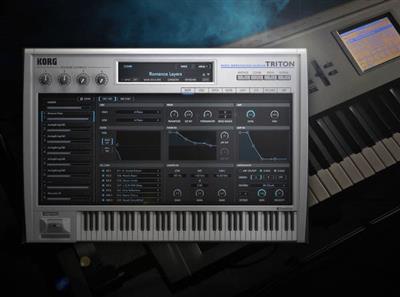
KORG Collection TRITON Explained
MP4 | Video: h264, yuv420p, 1920x1080 | Audio: aac, 48000 Hz | Duration: 1h 48m | 311 MB
Genre: eLearning | Language: English
MP4 | Video: h264, yuv420p, 1920x1080 | Audio: aac, 48000 Hz | Duration: 1h 48m | 311 MB
Genre: eLearning | Language: English
Before the computer-based DAW took over the world, the keyboard workstation was a mainstay in electronic-based music studios, and the KORG TRITON was one of the last great workstations standing. In this KORG TRITON video course, Groove3 instructor Tyler Coffin takes you on a tour of KORG's virtual recreation, the KORG Collection TRITON, demonstrating all the functions and modeling many of its classic sounds. You'll learn how to work in the various modes, layer different sounds, build sounds from scratch, and much more. These videos are designed for new KORG Collection TRITON users.
After welcoming you to the course, Tyler begins with a bit of history of the hardware unit and an overview of what KORG set out to accomplish with their virtual recreation. Then you'll get an overview of the interface and the various modes that will be covered throughout the tutorial. Program mode is first, and you'll get an in-depth look at the various pages within, starting with the OSC page, where the basic building blocks of the sound are found.
Next up are the AMP, FILTER, and PITCH pages, all of which feature many parameters that allow various types of sound-shaping. Then you'll discover how to add modulation on the LFO page, create dynamic rhythmic sequences of notes on the ARP page, add effects on the IFX/MFX pages, and access key parameters from each with the EASY page.
Throughout the rest of the course, you'll learn other features as well, including the COMBI mode (layering sounds to play together or as a split on the keyboard), GLOBAL mode (various general settings), TRITON Extreme (separate version with added features), the browser, and more. Tyler finishes off with three sound design examples: bass, lead, and COMBI sounds.
For those familiar with the original hardware, you're bound to be floored by KORG's attention to detail in recreating their classic. In this KORG TRITON course, you'll learn how to make the most of this instrument's incredible set of features and sounds quickly and easily. Check out the individual KORG Collection TRITON video descriptions for more information about all the things this powerful instrument can do. Find out why KORG decided to recreate this classic synth... watch "KORG Collection TRITON Explained®" today!
rapidgator.net:
uploadgig.com:
nitroflare.com:
1dl.net:
We need your support!
Make a donation to help us stay online

Bitcoin (BTC)
bc1q08g9d22cxkawsjlf8etuek2pc9n2a3hs4cdrld

Bitcoin Cash (BCH)
qqvwexzhvgauxq2apgc4j0ewvcak6hh6lsnzmvtkem

Ethereum (ETH)
0xb55513D2c91A6e3c497621644ec99e206CDaf239

Litecoin (LTC)
ltc1qt6g2trfv9tjs4qj68sqc4uf0ukvc9jpnsyt59u

USDT (ERC20)
0xb55513D2c91A6e3c497621644ec99e206CDaf239

USDT (TRC20)
TYdPNrz7v1P9riWBWZ317oBgJueheGjATm
Information |
|||
 |
Users of GUESTS are not allowed to comment this publication. | ||