


Verified Views For Planning Applications
Category: Tutorials
- views: 135
- date: 30 January 2023
- posted by: voska89
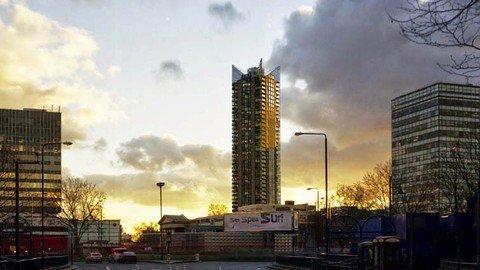
Last updated 8/2021
MP4 | Video: h264, 1280x720 | Audio: AAC, 44.1 KHz
Language: English | Size: 3.82 GB | Duration: 4h 18m
Verified Views+3d+3ds max + 3d Rendering + V-Ray+3d Lighting+Shading/Texturing + 3dsmax+ Vray+ Photoshop+Planning
What you'll learn
Users will learn to Create and submit Verified Views for Planning Applications, using 3ds Max, V-Ray and Photoshop
Learn to use photography in the process of creating Verified Views
Learn to use the Survey Data from the Surveyor
Learn to use 3ds Max X-References
Learn to use Dummy helpers in 3ds Max
Learn to use Daylight systems
Learn to use Photoshop
Sun Surveyor
Learn to Create AVR0, AVR1, AVR2 and AVR3
Much More
Requirements
This course is Tailored to Intermediate and Advanced users
You need to possess a copy of 3ds Max, VRay and Photoshop
64 bit Windows operating system
Basic computer knowledge
Computer and Internet
Description
This detailed step-by-step course guides users through the meticulous process of creating and submitting Verified Views for Planning Applications, using 3ds Max, V-Ray and PhotoshopThe full course is HD (1920X1080) with custom captions/subtitles, and you can stream the videos from your mobile (enable full HD and CC).Alternatively, you can download to watch them from your computer (VLC media player allows users to load captions/subtitles) .Also, I offer 24/7 technical support and Udemy offers a 30 days money back guarantee. The course focuses on the methodical process of: 1- Pre-planning the Proposed views, whilst acquiring 3d context models, setting up the 3ds max scene and the first 3d Camera2- Adjusting the 3d camera, the render output size, the vray parameters, the new chalk material, the override material function, and creation of the VRay sunlight.3- Adding the VrayEdgesTex procedural map; whilst adjustment layers in post, taking Verified Views photos on site, create marked images with survey points in post, and use the survey points photography.4- Utilizing vanishing lines to centre the photo in order to match the camera accurately in 3ds Max5- Deploying 3ds max scripts to generate the physical survey points and recreate the camera in 3ds max6- Create dummy helpers and X-References to move and adjust the scene closer to 0.0.0 7- Tweak the camera further to match the survey accurately, while using the dummy helper and the X-reference8- Create the Daylight system object is implemented to create Accurate Visual Representations (AVR)0, AVR1, AVR2 and AVR39- And Much More8- Every technique covered in this course is backed by 10+ years of experience in the 3d Visualization/Production Industry, and popular Books Published on these key subjects . Finally, my methodologies are widely implemented by Award Winning Visualization companies and famous Film Studios World Wide.
Overview
Section 1: Introduction
Lecture 1 Proposed view pre-planning , 3d context model , setting Up the 3ds max & Camera
Lecture 2 Adjust the camera, Render Output size, VRay Parameters, New Chalk material, etc
Lecture 3 Adjust the Vray Sun light & the Environment, tweak the Vray rendering settings
Lecture 4 Learn to use the VrayEdgesTex procedural map, the adjustment layers in post, etc
Lecture 5 Use vanishing lines, Max Scripts, Survey points, Dummy helpers & XReferences
Lecture 6 Adjust the camera further to match the survey using the dummy helper and the X-r
Lecture 7 External Daylight part 1
Lecture 8 External Daylight part 2
Lecture 9 External Daylight part 3
Lecture 10 External Daylight part 4
Lecture 11 External Daylight part 5
Lecture 12 External Daylight part 6
Lecture 13 External Daylight part 7
Lecture 14 Project Manager new Features in 3ds Max
Lecture 15 TurboSplines with 3ds Max
Lecture 16 Mirza Link Manager with 3ds max
Lecture 17 Spline Cleaner with 3ds Max
Lecture 18 Proxy Textures with 3ds Max
Lecture 19 Automodeller with 3ds Max
Lecture 20 Overnight Batch Render with 3ds Max
Lecture 21 Q-Proxies with 3ds Max
Lecture 22 Verge3D with 3ds Max
Lecture 23 Q-Proxies with 3ds Max, part 2
Lecture 24 SubSpline script with 3ds Max
Lecture 25 VRayNormals in Post-Production
Architects,Designers,3D Visualizers,3D Artists,Architectural Planners
Homepage
https://www.udemy.com/course/verified-views-for-planning-applications/DOWNLOAD LINK
Fikper
orifp.Verified.Views.For.Planning.Applications.part1.rar.html
orifp.Verified.Views.For.Planning.Applications.part2.rar.html
orifp.Verified.Views.For.Planning.Applications.part3.rar.html
orifp.Verified.Views.For.Planning.Applications.part4.rar.html
Rapidgator
orifp.Verified.Views.For.Planning.Applications.part1.rar.html
orifp.Verified.Views.For.Planning.Applications.part2.rar.html
orifp.Verified.Views.For.Planning.Applications.part3.rar.html
orifp.Verified.Views.For.Planning.Applications.part4.rar.html
Uploadgig
orifp.Verified.Views.For.Planning.Applications.part1.rar
orifp.Verified.Views.For.Planning.Applications.part2.rar
orifp.Verified.Views.For.Planning.Applications.part3.rar
orifp.Verified.Views.For.Planning.Applications.part4.rar
NitroFlare
orifp.Verified.Views.For.Planning.Applications.part1.rar
orifp.Verified.Views.For.Planning.Applications.part2.rar
orifp.Verified.Views.For.Planning.Applications.part3.rar
orifp.Verified.Views.For.Planning.Applications.part4.rar
Links are Interchangeable - No Password - Single Extraction
We need your support!
Make a donation to help us stay online

Bitcoin (BTC)
bc1q08g9d22cxkawsjlf8etuek2pc9n2a3hs4cdrld

Bitcoin Cash (BCH)
qqvwexzhvgauxq2apgc4j0ewvcak6hh6lsnzmvtkem

Ethereum (ETH)
0xb55513D2c91A6e3c497621644ec99e206CDaf239

Litecoin (LTC)
ltc1qt6g2trfv9tjs4qj68sqc4uf0ukvc9jpnsyt59u

USDT (ERC20)
0xb55513D2c91A6e3c497621644ec99e206CDaf239

USDT (TRC20)
TYdPNrz7v1P9riWBWZ317oBgJueheGjATm
Information |
|||
 |
Users of GUESTS are not allowed to comment this publication. | ||