


Brother Scanncut - Complete Beginner'S Guide
Category: Tutorials
- views: 76
- date: 21 January 2023
- posted by: voska89
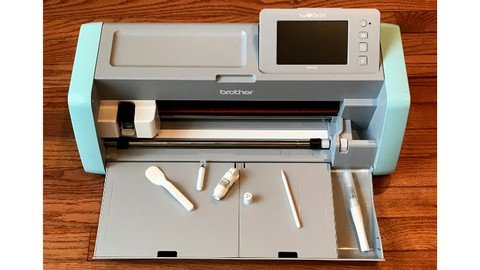
Last updated 12/2022
MP4 | Video: h264, 1280x720 | Audio: AAC, 44.1 KHz
Language: English | Size: 2.71 GB | Duration: 2h 46m
Getting Started with the Brother ScanNCut
What you'll learn
You will be able to use your Brother ScanNCut SDX125 right out of the box.
You will become familiar with settings on your ScanNCut SDX125.
You will be able to use the built-in patterns to create shapes and layers for cards and embellishments.
You will be able to scan and cut stamped images and patterned paper.
You will be able to transfer and cut project files from Brother Canvas Workspace.
Requirements
No previous crafting experience is necessary.
A Brother ScanNCut SDX125 or the curiosity to learn more about the machine.
You will need several types of materials to cut including patterned paper, card stock, and vinyl.
Description
Do you have a Brother ScanNCut that you never use? Perhaps you tried and didn't know where to begin. Would you like to be able to scan, cut, draw and design your projects with confidence? Then, the Brother ScanNCut - Complete Beginner's Guide is the course for you. You will learn the necessary skills to get started from the basic settings to using Canvas Workspace software. You will practice what you learn through hands-on exercises. This course is hands-on with many practical examples and projects. This course is based on the SDX125E Model. However, you can apply your skills to ANY model of Brother ScanNCut. The Canvas Workspace software is compatible with any wireless model. Use materials from your craft stash to cut the sample projects. Watch detailed tutorials and then practice and share what you learn. The course never expires so there will be chances to review the material again as you want to try the skills you learn. I encourage you to complete each of the assignments and to share your work with other students in the course. I look forward to embarking on this crafty adventure with you.This course includes the following topics:Course IntroductionScanNCut SDX125 Settings & Editing FeaturesCanvas Workspace for WebCanvas Workspace for PCScanning & Cutting OverviewWorking with SVGsCourse Conclusion
Overview
Section 1: Introduction
Lecture 1 Instructor Introduction
Lecture 2 Course Overview & Projects
Lecture 3 Setting up your Wireless Network
Lecture 4 Get Registration Code on the Machine
Lecture 5 Register your ScanNCut on Canvas Workspace
Lecture 6 Enter Pin Code and Check Registration
Lecture 7 Update Machine and Check Firmware Version
Section 2: ScanNCut SDX125 Settings & Editing Features
Lecture 8 ScanNCut Overview
Lecture 9 Change the Cutting Area
Lecture 10 Resizing, Duplicating, and Rotating Shapes
Lecture 11 Saving, Layering & Retrieving a Pattern
Section 3: Canvas Workspace for Web
Lecture 12 Introduction to Canvas Workspace for Web
Lecture 13 Retrieving and Cutting the Gift Box File
Lecture 14 Assembling the Finished Gift Boxes
Lecture 15 Transfer a Pattern from the Machine
Lecture 16 Modifying a File inside of Canvas Workspace
Lecture 17 Retrieving, Drawing and Cutting a Pattern
Section 4: Canvas Workspace for PC
Lecture 18 Installing Canvas Workspace for the PC
Lecture 19 Welding Fonts & Transferring a File
Lecture 20 Retrieving a File and Cutting Vinyl
Lecture 21 Weeding and Transferring Vinyl
Lecture 22 Fitting Text to a Path
Section 5: Scanning & Cutting Overview
Lecture 23 Scanning & Cutting Stamped Images
Lecture 24 Scanning & Cutting Patterned Paper
Lecture 25 Layering a Pattern & Troubleshooting Tips
Section 6: Working with SVGs
Lecture 26 Introduction to Template Maker
Lecture 27 Importing, Modifying & Transferring SVGs
Lecture 28 Retrieving, Cutting & Assembling the Envelope
New Brother ScanNCut Users.,Crafters who own a SDX125 a ScanNCut and never took it out of the box.,Crafters who are interested in learning how the Brother ScanNCut SDX125 can take their crafting skills to a new level.,Brother ScanNCut SDX125 owners who want to make the most out of their machine.
Homepage
https://www.udemy.com/course/scanncut-beginners/DOWNLOAD LINK
Fikper
pyitq.Brother.Scanncut..Complete.BeginnerS.Guide.part1.rar.html
pyitq.Brother.Scanncut..Complete.BeginnerS.Guide.part2.rar.html
Rapidgator
pyitq.Brother.Scanncut..Complete.BeginnerS.Guide.part1.rar.html
pyitq.Brother.Scanncut..Complete.BeginnerS.Guide.part2.rar.html
Uploadgig
pyitq.Brother.Scanncut..Complete.BeginnerS.Guide.part1.rar
pyitq.Brother.Scanncut..Complete.BeginnerS.Guide.part2.rar
NitroFlare
pyitq.Brother.Scanncut..Complete.BeginnerS.Guide.part1.rar
pyitq.Brother.Scanncut..Complete.BeginnerS.Guide.part2.rar
Links are Interchangeable - No Password - Single Extraction
We need your support!
Make a donation to help us stay online

Bitcoin (BTC)
bc1q08g9d22cxkawsjlf8etuek2pc9n2a3hs4cdrld

Bitcoin Cash (BCH)
qqvwexzhvgauxq2apgc4j0ewvcak6hh6lsnzmvtkem

Ethereum (ETH)
0xb55513D2c91A6e3c497621644ec99e206CDaf239

Litecoin (LTC)
ltc1qt6g2trfv9tjs4qj68sqc4uf0ukvc9jpnsyt59u

USDT (ERC20)
0xb55513D2c91A6e3c497621644ec99e206CDaf239

USDT (TRC20)
TYdPNrz7v1P9riWBWZ317oBgJueheGjATm
Information |
|||
 |
Users of GUESTS are not allowed to comment this publication. | ||