


Learn Wincc HMI ,with S7 1200 via TIA Portal
Category: Tutorials
- views: 273
- date: 7 July 2022
- posted by: voska89
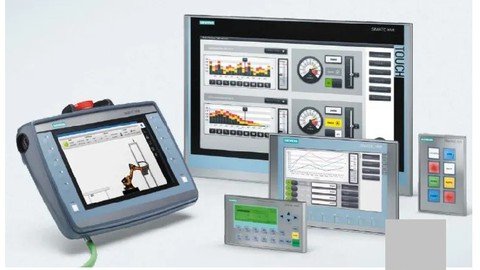
Published 07/2022
Genre: eLearning | MP4 | Video: h264, 1280x720 | Audio: AAC, 44.1 KHz
Language: English | Size: 1.73 GB | Duration: 28 lectures • 3h 25m
Learn the design of panel and comfort panel displays with Tia portal through professional wincc
What you'll learn
User control and management
In this course you will learn from A to Z how to design a panel on the TIA portal (with the panel, comfort panel, RT advanced displays),
Creation of alarms
Connection and disconnection logging,
Creation of events
Managing views and creating pop-ups
Scheduling of periodic, acyclical tasks....
Automatic cursor handling for barcodes
Automatic management of views via PLC
Vbscript
Requirements
Have a basic notion of automation and know how to program in ladder
Have installed the TIA portal software v14 or more Have installed wincc advanced Have installed Plcsim V14
Description
SIMATIC WinCC is a supervisory control and data acquisition and human-machine interface system from Siemens. SCADA systems are used to monitor and control physical processes involved in industry and infrastructure on a large scale and over long.See how to create Siemens HMI project and add in a Siemens Comfort Panel and PC Runtime Advanced Application to the project. This is done in the Siemens WinCC Comfort/Advanced software. In this course you will learn the design of panels and comfort panels from Tia portal V14 and WinCC professional. At the end of the training you will be able to create alarms, alarm events, user management, creation of pop-ups or contextual views, automatic management of views and cursors. You will be able to create an hmi on tia portal and you will be able to create alarms, alarm events, user management, creation of pop-ups or contextual views, automatic management of views and cursors. Siemens KTP 400, how to add date/time, text, objects, and I/O field configuration on HMI screen, In this video, you will learn how to add basic elements for HMI screen designing and learn about symbolic/graphical IO filed, Date / Time fields, Bar graph, element objects. In the end, will complete the previous screen designing project.
Who this course is for
Beginner or intermediate automation technician
beginner or intermediate automation engineer
beginner or intermediate industrial maintenance technician
Homepage
https://www.udemy.com/course/learn-wincc-hmi-with-s7-1200-via-tia-portal/DOWNLOAD LINK
Download ( Rapidgator )
https://rapidgator.net/file/18360a20ce1346bf07f3728f0e767505/fsaki.Learn.Wincc.HMI.with.S7.1200.via.TIA.Portal.part2.rar.html
https://rapidgator.net/file/ae0a15e3804b7af0007f9c4640dcea5c/fsaki.Learn.Wincc.HMI.with.S7.1200.via.TIA.Portal.part1.rar.html
Download ( NitroFlare )
https://nitro.download/view/356CFBE5A2CFF12/fsaki.Learn.Wincc.HMI.with.S7.1200.via.TIA.Portal.part2.rar
https://nitro.download/view/590667BE661F66E/fsaki.Learn.Wincc.HMI.with.S7.1200.via.TIA.Portal.part1.rar
Download (Uploadgig)
https://uploadgig.com/file/download/3631310927ef9c45/fsaki.Learn.Wincc.HMI.with.S7.1200.via.TIA.Portal.part2.rar
https://uploadgig.com/file/download/56C283b117543b4F/fsaki.Learn.Wincc.HMI.with.S7.1200.via.TIA.Portal.part1.rar
Links are Interchangeable - No Password - Single Extraction
We need your support!
Make a donation to help us stay online

Bitcoin (BTC)
bc1q08g9d22cxkawsjlf8etuek2pc9n2a3hs4cdrld

Bitcoin Cash (BCH)
qqvwexzhvgauxq2apgc4j0ewvcak6hh6lsnzmvtkem

Ethereum (ETH)
0xb55513D2c91A6e3c497621644ec99e206CDaf239

Litecoin (LTC)
ltc1qt6g2trfv9tjs4qj68sqc4uf0ukvc9jpnsyt59u

USDT (ERC20)
0xb55513D2c91A6e3c497621644ec99e206CDaf239

USDT (TRC20)
TYdPNrz7v1P9riWBWZ317oBgJueheGjATm
Information |
|||
 |
Users of GUESTS are not allowed to comment this publication. | ||