


Crisp - Simple Joomla admin template
Category: Templates/Themes
- views: 8 431
- date: 25 July 2011
- posted by: Expl01tugA

Following on from the success of the Simpla Joomla admin template, comes the Crisp Admin Joomla template. While Crisp is not a huge departure from the Simpla admin template in terms of functionality it is a simpler, crisper design that is well suited to businesses and corporates that are using Joomla. Crisp smooths out the Joomla admin and provides a clean, minimal interface for your users to enjoy Joomla with.
Simpla Color Schemes
There are six color variations that control the top header and link colour.

You can choose between the following color variations for both the sidebar and top menus to achieve the feel that suits you. You can select from Green, Blue, Red, Brown, Black and Teal color schemes.
Template Features
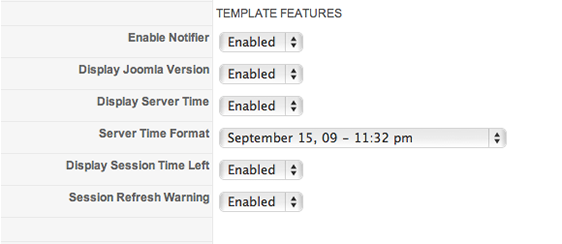
The Crisp Joomla template has a range of addon features that help to enhance the Joomla admin user interface. They include:
Joomla Update notifier
Script that lets you know when or if you need to update Joomla.
Server Time
In those instances where you work in a different time zone to your server or general audience.
Display Session time remaining
You wont ever lose work or get locked out again now that you have a countdown clock built into the Joomla admin.
Session refresh warning
Just to reinforce the fact that your session is about to end the browser will prompt you to refresh the page to avoid getting logged out.
Controlling the menus
Crisp makes it really easy to decide which menu system you want to display in the Joomla administrator area.
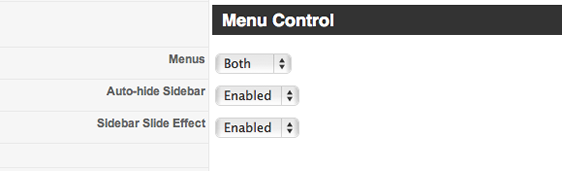
You can choose between displaying:
- Sidebar menu only
- Top menu only
- Both sidebar and top menu
You can also select to auto hide the sidebar if you want the sidebar to disappear when editing screens that require more width or require that the user does not have access to the main menu to avoid locking out items.
The sidebar can also be toggled on or off via the top menu toggle item that sits in the very top toolbar where the details for the site are displayed. The toggle works even if the sidebar is meant to be hidden just in case the user needs to break out from where they are.
Quick link icons
If you've taken a look at the demo or the screenshots of the Crisp interface you will have noticed the icons that sit above the main content area. The icons themselves come from Icojoy and like the default Joomla icons provide quick access to your favourite Joomla functions. The difference here being that you get full control over the icon type, the url and the label attached to the icon. You can also control the size of the icon as well as the width and height of the icon space. There are 20 custom icon links to choose from.
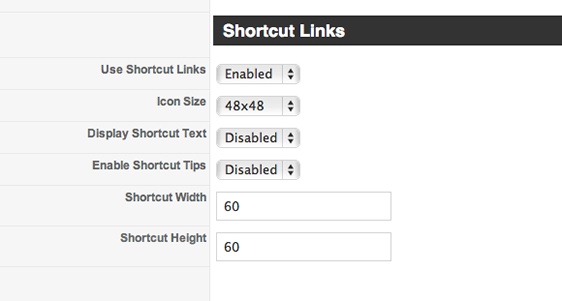
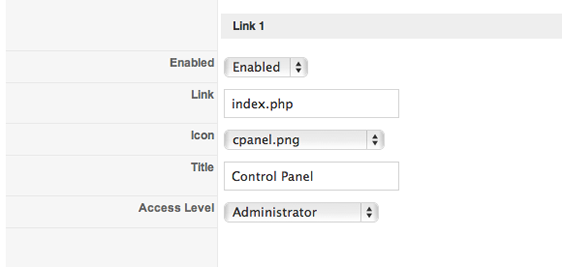
Setting the values for each link are easy and basically involves enabling the link, pasting the link into the link input field, selecting the icon and nominating the title for the icon.
Logo and branding
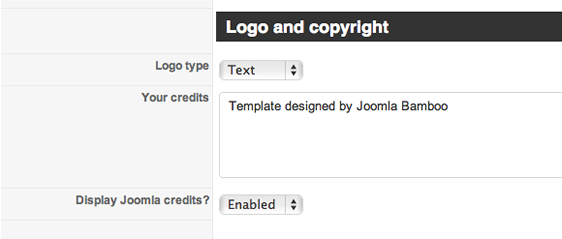
Crisp also provides an easy way to change the logo and branding of the Joomla admin. You can choose between displaying your own logo or the site name in the top left hand corner. Please note if using the logo option, the image needs to be called logo.png and is placed in the administrator/templates/jbcrisp/images folder.
You will note on the demo that there are two lines of copyright information at the bottom of the page. The first line is your own configurable copyright or text snippet and the bottom line is the default Joomla copyright notice. These two items are configurable via the Crisp template parameters.
Removing default Joomla modules
You may decide to keep the default joomla quick link icons in place but we have them unpublished on the Crisp demo site.
To unpublish the icons:
go to the module manager > administrator modules
scroll down to the icon area and disable the module that appears there
Its worth noting that if you happen to install JoomlaPack or K2 on your site it automatically creates an icon or set of icons in that position so it may be necessary to unpublish that after installing Joomlapack or K2.
Components tested with the Crisp theme
Here is a list of commonly used components that we have tested with the Crisp admin theme:
Morph
Docman
Agora forum
Kunena
Sobi
Mass Content
jFusion
Community Builder
Chronoforms
XCloner
Joomlapack
Sh404
Virtuemart
Update Manager
K2
JomComment
AEC Account Expiration Component
Phoca Downloads
Rokdownloads
Please note that while the above components have been tested with the Crisp Admin theme, due to the way that certain components are coded the result may not be as slick as expected as a result of hardcoded styles and other anomalies in the component markup.
Demo:
http://nq.k7.sl.pt
We need your support!
Make a donation to help us stay online

Bitcoin (BTC)
bc1q08g9d22cxkawsjlf8etuek2pc9n2a3hs4cdrld

Bitcoin Cash (BCH)
qqvwexzhvgauxq2apgc4j0ewvcak6hh6lsnzmvtkem

Ethereum (ETH)
0xb55513D2c91A6e3c497621644ec99e206CDaf239

Litecoin (LTC)
ltc1qt6g2trfv9tjs4qj68sqc4uf0ukvc9jpnsyt59u

USDT (ERC20)
0xb55513D2c91A6e3c497621644ec99e206CDaf239

USDT (TRC20)
TYdPNrz7v1P9riWBWZ317oBgJueheGjATm
Information |
|||
 |
Users of GUESTS are not allowed to comment this publication. | ||