


live chat addon v2.1 Whmcs 4.5.0
Category: Plugins/Modules
- views: 6 801
- date: 26 September 2011
- posted by: mys78

Upgrading the Live Help Addon is easy. So if there's a new release, simply follow the steps below to update:
Begin by downloading the update from our client area
Now unzip the folder and delete /modules/livehelp/include/database.php from the new files
Next, upload the files from the upload_me directory to your main WHMCS directory overwriting any existing files
Then to complete the process, simply open the Live Help Windows Application and sign-in to Live Help to complete the database upgrade process
Finally delete the install folder from the /modules/livehelp/ directory and you're done.
Once you've purchased the Live Chat Addon for WHMCS, you will be able to download the files for it from our client area (it will show as an available download under the license you have purchased it for in My Licenses & Services > View Details > Downloads) and can then proceed to install it as follows:
Begin by unzipping the contents of the download and upload all the files contained in the upload_me folder to your main WHMCS directory
Next, visit www.yourdomain.com/whmcs/modules/livehelp/install/ to begin the installation process
Accept & Agree to the Software License Agreement to continue
On the next step, confirm the Offline Email Address (that will default to the first public support department configured in your WHMCS system)
Choose whether to install the optional GeoIP data which allows you to see where visitors are located (recommended)
And finally enter the desired username & password for your primary live chat operator
Then submit to complete the installation. If you get any errors, go back and correct them and then delete the /modules/livehelp/install/ directory from your server to finish.
You're now just one step away from integrated Live Chat & Visitor Monitoring with WHMCS.
This is where you add the javascript tracking code to your template. It couldn't be easier, all you need to do is add {$livehelpjs} to the section of your template in the header.tpl template file as shown below.
You don't have to do anything else in order to be able to monitor visitors and proactively iniate chats with them, however if you want the visitor to be able to initiate a chat, then you will want to add the live help button somewhere.
You can display a live chat status button by simply inserting {$livehelp} into any template file where you want it to appear, for example you could add it to the order form, ticket submission page, or the footer as demonstrated below.
javascript Frameworks
If you are using a javascript framework on your pages other than jQuery (such as MooTools) we recommend using the jquery.livehelp.noconflict.js file instead.
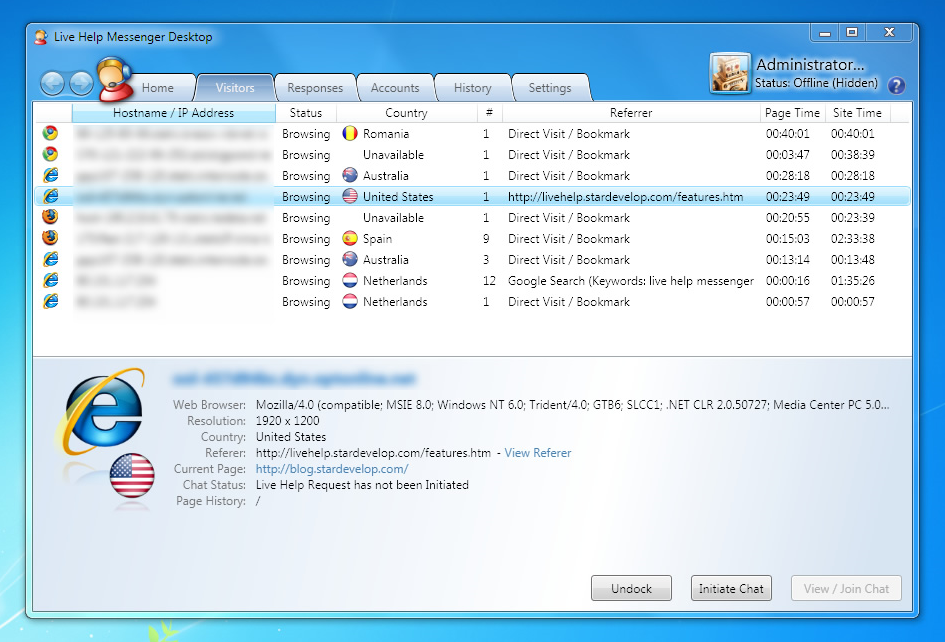
Windows Application
Requirements
The requirements for the Windows App are as follows:
Windows 7 / Vista / XP SP 2
Internet Explorer 7 or above
.NET Framework 3.5 SP1 or above - Download
Internet Connection
download
Note: WHMCS version 4.4.2 and above is required to use the addon.
demo:http://www.whmcs.com/livechat.php
docs:http://docs.whmcs.com/Live_Chat_Addon#Requirements
rar pass:mys78
docs:http://docs.whmcs.com/Live_Chat_Addon#Requirements
rar pass:mys78
We need your support!
Make a donation to help us stay online

Bitcoin (BTC)
bc1q08g9d22cxkawsjlf8etuek2pc9n2a3hs4cdrld

Bitcoin Cash (BCH)
qqvwexzhvgauxq2apgc4j0ewvcak6hh6lsnzmvtkem

Ethereum (ETH)
0xb55513D2c91A6e3c497621644ec99e206CDaf239

Litecoin (LTC)
ltc1qt6g2trfv9tjs4qj68sqc4uf0ukvc9jpnsyt59u

USDT (ERC20)
0xb55513D2c91A6e3c497621644ec99e206CDaf239

USDT (TRC20)
TYdPNrz7v1P9riWBWZ317oBgJueheGjATm
Information |
|||
 |
Users of GUESTS are not allowed to comment this publication. | ||