


Zbrainsoft Dose for Excel 3.6.9 Multilingual
Category: Apps (SEO/Marketing/Design)
- views: 44
- date: 3 November 2026
- posted by: DrZero

File size: 53.6 MB
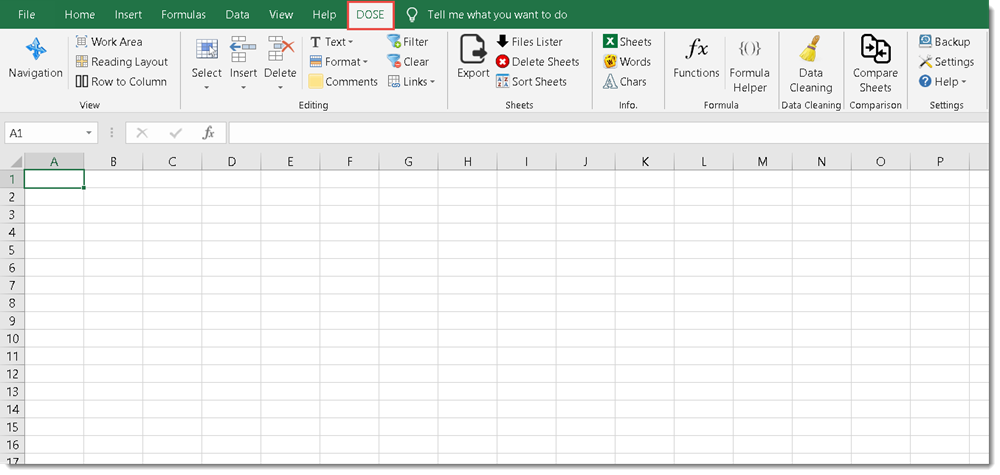
If you're tired of eliminating duplicate rows, comparing sheets, or executing hard activities in Excel, Dose for Excel is the powerful convenient solution you need to simplify all of these complicated chores into a few clicks. It has over 100 powerful new functions and features that have been added to the Excel ribbon for your convenience.
You may, for example, instantly export sheets, merge cells, rows, or columns without losing data, use the comments helper, count cells by color, use powerful built-in calculations, and easily backup your workbooks. Dose for Excel is a simple application that will save you time and effort.
Navigation
If you have a lot of Excel workbooks open, it can be tough to navigate between them. This application will let you browse through your workbooks quickly and elegantly, as well as to a specific worksheet inside the workbook.
Work Area
Convert your Excel workbook to Full Screen mode for easier reading; the ribbon, status bar, and formula bar will be minimized. Return the workbook to the first show state by showing them again.
Reading Layout
If your worksheet contains a large amount of data with many rows and columns, this tool will make it easier to view your data by highlighting the column and row of the selected cell.
Row to Column
View a row with an excessive number of columns in a new window with two columns, one for headers and the other for row data.
Select Tools
In Excel, a selection tool that makes any form of selection easier.
Select Used Range
This tool allows you to quickly choose cells. This application will select all used ranges regardless if there are blank cells, rows, or columns.
Extend selection to the last used row
Even if there are empty cells or rows, you can easily extend the selection to the last utilized row.
Extend selection to the last used column
Even if there are empty cells or columns, you can easily extend the selection to the last utilized column.
Select Merged Cells
Select a range of cells and then click "Select Merged Cells" to select all merged cells.
Select Interval Rows / Columns
You can quickly choose individual rows or columns at a predetermined interval. You can, for example, choose 5 rows every 2 rows.
Select Specific Cells
Choose cells that fulfill the parameters you've chosen. You can then execute various operations on the selected cells, such as delete, format, and so on.
System Requirements
• Operating System: Windows 2000, XP, Vista, 7, 8, 8.1, 10, or Windows Server editions
• Spreadsheet Software: Microsoft Excel 2007, 2010, 2013, 2016, or newer versions
• Required Components: Microsoft .NET Framework 4.5+ and Visual Studio Tools for Office (VSTO) 2010 Runtime
Screen :
What's New

HOMEPAGE
https://www.zbrainsoft.com/
Buy Premium Account From My Download Links & Get Fastest Speed.
We need your support!
Make a donation to help us stay online

Bitcoin (BTC)
bc1q08g9d22cxkawsjlf8etuek2pc9n2a3hs4cdrld

Bitcoin Cash (BCH)
qqvwexzhvgauxq2apgc4j0ewvcak6hh6lsnzmvtkem

Ethereum (ETH)
0xb55513D2c91A6e3c497621644ec99e206CDaf239

Litecoin (LTC)
ltc1qt6g2trfv9tjs4qj68sqc4uf0ukvc9jpnsyt59u

USDT (ERC20)
0xb55513D2c91A6e3c497621644ec99e206CDaf239

USDT (TRC20)
TYdPNrz7v1P9riWBWZ317oBgJueheGjATm
Information |
|||
 |
Users of GUESTS are not allowed to comment this publication. | ||