


MiniMeters 1.0.30.358
Category: Apps (SEO/Marketing/Design)
- views: 226
- date: 22 July 2026
- posted by: voska89
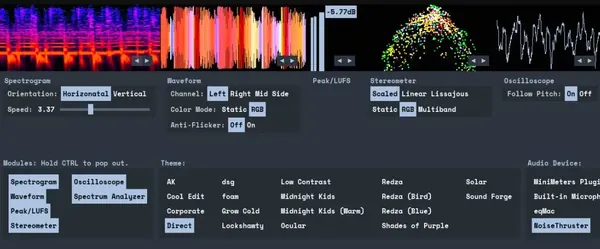
Free Download MiniMeters 1.0.30.358 (Win/macOS/Linux) | 389.5 Mb
MiniMeters is an audio metering application and plug-in suite designed for music producers, sound engineers, and creators who need detailed visual analysis of audio signals. It provides multiple monitoring modules for examining frequency content, waveform behavior, loudness levels, stereo information, and other important audio characteristics.
The software can operate as a standalone application or integrate with digital audio workstations through included plug-ins. It allows users to monitor system audio, route audio directly from a DAW, and customize meter layouts according to different production workflows.
With support for Windows, macOS, and Linux, MiniMeters provides flexible audio visualization tools for mixing, mastering, sound design, and technical audio analysis.
Software Overview
MiniMeters provides a collection of customizable audio meters that help users analyze different aspects of sound in real time. The application includes seven primary modules: Spectrogram, Waveform, Loudness, Stereometer, Oscilloscope, VU, and Spectrum.Users can arrange modules in different layouts, create custom meter configurations, or use the Quad Layout for a compact monitoring setup. The included Audio Server plug-in allows audio to be transferred from a DAW or plug-in host directly into the MiniMeters application.
The software also supports audio recording and clipping functions, allowing users to capture received audio for further review and analysis.
Key Features
- Audio metering application and plug-in suite for Windows, macOS, and Linux
- Seven built-in modules for detailed audio visualization
- Customizable meter layouts with horizontal, pop-out, and Quad Layout options
- System audio capture support on compatible platforms
- Audio Server plug-in for DAW integration
- Supports VST3, Audio Unit, and CLAP plug-in formats
- Records or clips received audio for analysis
- Custom color schemes for personalized meter displays
- Real-time waveform, frequency, loudness, and stereo analysis
Why Choose MiniMeters
MiniMeters is designed for users who need accurate visual feedback during music production and audio engineering tasks. Its modular design allows producers and engineers to build monitoring setups that match their workflow requirements.The combination of standalone operation and DAW-compatible plug-ins makes it suitable for mixing, mastering, sound design, and audio experimentation across multiple operating systems.
Modules
- Spectrogram: Displays frequency content changes over time with horizontal or vertical viewing modes.
- Waveform: Shows audio volume behavior over time with adjustable speed and multi-band visualization options.
- Loudness: Displays peak and LUFS volume measurements for monitoring audio levels.
- Stereometer: Analyzes stereo width and balance using Scaled, Linear, and Lissajous display modes.
- Oscilloscope: Provides detailed waveform visualization with pitch tracking capabilities.
- Spectrum Analyzer: Displays frequency information in Left/Right or Mid/Side modes with frequency readout options.
System Requirements
Windows 10+x64 (Intel or AMD) processor required
macOS 10.15 or newer
Intel & Apple Silicon Macs supported
Linux Kernel 5.4.0-174 or newer
x86_64 or arm64 processor required
Tested to work on Ubuntu 20.04+
Built on Ubuntu 22.04 using glibc v2.31
Stick Mode:
wlr-layer-shell is required on Wayland.
_NET_WM_WINDOW_TYPE_DOCK is required on X11.
Frequently Asked Questions
What is MiniMeters used for?
MiniMeters is used for real-time audio monitoring and visualization, helping users analyze loudness, frequency content, waveforms, and stereo characteristics.Can MiniMeters work with a DAW?
Yes. The included Audio Server plug-in allows users to send audio from a DAW or plug-in host directly into the MiniMeters application.Which plug-in formats are included with MiniMeters?
MiniMeters includes VST3, Audio Unit, and CLAP plug-in versions of its audio monitoring tools.Does MiniMeters support Apple Silicon Macs?
Yes. MiniMeters supports both Intel and Apple Silicon Mac systems.Home Page
https://directmusic.itch.io/minimeters
Product Information
- Software Name: MiniMeters
- Version: 1.0.30.358
- Architecture: x64 / ARM
- Languages: English
- License type: Full Version
- File Size: 389.5 Mb
DOWNLOAD LINK
Links are Interchangeable - No Password - Single Extraction
We need your support!
Make a donation to help us stay online

Bitcoin (BTC)
bc1q08g9d22cxkawsjlf8etuek2pc9n2a3hs4cdrld

Bitcoin Cash (BCH)
qqvwexzhvgauxq2apgc4j0ewvcak6hh6lsnzmvtkem

Ethereum (ETH)
0xb55513D2c91A6e3c497621644ec99e206CDaf239

Litecoin (LTC)
ltc1qt6g2trfv9tjs4qj68sqc4uf0ukvc9jpnsyt59u

USDT (ERC20)
0xb55513D2c91A6e3c497621644ec99e206CDaf239

USDT (TRC20)
TYdPNrz7v1P9riWBWZ317oBgJueheGjATm
Information |
|||
 |
Users of GUESTS are not allowed to comment this publication. | ||