


priPrinter Professional / Server 7.0.1.2628 Multilingual
Category: Apps (SEO/Marketing/Design)
- views: 198
- date: 18 July 2026
- posted by: voska89
Free Download priPrinter Professional / Server 7.0.1.2628 Multilingual Fast Links | 6.3 Mb
priPrinter Professional / Server is a virtual printer and print preview application that allows users to review, edit, and optimize print jobs before sending them to a physical printer. It helps reduce unnecessary printing by providing complete control over page layout, document arrangement, and print settings directly on the screen.
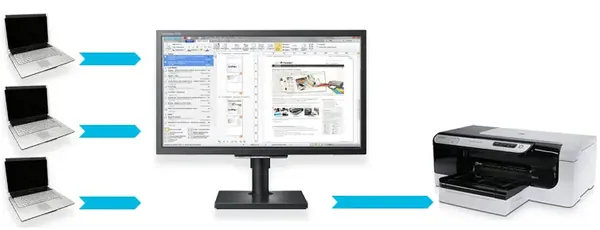
Designed for both individual and network environments, the software enables users to modify printed output by adjusting margins, rearranging pages, combining multiple pages onto a single sheet, adding watermarks, correcting text, and exporting documents to PDF or image formats. The Server edition extends these capabilities by allowing multiple network users to send print jobs to a centralized preview workstation.
With document history, search functionality, and flexible print management tools, priPrinter provides an efficient workflow for offices, educational institutions, and home users who need greater control over printing tasks.
Software Overview
priPrinter replaces the traditional print process with an interactive preview environment where documents can be reviewed and modified before printing. Users can delete unnecessary pages, reorder content, adjust page layouts, create booklets or posters, and customize watermarks without changing the original document.The software supports printing to physical printers, exporting to PDF or image files, and maintaining a searchable print history for previously processed documents. Custom profiles make it easy to reuse preferred layouts and printing configurations.
The Server edition provides centralized print preview management across a network. Print jobs submitted from multiple computers can be reviewed, combined, edited, reordered, and printed or exported by a designated workstation, making it suitable for shared office environments.
Key Features
- Virtual printer with interactive print preview.
- Modify page layouts before printing.
- Reorder, remove, and combine document pages.
- Adjust margins and place multiple pages on a single sheet.
- Create booklets, posters, and customized layouts.
- Apply watermarks and document markups.
- Edit document text before printing.
- Export print jobs to PDF and image formats.
- Maintain searchable print history.
- Save frequently used layouts as reusable profiles.
- Share print preview across a network with the Server edition.
- Support drag-and-drop job reordering and user filtering.
Why Choose priPrinter Professional / Server
priPrinter Professional / Server is well suited for users who need greater flexibility than standard printer drivers provide. Its print preview tools help reduce paper waste, improve document presentation, and simplify print management before output is finalized.The Server edition is especially useful in shared environments where print jobs from multiple users need centralized review, editing, and organization before printing or PDF generation.
System Requirements
Windows operating system.Frequently Asked Questions
What is priPrinter Professional used for?
It allows users to preview, edit, rearrange, and optimize print jobs before sending them to a printer or exporting them as PDF or image files.What does the Server edition provide?
The Server edition enables multiple network users to send print jobs to a centralized preview workstation where documents can be reviewed and managed.Can priPrinter export documents as PDF?
Yes. Print jobs can be saved as PDF files in addition to being printed or exported as images.Does the software keep a history of printed documents?
Yes. It includes searchable print history that allows previously printed documents to be located and reused.Home Page
http://www.priprinter.com/
Product Information
- Software Name: priPrinter Professional / Server
- Version: 7.0.1.2628
- Languages: Multilingual
- License type: Full Version
- File Size: 6.3 Mb
DOWNLOAD LINK
Rapidgator
zym06.priPrinter.7.0.1.2628.rar.html
zym06.priPrinter.Server.7.0.1.2628.rar.html
UploadCloud
zym06.priPrinter.7.0.1.2628.rar.html
zym06.priPrinter.Server.7.0.1.2628.rar.html
DDownload
zym06.priPrinter.7.0.1.2628.rar
zym06.priPrinter.Server.7.0.1.2628.rar
FreeDL
zym06.priPrinter.7.0.1.2628.rar.html
zym06.priPrinter.Server.7.0.1.2628.rar.html
Links are Interchangeable - No Password - Single Extraction
We need your support!
Make a donation to help us stay online

Bitcoin (BTC)
bc1q08g9d22cxkawsjlf8etuek2pc9n2a3hs4cdrld

Bitcoin Cash (BCH)
qqvwexzhvgauxq2apgc4j0ewvcak6hh6lsnzmvtkem

Ethereum (ETH)
0xb55513D2c91A6e3c497621644ec99e206CDaf239

Litecoin (LTC)
ltc1qt6g2trfv9tjs4qj68sqc4uf0ukvc9jpnsyt59u

USDT (ERC20)
0xb55513D2c91A6e3c497621644ec99e206CDaf239

USDT (TRC20)
TYdPNrz7v1P9riWBWZ317oBgJueheGjATm
Information |
|||
 |
Users of GUESTS are not allowed to comment this publication. | ||