


MindGems Folder Size Professional 5.9.0.5
Category: Apps (SEO/Marketing/Design)
- views: 144
- date: 13 July 2026
- posted by: voska89
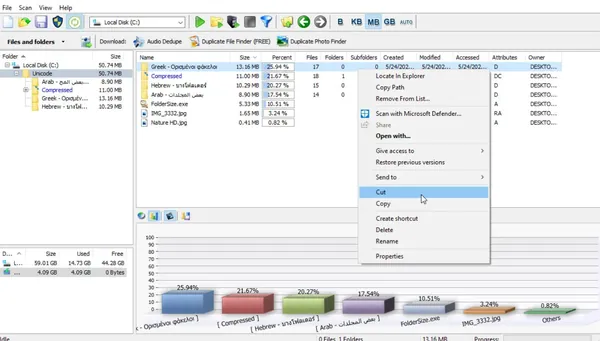
MindGems Folder Size Professional 5.9.0.5 | 9.8 Mb
MindGems Folder Size Professional is a disk space analysis utility designed to help Windows users inspect, organize, and manage storage usage more efficiently. The software scans drives, folders, and network locations to display detailed information about file and folder sizes, allowing users to quickly identify where storage space is being consumed.
Folder Size Professional provides a clear overview of disk usage through detailed reports and visual charts. It can analyze local drives, external storage devices, NAS, SAN, and network shares while integrating with Windows File Explorer for faster access to folder size information.
The application is useful for users who need to clean up storage, locate large files, manage archives, or monitor disk usage across multiple locations. Its reporting tools and filtering options make it suitable for both personal computers and professional environments where storage management is important.
Key Features:
- Analyze folder and file sizes across local drives, external storage, and network locations.
- Display detailed disk usage information with folder size charts and reports.
- Show file and folder details including size, percentage usage, timestamps, ownership, and item counts.
- Locate the largest, smallest, oldest, and newest files or folders quickly.
- Find empty folders, empty files, and folders containing excessive storage usage.
- Sort files and folders by size, name, date, owner, and other available properties.
- Integrate with Windows File Explorer through the "Scan with Folder Size" context menu.
- Display storage values in Bytes, Kilobytes, Megabytes, or Gigabytes.
- Export analysis reports to Excel, CSV, or XML formats.
- Save and reload scan results for later comparison.
- Support command-line options for automated disk usage analysis.
- Continue interrupted scans using progressive scanning technology.
Why Choose MindGems Folder Size Professional:
MindGems Folder Size Professional provides a practical way to understand how storage space is distributed across a computer or network environment. By presenting detailed folder statistics and visual reports, it helps users make informed decisions when organizing files or freeing disk space.
The software is suitable for home users, administrators, and professionals who need a reliable method to analyze storage usage. Its Windows Explorer integration and reporting capabilities make everyday file management tasks faster and more convenient.
System Requirements:
Windows 11/10/8.1/8/7/Vista (Both 32 & 64 Bit)
FAQ:
What is MindGems Folder Size Professional used for?
MindGems Folder Size Professional is used to analyze disk space usage by displaying folder sizes, file details, and storage reports to help users manage their files more effectively.
Can Folder Size Professional scan external drives and network storage?
Yes. The software supports scanning local drives, USB and Flash disks, NAS, SAN, and network shares.
Does the software integrate with Windows File Explorer?
Yes. Folder Size Professional adds a Windows Explorer context menu option that allows users to quickly scan folders and view their size information.
Can scan results be exported for reporting purposes?
Yes. The software can export file and folder analysis reports to formats such as Excel, CSV, and XML.
Home Page
https://www.mindgems.com/products/Folder-Size/Folder-Size.html
Product Information:
- Software Name: MindGems Folder Size Professional
- Year of release:
- Version: 5.9.0.5
- Architecture: x86/x64
- Languages: English
- License type: Full Version
- File Size: 9.8 Mb
DOWNLOAD LINK
Rapidgator
xjxc5.MindGems.Folder.Size.Professional.5.9.0.5.rar.html
UploadCloud
xjxc5.MindGems.Folder.Size.Professional.5.9.0.5.rar.html
DDownload
xjxc5.MindGems.Folder.Size.Professional.5.9.0.5.rar
KatFile
xjxc5.MindGems.Folder.Size.Professional.5.9.0.5.rar.html
FreeDL
xjxc5.MindGems.Folder.Size.Professional.5.9.0.5.rar.html
Links are Interchangeable - No Password - Single Extraction
We need your support!
Make a donation to help us stay online

Bitcoin (BTC)
bc1q08g9d22cxkawsjlf8etuek2pc9n2a3hs4cdrld

Bitcoin Cash (BCH)
qqvwexzhvgauxq2apgc4j0ewvcak6hh6lsnzmvtkem

Ethereum (ETH)
0xb55513D2c91A6e3c497621644ec99e206CDaf239

Litecoin (LTC)
ltc1qt6g2trfv9tjs4qj68sqc4uf0ukvc9jpnsyt59u

USDT (ERC20)
0xb55513D2c91A6e3c497621644ec99e206CDaf239

USDT (TRC20)
TYdPNrz7v1P9riWBWZ317oBgJueheGjATm
Information |
|||
 |
Users of GUESTS are not allowed to comment this publication. | ||