


Actual File Folders 1.15.5 Multilingual
Category: Apps (SEO/Marketing/Design)
- views: 177
- date: 9 July 2026
- posted by: DrZero
File size: 8.55 MB
Are you tired of constantly looking for your desired folder to open or save a file? Does a common dialog box annoy you? With Actual File Folders, you can switch between desired folders many times faster without long mouse manipulations. It will greatly increase your work productivity. In addition, Actual File Folders allows you to return to folders where you performed any actions. Just two additional title buttons for the Explorer dialog box will facilitate your work with PC at times. Actual File Folders is compatible with any software and Windows operating systems.
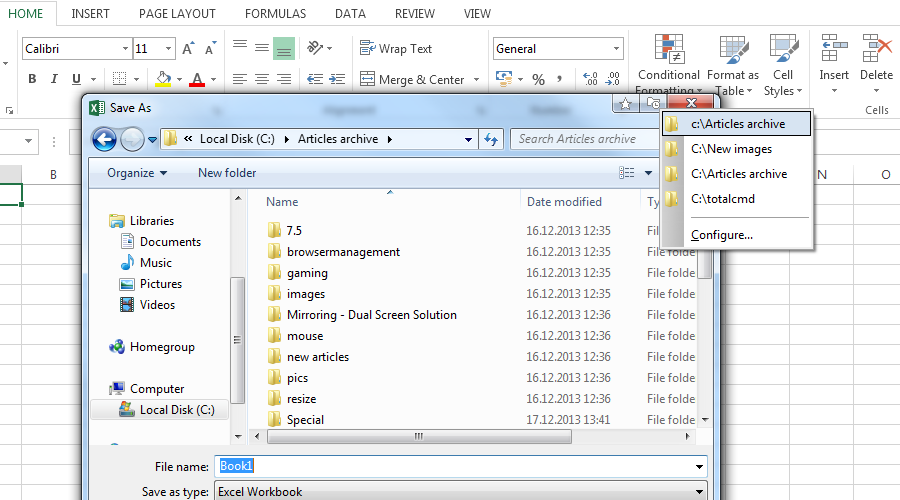
The Favorite Folders is a file folders extension lets you create the list of shortcuts to the folders you use the most often. Then, you can invoke this list in any file-related window of any program and access any of your favorite folders instantly in a single click. This is a good replacement for the tedious clicking to navigate to the required folder through the folders hierarchy. This resembles a list of bookmarks for your favorite websites in your web browser: instead of typing the URL each time you'd like to open your favorite website, you invoke the list of bookmarks and click that site's bookmark to get to it instantly.
You can manage the list of Favorite Folders shortcuts on the Favorite Folders panel. Then, you can invoke this list by clicking the special title button . When enabled, this button will be added to the title bar of any supported window.
Because most of Windows applications use the system dialogs for such operations as opening a file, saving a file and browsing for a folder, you can create the Favorite Folders list of shortcuts once and then use it virtually in any program.
The Recent Folders is a file folders extension tracks automatically which folders you have been visiting recently and keeps the the list of shortcuts to those folders so that you could get back to them instantly in a single click. This resembles the browsing history in your web browser: you can quickly return to a web page you visited some time ago if circumstances require.
Most of file manager programs (including Windows Explorer itself) offer such service; however, the browsing history is available either while the window remains open or in that particular file manager only.
Instead, Actual File Folders keeps the browsing history globally, no matter which program you have used the folder in. This means that, for example, you can open the document in Microsoft Word from some folder, switch to Microsoft Excel and then jump there to the same folder using the Recent Folders history.
You can adjust the Recent Folders options on the Recent Folders panel. The list of recent folders can be invoked by clicking the special title button . When enabled, this button will be added to the title bar of any supported window.
Title buttons compact mode now works correctly in systems with right-to-left
languages (like Arabic or Hebrew).
System Requirements
Windows 11 / 10 / 8.1 / 8 / 7 / Vista / XP / 2000 (both 32-bit and 64-bit editions)
Windows Server 2022 / 2019 / 2016 / 2012 R2 / 2012 / 2008 R2 / 2008 / 2003 / 2000 (both 32-bit and 64-bit* editions)
Screen :
What's New

HOMEPAGE
https://www.actualtools.com/
Buy Premium Account From My Download Links & Get Fastest Speed.
We need your support!
Make a donation to help us stay online

Bitcoin (BTC)
bc1q08g9d22cxkawsjlf8etuek2pc9n2a3hs4cdrld

Bitcoin Cash (BCH)
qqvwexzhvgauxq2apgc4j0ewvcak6hh6lsnzmvtkem

Ethereum (ETH)
0xb55513D2c91A6e3c497621644ec99e206CDaf239

Litecoin (LTC)
ltc1qt6g2trfv9tjs4qj68sqc4uf0ukvc9jpnsyt59u

USDT (ERC20)
0xb55513D2c91A6e3c497621644ec99e206CDaf239

USDT (TRC20)
TYdPNrz7v1P9riWBWZ317oBgJueheGjATm
Information |
|||
 |
Users of GUESTS are not allowed to comment this publication. | ||