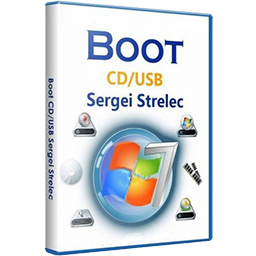
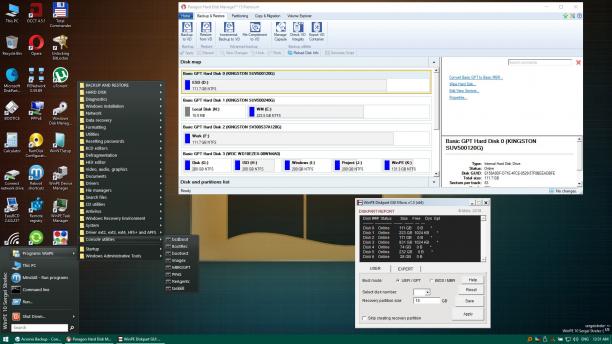
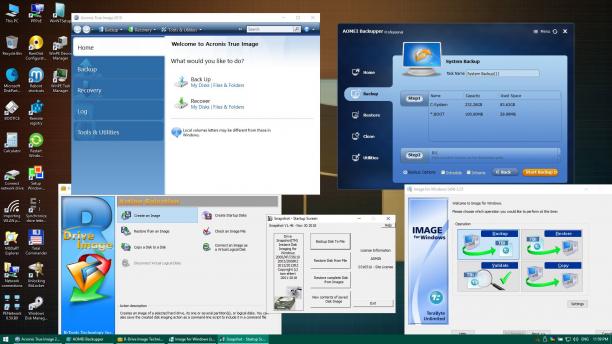
Bootable disk Windows 11, 10 and 8 PE - for maintenance of computers, hard disks and partitions, backup and restore disks and partitions, computer diagnostics, data recovery, Windows installation.
Composition of assembly WinPE11x64 WinPE10x64 WinPE10x86 WinPE8x86 WinPE8x86(Native)
HDD Regenerator 2011 HDDaRTs 20.03.2025 (author program Ander_73 ) BIBM++ 1.92 (author program Ander_73 ) MemTest86 11.5.1000 (UEFI) HDD Regenerator 2011 MHDD 4.6 Victoria 3.52 Memtest86+ 7.20 (UEFI/DOS) HDAT2 7.6 GoIdMemory PRO 7.85 Active Password Changer Professional 5.0 Ghost 11.5 BootIt Bare Metal 1.92 DiskGenius 5.2.0.878 Kon-Boot for Windows 2.5.0 Hard Disk Sentinel for DOS 1.21 DRevitalize 3.32 CHZ Monitor Test 2.0
Supported methods and protocols: TCP/IP, NetBIOS, PPPoE, and WLAN (Wi-Fi), WebDAV. If you want use Wi-Fi - you need to install "wireless network-adapter driver". Choose "Drivers" section in the "Start Menu". Connecting to Wi-Fi require to use "PE Network Manger", click on tab "Wi-Fi" on it.
To import WLAN profiles on your computer or client computer, export the WLAN profile (s) Program Marat Galiullina Smart WiFi Solution (available in the archive) Or by means of Windows (Command line launch - PCM - On behalf of the administrator.) Command example
WLAN profiles put in a folder on your USB flash drive SSTR \ MInst \ WLANProfile The profile names can not contain spaces and have names in the Latin alphabet. The number of profiles does not matter. After loading WinPE, WLAN drivers will be installed and WLAN profiles imported. You will only need to select the necessary network in the PENetwork program, and click - Connect The execution script is written in the run.cmd file in the SSTR\MInst\bat folder If you do not need it, make the run.cmd file in the SSTR\MInst\ bat folder empty. You can also import manually after downloading, from the shortcut on the Desktop, or the Start menu, after installing the Wlan driver.
Features of connecting network drives in WinPE 10. If you connect a network drive, in the Username field, should be indicated in the format of "computer name\user name" or "IP address computer\user name"
Example: STRELEC-PC\SEREGA or 192.168.0.150\SEREGA Also, if the automounter.
Example net use Z: \\STRELEC-PC\J /USER:STRELEC-PC\SEREGA 123456
or
net use Z: \\192.168.0.150\J /USER:192.168.0.150\SEREGA 123456
You can put your WLAN or controller driver in the "SSTR\USER\MY_DRIVERS_x64" or "SSTR\USER\MY_DRIVERS_x86" folder Driver will be installed while Windows PE is booting. Important: subfolders should not have spaces in the names
If you want to change the image of the desktop, you must put your picture in the SSTR\MInst\Wallpaper folder to replace the existing Wallpaper.jpg under the same name (that is, replace its)
This is a special mode in which the first load specially prepared minimal kernel (without GUI) and works off a script that searches for media (DVD, USB-HDD) with an assembly and installs the "full" kernel.
+ Pros
1. Fast loading on USB 1.x. Instead of conventional 5-10 min USB 1.2 - about 1 minute. 2. Less memory consumption (for Strelec assembly - less on ~ 250Mb). 3. Reduced CPU requirements (Native Mode kernel patched to work with the CPU starting from P4 / Athlon), scanning is disabled NX-Bit.
-Minuses
1. Binding to the carrier (if extraction - PC "hangs"). 2. Slower core work (because everything is loaded not from the fast RAM-disk, and c is a slow media). In practice, special "brake" is not felt. 3. For compatibility with older CPU is disabled and multi-core support PAE.
Note: On modern PC is better to use normal startup.
We need your support!
Make a donation to help us stay onlineBitcoin (BTC)
bc1q08g9d22cxkawsjlf8etuek2pc9n2a3hs4cdrld
Bitcoin Cash (BCH)
qqvwexzhvgauxq2apgc4j0ewvcak6hh6lsnzmvtkem
Ethereum (ETH)
0xb55513D2c91A6e3c497621644ec99e206CDaf239
Litecoin (LTC)
ltc1qt6g2trfv9tjs4qj68sqc4uf0ukvc9jpnsyt59u
USDT (ERC20)
0xb55513D2c91A6e3c497621644ec99e206CDaf239
USDT (TRC20)
TYdPNrz7v1P9riWBWZ317oBgJueheGjATm