


QueueExplorer Professional 5.0.84
Category: Apps (SEO/Marketing/Design)
- views: 130
- date: 24 June 2026
- posted by: voska89
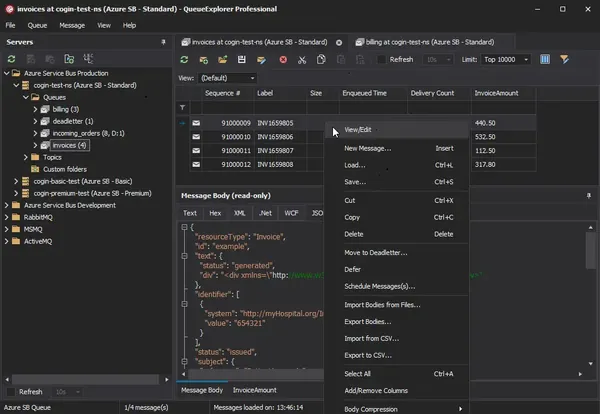
QueueExplorer Professional 5.0.84 | 35.4 Mb
QueueExplorer Professional is a specialized message queue management and troubleshooting solution designed for developers, system administrators, and integration teams. It provides advanced tools for monitoring, analyzing, testing, and managing message-based systems, helping users quickly identify issues, inspect message content, and maintain reliable communication across distributed applications.
The software supports multiple messaging platforms from a single installation, allowing organizations to work with different queue technologies without additional licensing requirements. Its native Windows interface delivers fast access to queues, messages, topics, and related objects while offering capabilities far beyond standard management consoles.
Whether you need to inspect message payloads, troubleshoot failed deliveries, perform load testing, migrate queue configurations, or manage production environments, QueueExplorer Professional provides a centralized workspace for handling complex messaging infrastructures.
Key Features:
Message Analysis and Viewing:
Development and Testing Tools:
Performance and Load Testing:
Administration and Troubleshooting:
Advanced Search and Filtering:
Backup, Migration, and Synchronization:
Multi-System Management:
[b]System Requirements:
Windows 11, Windows 10, Windows 8, Windows 7
Windows Server 2022, Windows Server 2019,
Windows Server 2016, Windows Server 2012,
Windows Server 2008, Windows Server 2008 R2
.Net Framework 4.6.2 or higher
Home Page
- Supports MSMQ, Azure Service Bus, RabbitMQ, and ActiveMQ
- View, edit, copy, move, and delete messages
- Save and reload messages for later analysis
- Advanced message inspection and troubleshooting
- Native Windows application with fast performance
- Built-in stress testing capabilities
- Queue monitoring and administration tools
Message Analysis and Viewing:
- Inspect complete message contents
- View XML, JSON, WCF, Hex, and text formats
- Analyze headers and message properties
- Verify message formatting and delivery data
- Support for .NET object message inspection
- Multiple encoding display options
Development and Testing Tools:
- Create and edit test messages
- Simulate message producers and consumers
- Test system components independently
- Generate custom message scenarios
- Send individual or bulk test messages
- Validate application messaging workflows
Performance and Load Testing:
- Generate thousands of test messages
- Evaluate queue performance under load
- Measure application handling capacity
- Test message throughput and reliability
- Support large-scale performance simulations
Administration and Troubleshooting:
- Investigate failed and dead-letter messages
- Repair and resend problematic messages
- Monitor queue growth and activity
- Track system status in near real time
- Auto-refresh queue monitoring
- Quickly identify operational issues
Advanced Search and Filtering:
- Filter and sort messages efficiently
- Locate specific business data quickly
- Extract information using XPath
- Query JSON-based message content
- Use regular expressions for data extraction
- Display important business values instantly
Backup, Migration, and Synchronization:
- Backup messages to external files
- Restore messages when needed
- Move or copy messages between queues
- Compare queue structures and settings
- Synchronize metadata across environments
- Migrate queues between servers
- Duplicate queues with configuration settings
Multi-System Management:
- Manage multiple messaging platforms simultaneously
- Unified interface across supported systems
- Simplifies migration between queue technologies
- Reduces training and operational overhead
- Protects long-term software investment
[b]System Requirements:
Windows 11, Windows 10, Windows 8, Windows 7
Windows Server 2022, Windows Server 2019,
Windows Server 2016, Windows Server 2012,
Windows Server 2008, Windows Server 2008 R2
.Net Framework 4.6.2 or higher
Home Page
https://www.cogin.com/DOWNLOAD LINK
Links are Interchangeable - No Password - Single Extraction
We need your support!
Make a donation to help us stay online

Bitcoin (BTC)
bc1q08g9d22cxkawsjlf8etuek2pc9n2a3hs4cdrld

Bitcoin Cash (BCH)
qqvwexzhvgauxq2apgc4j0ewvcak6hh6lsnzmvtkem

Ethereum (ETH)
0xb55513D2c91A6e3c497621644ec99e206CDaf239

Litecoin (LTC)
ltc1qt6g2trfv9tjs4qj68sqc4uf0ukvc9jpnsyt59u

USDT (ERC20)
0xb55513D2c91A6e3c497621644ec99e206CDaf239

USDT (TRC20)
TYdPNrz7v1P9riWBWZ317oBgJueheGjATm
Information |
|||
 |
Users of GUESTS are not allowed to comment this publication. | ||