


HyperSnap 10.1.2 (x64) + Portable
Category: Apps (SEO/Marketing/Design)
- views: 125
- date: 24 June 2026
- posted by: voska89
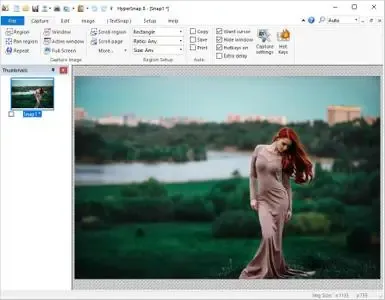
HyperSnap 10.1.2 (x64) + Portable Fast Links | 17.5/13.1 Mb
HyperSnap is an advanced screen capture and screen recording utility designed for technical documentation, software support, training materials, and professional content creation. It goes beyond standard screenshot tools by capturing complex screen elements such as scrolling windows, delayed menus, multi-monitor desktops, and hard-to-capture interface components.
The software includes built-in OCR technology that allows users to extract editable text directly from screen regions and image files. This makes it particularly useful when copy-and-paste functions are unavailable or when working with applications that restrict text selection.
HyperSnap also provides a complete set of annotation and image editing tools, enabling users to add notes, highlights, arrows, frames, shadows, and visual effects immediately after capture. Combined with automation features, hotkeys, and flexible export options, it streamlines repetitive documentation and support workflows.
Key Features:
- Capture any screen area or application window
- Record video directly from the desktop
- Capture scrolling windows and long documents
- Grab delayed menus and temporary interface elements
- Support for multi-monitor desktop environments
- Capture irregular and custom-shaped screen regions
- Built-in OCR text recognition technology
- Extract editable text from screen captures
- Convert text from images into editable content
- Annotate screenshots with arrows and callouts
- Add notes, highlights, frames, and shadows
- Apply image stamps and visual effects
- Perform quick image cleanup and adjustments
- Automatic saving and export options
- Clipboard integration for faster workflows
- Custom hotkeys for rapid screen capture
- Create documentation, manuals, and tutorials
- Ideal for support teams and technical writers
- Useful for QA testing and bug reporting
- Capture application states and user interface changes
- Create presentation and training materials
- Document software releases and updates efficiently
System Requirements:
Windows 10 and higher (64-bit)
Home Page
https://hyperionics.com/DOWNLOAD LINK
Links are Interchangeable - No Password - Single Extraction
We need your support!
Make a donation to help us stay online

Bitcoin (BTC)
bc1q08g9d22cxkawsjlf8etuek2pc9n2a3hs4cdrld

Bitcoin Cash (BCH)
qqvwexzhvgauxq2apgc4j0ewvcak6hh6lsnzmvtkem

Ethereum (ETH)
0xb55513D2c91A6e3c497621644ec99e206CDaf239

Litecoin (LTC)
ltc1qt6g2trfv9tjs4qj68sqc4uf0ukvc9jpnsyt59u

USDT (ERC20)
0xb55513D2c91A6e3c497621644ec99e206CDaf239

USDT (TRC20)
TYdPNrz7v1P9riWBWZ317oBgJueheGjATm
Information |
|||
 |
Users of GUESTS are not allowed to comment this publication. | ||