


Windows 10 Debloater 3.0.3
Category: Apps (SEO/Marketing/Design)
- views: 147
- date: 11 June 2026
- posted by: mitsumi
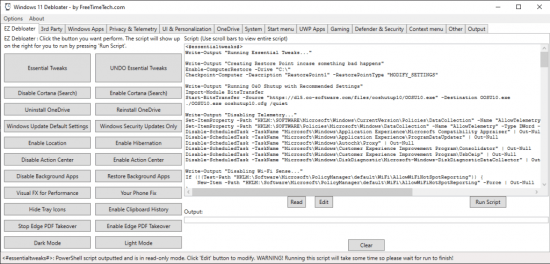
Windows 10 Debloater 3.0.3 | Size: 2.06 MB
Language: English
Customize your Windows 10 environment by disabling certain features and enabling others, then generating a PowerShell script to run and apply the changes.
Windows 10 Debloater is a portable customization utility that allows advanced users to disable/enable many Windows 10 features via PowerShell scripts.
Windows 10 Debloater is the perfect app for those who need to work on multiple Windows 10 machines. For those using Windows 11, Windows 11 Debloater from the same author is also available.
Windows 10 Debloater uses a tab-based UI grouping specific areas of interest for quick access.
You can use EZ Debloater (first tab on UI) to easily debloat, select what you want from the many options, or choose a preset first from 'Debloat Preset' to create the ultimate PowerShell script to debloat Microsoft Windows 11. Create your radio buttons preset. You can run the script directly from the program. This option also includes disabling Cortana background apps and disabling Microsoft Edge as the default PDF app.
System Requirements: Windows 10
DOWNLOAD LINKS:
We need your support!
Make a donation to help us stay online

Bitcoin (BTC)
bc1q08g9d22cxkawsjlf8etuek2pc9n2a3hs4cdrld

Bitcoin Cash (BCH)
qqvwexzhvgauxq2apgc4j0ewvcak6hh6lsnzmvtkem

Ethereum (ETH)
0xb55513D2c91A6e3c497621644ec99e206CDaf239

Litecoin (LTC)
ltc1qt6g2trfv9tjs4qj68sqc4uf0ukvc9jpnsyt59u

USDT (ERC20)
0xb55513D2c91A6e3c497621644ec99e206CDaf239

USDT (TRC20)
TYdPNrz7v1P9riWBWZ317oBgJueheGjATm
Information |
|||
 |
Users of GUESTS are not allowed to comment this publication. | ||