


miniToggle 2.0
Category: Apps (SEO/Marketing/Design)
- views: 97
- date: 7 June 2026
- posted by: mitsumi
miniToggle 2.0 | Size: 2.01 MB
Language: English
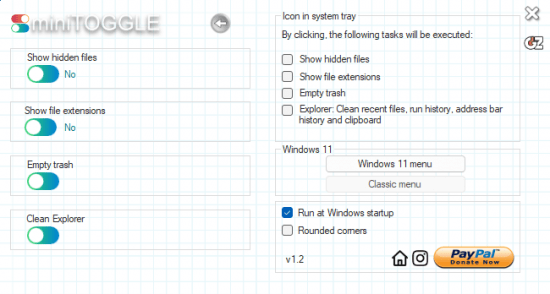
miniToggle provides you with a user-friendly application designed to further simplify the process of modifying Explorer settings. With miniToggle, users can conveniently toggle the visibility of hidden files, display or hide file extensions, and empty the recycle bin.
When using miniToggle's extended screen, users have the option to select and execute any of the above three settings by simply double-clicking on the tray icon. This feature provides quick and easy access to essential Explorer settings, enhancing user convenience and productivity.
miniToggle additionally allows users to switch between the new design and the classic version of the Windows 11 context menu. This feature is exclusively available for Windows 11.
System Requirements: Windows 11, Windows 10
DOWNLOAD LINKS:
We need your support!
Make a donation to help us stay online

Bitcoin (BTC)
bc1q08g9d22cxkawsjlf8etuek2pc9n2a3hs4cdrld

Bitcoin Cash (BCH)
qqvwexzhvgauxq2apgc4j0ewvcak6hh6lsnzmvtkem

Ethereum (ETH)
0xb55513D2c91A6e3c497621644ec99e206CDaf239

Litecoin (LTC)
ltc1qt6g2trfv9tjs4qj68sqc4uf0ukvc9jpnsyt59u

USDT (ERC20)
0xb55513D2c91A6e3c497621644ec99e206CDaf239

USDT (TRC20)
TYdPNrz7v1P9riWBWZ317oBgJueheGjATm
Information |
|||
 |
Users of GUESTS are not allowed to comment this publication. | ||