


f.lux 4.141
Category: Apps (SEO/Marketing/Design)
- views: 185
- date: 1 June 2026
- posted by: oaxino
f.lux 4.141 | Size: 673.34 KB
Language: English
[/center]
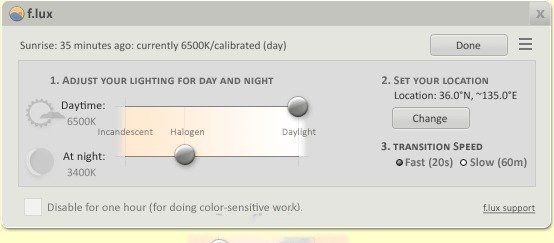
f.lux is a simple and easy to use application developed in order to provide you with the means of automatically adapting your desktop brightness and colors to the night / day lighting conditions.
This utility functions best when it knows your location details, as such it is recommended that you enter your geographical position, so f.lux can calculate the precise time of day and render the appropriate light tones. This is also advisable because the program has a hard time guessing your location.
After setting your position on the map, f.lux will determine your local time, placing your computer on a 24-hour transition schedule. You have the option of customizing the lighting for your screen for day and night time, ranging from 'Candle', to 'Halogen' and 'Daylight'.
In addition, f.lux enables you to preview an entire day's lighting changes in just a few seconds, so you can be certain your are happy with the settings, or go back and try again.
The application also offers a 'Movie Mode', that will attempt to keep the colors and shadow details, but still present images in warmer color tones, balancing powerful contrasts.
Moreover, you can turn off f.lux for an hour, if you need to work on something that is more color-sensitive and you want your computer to display images in their original tones, without any adjustments.
If you were ever blinded by an overly-bright computer when working at night or early in the morning, than you will immediately find use in f.lux. By adjusting your PC lights and colors to the time of day or night, you will spare your eyes from the effort of coping with high contrast levels between your room's lighting and your screen.
f.lux is a great tool that can help you feel more comfortable with your PC brightness and soften the shock your eyes face when switching from your computer to your ambient lights.
System Requirements: Windows 11, Windows 10, 8 , 7
DOWNLOAD LINKS:
We need your support!
Make a donation to help us stay online

Bitcoin (BTC)
bc1q08g9d22cxkawsjlf8etuek2pc9n2a3hs4cdrld

Bitcoin Cash (BCH)
qqvwexzhvgauxq2apgc4j0ewvcak6hh6lsnzmvtkem

Ethereum (ETH)
0xb55513D2c91A6e3c497621644ec99e206CDaf239

Litecoin (LTC)
ltc1qt6g2trfv9tjs4qj68sqc4uf0ukvc9jpnsyt59u

USDT (ERC20)
0xb55513D2c91A6e3c497621644ec99e206CDaf239

USDT (TRC20)
TYdPNrz7v1P9riWBWZ317oBgJueheGjATm
Information |
|||
 |
Users of GUESTS are not allowed to comment this publication. | ||