


EasyUEFI Professional Enterprise 6.4.0.2 Multilingual
Category: Apps (SEO/Marketing/Design)
- views: 181
- date: 31 May 2026
- posted by: voska89
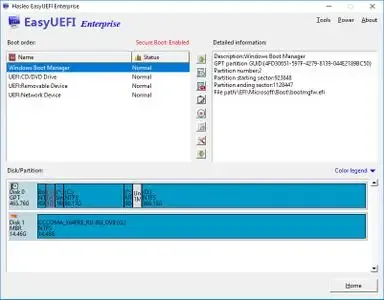
EasyUEFI Professional / Enterprise 6.4.0.2 Multilingual Fast Links | 23.6 Mb
Hasleo EasyUEFI is a handy and useful software that allows you to manage (U)EFI boot options, BCD boot options and EFI System Partition (ESP), it can help you repair Windows boot issues caused by corrupted or missing (U)EFI boot option, BCD boot option or EFI System Partition.
Hasleo EasyUEFI supports the creation of WinPE emergency disks, so you can boot from the WinPE emergency disks to fix issues caused by damaged or missing UEFI boot entries, BCD boot entries, or ESP when your Windows fails to boot.
(U)EFI boot option management
This feature allows you to easily manage (U)EFI boot options, such as create, delete, edit, clean up, backup and restore boot options, or change boot sequence, all these operations done under Windows without entering BIOS setup.
BCD boot option management
This feature allows you to easily manage BCD boot options, such as create, delete, edit, set default boot option, backup and restore boot options, or change display order.
EFI system partition (ESP) management
This feature allows you to effectively manage the EFI System Partitions, such as backup, restore, rebuild, delete, explore, read and write the EFI System Partition, or move EFI System Partition from one drive to another.
Featuers:
- Comprehensive (U)EFI boot option management functions, such as create, delete, edit (U)EFI boot options, change (U)EFI boot sequence, etc.
- Comprehensive BCD boot option management functions, such as create, delete, edit BCD boot options, change default boot entry, etc.
- Backup, restore, rebuild, delete, explore, read and write EFI System Partition (ESP) or move EFI System Partition (ESP) to another drive.
- Creation of Windows PE emergency disk and command line support
- (U)EFI-based Windows 7 or later Running on X86/X64/ARM64 Processors.
Supported Host Operating Systems
Manage the (U)EFI boot options(U)EFI-based Windows Vista or later (64 & 32 bits)
Manage the BCD boot options (U)EFI-based Windows Vista or later (64 & 32 bits)
Manage the EFI System Partitions (U)EFI-based Windows Vista or later (64 & 32 bits)
Create bootable Windows PE disk (U)EFI-based Windows Vista or later (64 & 32 bits)
Supported Destination Operating Systems
Manage the (U)EFI boot options (U)EFI-based Windows/Linux
Manage the BCD boot options Windows and WinPE
Supported Host Operating Systems
(U)EFI-based Windows 7 or later Running on X86/X64/ARM64 Processors
Home Page - http://www.easyuefi.com/
DOWNLOAD LINK
Links are Interchangeable - No Password - Single Extraction
We need your support!
Make a donation to help us stay online

Bitcoin (BTC)
bc1q08g9d22cxkawsjlf8etuek2pc9n2a3hs4cdrld

Bitcoin Cash (BCH)
qqvwexzhvgauxq2apgc4j0ewvcak6hh6lsnzmvtkem

Ethereum (ETH)
0xb55513D2c91A6e3c497621644ec99e206CDaf239

Litecoin (LTC)
ltc1qt6g2trfv9tjs4qj68sqc4uf0ukvc9jpnsyt59u

USDT (ERC20)
0xb55513D2c91A6e3c497621644ec99e206CDaf239

USDT (TRC20)
TYdPNrz7v1P9riWBWZ317oBgJueheGjATm
Information |
|||
 |
Users of GUESTS are not allowed to comment this publication. | ||