


VovSoft Website Screenshot Generator 2.4 (x64)
Category: Apps (SEO/Marketing/Design)
- views: 168
- date: 31 May 2026
- posted by: mitsumi
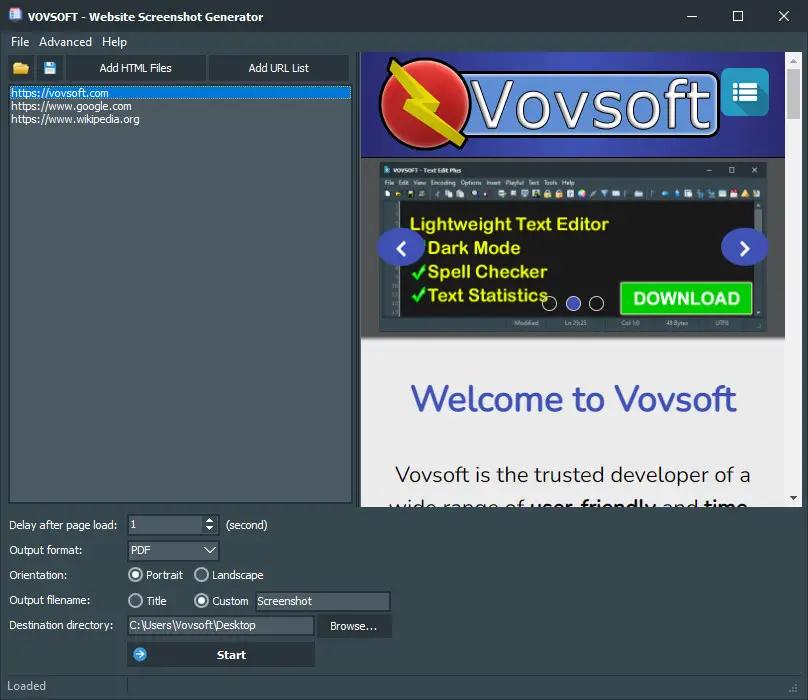
VovSoft Website Screenshots Generator 2.4 (x64) | Size: 89.26 MB
Language: English
Vovsoft Website Screenshots Generator is a powerful automation tool that allows you to capture screenshots of multiple web pages with just a few clicks. Whether you need to take screenshots for website testing, marketing, or design purposes, this software provides an easy and efficient solution. With its intuitive interface, you can simply enter the URLs, adjust the capture settings, and save the website snapshots in the desired format.
Batch URL to image converter
This batch URL to image converter program is an essential tool for anyone who needs to generate website screenshots quickly and easily. With this software, you can take high-quality screenshots of any website, and save them in the format of your choice, including PDF, PNG, and JPEG.
Whether you are a web developer, marketer, or designer, this software is a must-have tool that can help you streamline your workflow, and save time. With its user-friendly interface and ability to save screenshots as PDF, PNG, and JPEG, this software is an excellent choice for anyone who needs to capture website screenshots regularly.
This application includes and uses Chromium 109.
How to capture website screenshots in bulk
You can use this bulk website screenshot tool to capture screenshots of web pages. Follow the simple steps:
Download and run Vovsoft Website Screenshots Generator
Click "Add HTML Files" or "Add URL List" button
Add batches of HTML files or URLs
Choose output format (PDF, PNG, JPEG, TIFF, GIF, BMP)
Choose orientation (portrait, landscape)
Choose destination directory
Click "Start" button
Key Features
Website to PDF
Website to PNG
Website to JPG
Webpage snapshot
Operating System: Windows 11, Windows 10, Windows 8/8.1, Windows 7 (64-bit)
HOMEPAGE: Code:
https://vovsoft.com/software/website-screenshot-generator/
DOWNLOAD LINKS:
We need your support!
Make a donation to help us stay online

Bitcoin (BTC)
bc1q08g9d22cxkawsjlf8etuek2pc9n2a3hs4cdrld

Bitcoin Cash (BCH)
qqvwexzhvgauxq2apgc4j0ewvcak6hh6lsnzmvtkem

Ethereum (ETH)
0xb55513D2c91A6e3c497621644ec99e206CDaf239

Litecoin (LTC)
ltc1qt6g2trfv9tjs4qj68sqc4uf0ukvc9jpnsyt59u

USDT (ERC20)
0xb55513D2c91A6e3c497621644ec99e206CDaf239

USDT (TRC20)
TYdPNrz7v1P9riWBWZ317oBgJueheGjATm
Information |
|||
 |
Users of GUESTS are not allowed to comment this publication. | ||