


DefenderUI 2.06
Category: Apps (SEO/Marketing/Design)
- views: 195
- date: 7 May 2026
- posted by: oaxino
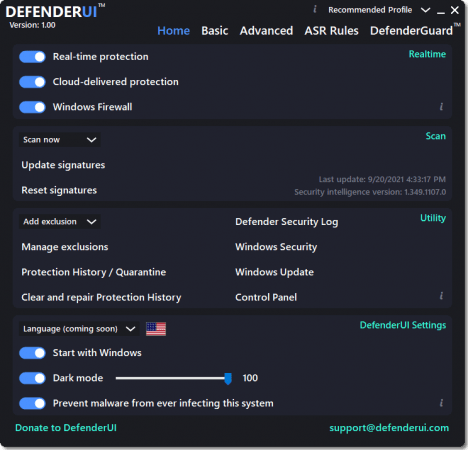
DefenderUI 2.06 | Size: 2.49 MB
Language: English
DefenderUI significantly improves usability & unlocks many hidden security features.Compatible with Windows 10 / 11.
Different security profiles to choose from
With DefenderUI, you can control Microsoft Defender much easier. For instance, it allows you to enable or disable real-time and cloud-delivered protection, or turn off and on the Windows Firewall.
There are four different security profiles that you can use. The recommended profile activates various security features in Microsoft Defender that are not available by default, providing enhanced protection. If you need more control, then you can opt for the "Interactive" profiles, which prompts the user for confirmation.
The "Aggressive" profile unlocks most of the hidden security features in Defender, and it is recommended for when the security is critical. Last but not least, the "Default" profile restores Microsoft Defender to its factory settings.
On-demand scans and extra protection modules
With DefenderUI, you can perform on-demand scans. It supports quick, full and custom scans as well. Moreover, it allows you to run an offline scan, which requires a system restart.
Accessing the Defender quarantine, viewing the action history for Windows Defender, opening the security log files is possible via DefenderUI. Windows Security, Windows Update and the Control Panel can be opened with a single click.
Aside from monitoring the PC in real-time, DefenderUI also provides behavioral and PUA protection, which can be disabled both, if needed. Moreover, there is a module dedicated to ransomware protection, allowing controlled folder access.
A GUI for Microsoft Defender
DefenderUI helps you gain full control over the security features of Microsoft Defender. It is easy to use, it features different security profiles and it features one-click access to both basic and advanced security settings. With its help, Microsoft Defender is no longer an antivirus that runs in the background, but a full-featured security tool with various settings and options.
System Requirements: Windows 11, Windows 10, 8 , 7
DOWNLOAD LINKS:
We need your support!
Make a donation to help us stay online

Bitcoin (BTC)
bc1q08g9d22cxkawsjlf8etuek2pc9n2a3hs4cdrld

Bitcoin Cash (BCH)
qqvwexzhvgauxq2apgc4j0ewvcak6hh6lsnzmvtkem

Ethereum (ETH)
0xb55513D2c91A6e3c497621644ec99e206CDaf239

Litecoin (LTC)
ltc1qt6g2trfv9tjs4qj68sqc4uf0ukvc9jpnsyt59u

USDT (ERC20)
0xb55513D2c91A6e3c497621644ec99e206CDaf239

USDT (TRC20)
TYdPNrz7v1P9riWBWZ317oBgJueheGjATm
Information |
|||
 |
Users of GUESTS are not allowed to comment this publication. | ||