


SeekFast 7.1
Category: Apps (SEO/Marketing/Design)
- views: 126
- date: 7 May 2026
- posted by: newapp2023
SeekFast 7.1 | File size: 26 MB
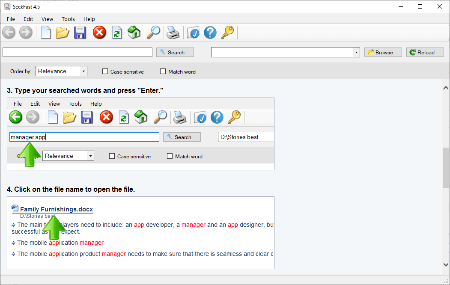
SeekFast has the ability to rapidly search for specific text in all the documents on your computer. SeekFast then organizes the results in a way that makes it easy for you to find the text you are looking for, to see its context, and open the file containing it.
Some of the essential features of SeekFast are
Rapidly searching thousands of documents
SeekFast is an extremely fast and easy to use program that can search for a text in multiple files in a folder on your computer. If you are using the full version, you will be able to search thousands of documents. Searching is easy and convenient, and although SeekFast has a Help section, the program is easy enough to use without even reading the information in it. All you have to do is choose a directory to search and enter search words or phrases – you will get all the sentences in which they occur in seconds. This is particularly useful if you need to find something quickly.
Displaying most relevant results first
SeekFast uses modern linguistic technology, allowing the results to appear in order of relevance to your search – just like a search in Google or any other web-based search engine. You can also sort the results by date of last modification. If you get too many results per search, you can narrow down the search by adding one or more words.
Viewing the sentence containing searched terms
You can view the sentence surrounding the search words on the screen. Search terms are highlighted in red, making them easy to notice in the search process.
Opening the corresponding documents with a single click
With SeekFast you can open each document with its associated program with a single click. Just click on the filename listed in your search.
Viewing larger parts of the text with a single click
You can easily view the larger context in which the search terms occur. It is not necessary to open the file – just click on the sentence and you will see the entire context on the screen of the program. This may be enough to find the specific information you are searching for, so that it may be unnecessary to open the document. From the SeekFast screen you can copy any amount of the text at this point for insertion into any program you choose. Also, there is an option to set the maximum number of sentences that will be displayed from each file.
Integration in File Explorer
You can open SeekFast directly from File Explorer – just right-click on the folder you want to search and choose SeekFast. When you open the program, SeekFast reads the files and you can search the selected directory.
Freedom from indexing
A great advantage over other search software is that SeekFast does not use indexing. Indexing works constantly and takes a lot of the resources of your computer. It can slow down the work of your system and can give you incorrect results if there are recent changes in documents. With SeekFast you get up-to-date results and you do not overload your computer with indexing.
Support of various file formats
SeekFast can search a wide variety of document types: Microsoft Word Documents (DOC, DOCX), PDF files (PDF), Microsoft Excel Spreadsheets (XLS, XLSX), Microsoft PowerPoint files (PPT, PPTX), OpenOffice Document Text (ODT), LibreOffice Writer documents (ODT), LaTeX documents (TEX), Rich Text Format (RTF), and other text documents (TXT, HTML, CPP, JAVA, JSP, XML, PHP, PL, PY and more). You can choose what types of files are to be searched, so if you know the type of the document you want to find, you can narrow down the search and find what you want quickly and easily.
Whats New
Updates: official site does not provide any info about changes in this version
System Requirements: Windows 10 and 11 (64-bit)
HomePage:
https://seekfast.org/
-:DOWNLOAD FROM LINKS:-
Download From RapidGator
Download From NitroFlare
We need your support!
Make a donation to help us stay online

Bitcoin (BTC)
bc1q08g9d22cxkawsjlf8etuek2pc9n2a3hs4cdrld

Bitcoin Cash (BCH)
qqvwexzhvgauxq2apgc4j0ewvcak6hh6lsnzmvtkem

Ethereum (ETH)
0xb55513D2c91A6e3c497621644ec99e206CDaf239

Litecoin (LTC)
ltc1qt6g2trfv9tjs4qj68sqc4uf0ukvc9jpnsyt59u

USDT (ERC20)
0xb55513D2c91A6e3c497621644ec99e206CDaf239

USDT (TRC20)
TYdPNrz7v1P9riWBWZ317oBgJueheGjATm
Information |
|||
 |
Users of GUESTS are not allowed to comment this publication. | ||