


Eltima USB Network Gate 11.0.2772 Multilingual (x64)
Category: Apps (SEO/Marketing/Design)
- views: 63
- date: 13 April 2026
- posted by: voska89
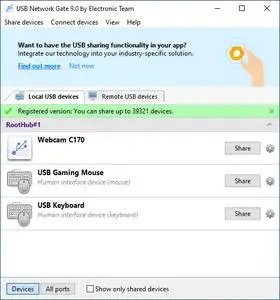
Free Download Eltima USB Network Gate 11.0.2772 (x64) Multilingual Fast Links | 9.3 Mb
With USB Network Gate you get to efficiently share multiple USB devices over Ethernet and connect to them on remote machines as if the devices were physically plugged into the computers regardless of the location or distance between them.
Share USB over IP networkUSB Network Gate offers a number of handy features that make sharing USB over Ethernet an easy and quick process. Now any user can print, scan, access USB license dongles and USB hubs over Ethernet from any computer in your office, no matter how big it is and how many floors it occupies.
USB over Ethernet data traffic optimization
With USB to Ethernet Connector traffic compression option, you can drastically improve transfer speed and bandwidth utilization. This option will be especially useful in conjunction with the devices that tend to transfer data uncompressed.
Share USB over Wi-Fi safely
The most valuable resource in the modern world is information, and our USB over IP software will make sure that no third party will gain access to yours. Highly secured connection standards are provided by the embedded traffic encryption option. Moreover, you can add a password to control remote user access.
Turn your computer into a USB server
There is no need to reboot your computer or restart USB Network Gate every time you need to share another device. Just unplug the currently shared USB device and plug in another one, it's that simple! A new device will automatically appear on the remote client, thanks to the fact that the application shares a USB port over the network, not just a connected device.
Compare USB Network Gate with USB/IP, VirtualHere and USB over Network
See our comparison chart of the top software tools for sharing USB devices over Ethernet and select the solution best suited to your needs.
Share USB over RDPThe common problem you may face when using Remote Desktop Connection is that you are unable to access local USB devices. USB Network Gate allows you to work with any local USB devices even while in a remote session. Moreover, you can set your remote machine to automatically detect and connect to shared USB devices momentarily, as if you just plugged the device in a remote machine physically.
Citrix ICA protocol support
In case you do not use Microsoft RDP or a client computer runs the operating system other than Windows, then fear not: USB device redirection can be done via Citrix ICA protocol. USB Network Gate natively supports Citrix ICA since version 7.0.
RemoteFX USB redirection support
USB Network Gate supports native RemoteFX USB Redirection (MS-RDPEUSB), allowing you to redirect shared devices from your local Linux computer to a remote Windows client without installing USB Network Gate on the latter. Note that shared USB devices have to be supported by RemoteFX USB Redirection. Otherwise, you'll need to install USB Network Gate on Windows client.
System Requirements:
Windows (32-bit and 64-bit): XP/Vista/7/8/10/11, Windows Server
Home Page -
https://www.eltima.com/DOWNLOAD LINK
Links are Interchangeable - No Password - Single Extraction
We need your support!
Make a donation to help us stay online

Bitcoin (BTC)
bc1q08g9d22cxkawsjlf8etuek2pc9n2a3hs4cdrld

Bitcoin Cash (BCH)
qqvwexzhvgauxq2apgc4j0ewvcak6hh6lsnzmvtkem

Ethereum (ETH)
0xb55513D2c91A6e3c497621644ec99e206CDaf239

Litecoin (LTC)
ltc1qt6g2trfv9tjs4qj68sqc4uf0ukvc9jpnsyt59u

USDT (ERC20)
0xb55513D2c91A6e3c497621644ec99e206CDaf239

USDT (TRC20)
TYdPNrz7v1P9riWBWZ317oBgJueheGjATm
Information |
|||
 |
Users of GUESTS are not allowed to comment this publication. | ||