


LizardSystems Terminal Services Manager 26.04.3 Multilingual
Category: Apps (SEO/Marketing/Design)
- views: 171
- date: 8 April 2026
- posted by: oaxino
LizardSystems Terminal Services Manager 26.04.3 Multilingual
Windows x64 | File size: 19.04 MB
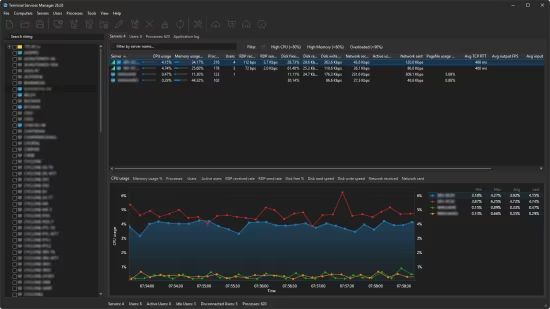
Terminal Services Manager connects to one or more RDS servers and shows all sessions, users, and processes in one place. You get CPU, memory, and 11 additional server metrics on interactive charts with zoom, pan, and measurement. The legend shows min, max, average, and current values in real time.
Per-user columns display round-trip time, bandwidth, frame rate, and frame quality for each active session. A signal-strength icon shows connection quality for each session, and server-level columns show Avg TCP RTT, Avg output FPS, Avg input FPS, and Avg frame quality. A signal-strength icon on each server shows the worst connection quality.. Diagnostic counters (packet loss, retransmission, frames skipped, encoding time) help you spot troubled sessions quickly.
You can audit user activity, monitor failed logon attempts, manage user profiles remotely, and enable or disable Remote Desktop on remote computers. Log off or disconnect idle users in bulk, send messages, and shadow user sessions.
The interface has Dark Mode with automatic switching based on your Windows theme, high-DPI support, and works on Windows 11.
Key features
- View users, sessions, and processes across multiple RDS servers with live CPU, memory, and resource usage
- Per-user RDP connection quality: round-trip time, bandwidth, frame rate, frame quality, and diagnostic counters
- 11 server performance metrics (available memory, pagefile, disk I/O, disk free space, network throughput, uptime) with interactive charts
- Multi-condition filtering with AND/OR logic, text and numeric comparisons, quick search, and 19 built-in presets on all tabs
- 130+ administrative commands in 12 categories (Network Diagnostics, PowerShell Remote, Sysinternals Suite, and more). You can add your own commands and categories
- User activity audit: track logon, logoff, disconnect, and reconnect events per user
- Failed logon attempts monitoring with details on who, when, and from which address
- Manage user profiles on remote computers: view, delete, and free up disk space
- Enable or disable Remote Desktop on remote computers
- Log off or disconnect idle and disconnected users in bulk
- Shadow (remote control) user sessions
- Send messages to selected users with message presets and variables (%computer_name%, %user_name%)
- Discover computers from 7 sources: Network, Active Directory, IP Range, Hyper-V, RDS Connection Broker, SCCM/MECM, WSUS
- Bulk operations: remove inactive or duplicate computers, normalize names, group by subnet or domain
- RDS Licensing dialog with license server info, grace period, and pack details
- Dark Mode with automatic Windows theme switching, high-DPI support, Windows 11 compatible
- Available in 16 languages
HOMEPAGE
https://lizardsystems.com/
DOWNLOAD
We need your support!
Make a donation to help us stay online

Bitcoin (BTC)
bc1q08g9d22cxkawsjlf8etuek2pc9n2a3hs4cdrld

Bitcoin Cash (BCH)
qqvwexzhvgauxq2apgc4j0ewvcak6hh6lsnzmvtkem

Ethereum (ETH)
0xb55513D2c91A6e3c497621644ec99e206CDaf239

Litecoin (LTC)
ltc1qt6g2trfv9tjs4qj68sqc4uf0ukvc9jpnsyt59u

USDT (ERC20)
0xb55513D2c91A6e3c497621644ec99e206CDaf239

USDT (TRC20)
TYdPNrz7v1P9riWBWZ317oBgJueheGjATm
Information |
|||
 |
Users of GUESTS are not allowed to comment this publication. | ||