


Windows Firewall Control 6.27
Category: Apps (SEO/Marketing/Design)
- views: 101
- date: 11 March 2026
- posted by: newapp2023
Windows Firewall Control 6.27 Multilingual | File size: 3.4 MB
Windows Firewall Control is a powerful tool which extends the functionality of Windows Firewall and provides new extra features which makes Windows Firewall better. It runs in the system tray and allows the user to control the native firewall easily without having to waste time by navigating to the specific part of the firewall. This is the best tool to manage the native firewall from Windows 10, 8.1, 8, 7, Server 2016, Server 2012.
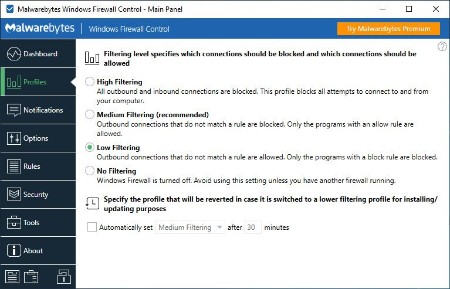
Windows Firewall Control offers four filtering modes which can be switched with just a mouse click
High Filtering - All outbound and inbound connections are blocked. This profile blocks all attempts to connect to and from your computer.
Medium Filtering - Outbound connections that do not match a rule are blocked. Only the programs that you allow can initiate outbound connections.
Low Filtering - Outbound connections that do not match a rule are allowed. The user can block the programs he doesn't want to allow initiating outbound connections.
No Filtering - Windows Firewall is turned off. Avoid using this setting unless you have another firewall running on your computer.
Windows Firewall Control doesn't do any packet filtering and does not block or allow any connection. This is done by Windows Firewall itself based on the existing firewall rules.
Program Features
- Notifications of outbound blocked connections.
- Learning mode that automatically allows digitally signed programs.
- Create temporary rules which are automatically deleted when they expire or on program restart.
- Intuitive user interface which is easy accessible through a system tray icon.
- Full support with standard user accounts. Elevated privileges are required only at installation.
- Disable the ability of other programs to tamper Windows Firewall rules and state.
- Integrated support of creating, modifying and deleting Window Firewall rules.
- Multiple and easier ways of creating new rules in Windows Firewall.
- Lock feature which can disable the access to the settings of the program and Windows Firewall.
- Shell integration into the right click context menu of the executable files.
- Automatically display invalid rules for programs that do not exist any more.
- Possibility to find and display duplicate firewall rules.
- Merge multiple similar rules or duplicate existing ones.
- View recently allowed and blocked connections and create new rules from the Security log.
- Import and export of partial sets of rules.
- Protection to unauthorized uninstallation.
- Possibility to restore previous settings at uninstallation.
- Global hot keys are supported and various shortcut keys are available.
- Integrated multi language support in 29 languages.
- And many, many more. Just try it out.
Whats New
https://www.binisoft.org/changelog.txtHomePage:
https://www.binisoft.org/
-:DOWNLOAD FROM LINKS:-
Download From RapidGator
Download From NitroFlare
We need your support!
Make a donation to help us stay online

Bitcoin (BTC)
bc1q08g9d22cxkawsjlf8etuek2pc9n2a3hs4cdrld

Bitcoin Cash (BCH)
qqvwexzhvgauxq2apgc4j0ewvcak6hh6lsnzmvtkem

Ethereum (ETH)
0xb55513D2c91A6e3c497621644ec99e206CDaf239

Litecoin (LTC)
ltc1qt6g2trfv9tjs4qj68sqc4uf0ukvc9jpnsyt59u

USDT (ERC20)
0xb55513D2c91A6e3c497621644ec99e206CDaf239

USDT (TRC20)
TYdPNrz7v1P9riWBWZ317oBgJueheGjATm
Information |
|||
 |
Users of GUESTS are not allowed to comment this publication. | ||