


Hit'n'Mix Ripx Daw Pro 8.0.0
Category: Apps (SEO/Marketing/Design)
- views: 167
- date: 2 December 2025
- posted by: mitsumi
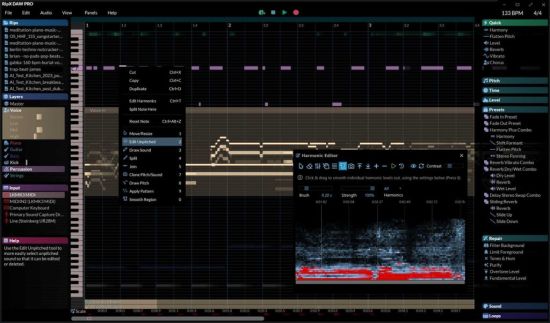
Hit'n'Mix Ripx Daw Pro 8.0.0
File size: 3.1 GB
RipX DAW PRO comes with all of the features of the RipX AI DAW, and then adds advanced stem clean-up and audio manipulation tools to the workflow so you can create the highest quality extracted audio, and tweak / create sound at unprecedented levels of detail. Think of it like a built-in Izotope RX suite.
RipX DAW PRO adds the following features and much more
Award-winning Audioshop® tools for fixing and cleaning up recordings quickly and easily
Unpitched audio editor for cleaning up noise separately from pitched sounds
The powerful and unique Harmonic Editor for the ultimate in sound editing
RipScript scripting language for building and customizing your own tools
Experience unprecedented control over notes, harmonics and unpitched sound, all in a powerful and easy-to-use click & drag interface.
Audioshop® Sound Manipulation Tools
Powerfully & quickly adjust pitch, time-stretch, copy and paste individual or groups of notes, sibilants and unpitched sounds.
Edit Unpitched tool displays all unpitched sound spread over the entire Rip, from its top to its bottom. Click & drag to select a region of unpitched sound and edit it.
Draw notes, drums and samples onto your rip with the Draw Sound tool.
Use the Split tool to cut notes into sections for further editing.
Piece together notes so you can edit as one, with the Join tool.
Clone characteristics such as pitch variation (e.g. vibrato), sound (timbre with volume) & panning from one note to another, for example to duplicate a real instrumentalist's playing style, with the Clone tool.
Make fine pitch adjustments and slides simply by clicking and dragging, with the Draw Pitch tool.
Add fluctuations in pitch, formant, volume, and panning to notes, using the Apply Pattern tool.
Blend together the pitch, formant, timbre, volume and/or stereo panning of notes by clicking & dragging over them, with the Smooth Region tool.
Harmonic Editor
This is no basic spectrum editor – these are the actual harmonics that describe the sound of a note, and Harmonic Editor allows complete control over them.
Perfect for removing noise, adjusting timbre and creating interesting new sounds.
Clean & Repair Audio
Live audio repair and clean-up features for removing background noise, limiting foreground artifacts, reducing tones & hum, and purifying pitched and unpitched sounds.
Adjust overtone levels in notes and even regenerate fundamental harmonics, to bring back bass presence in vocals and instruments, lost during mixing & mastering.
HOMEPAGE
https://hitnmix.com/ripx-daw-pro/
DOWNLOAD
https://rapidgator.net/file/67d1145fa6bf4608681412d8e9d938a0/Hitnmix.RipX.Daw.Pro.v8.0..part1.rar.html
https://rapidgator.net/file/3e4940c3083cf39629ab5a3e7dd5941b/Hitnmix.RipX.Daw.Pro.v8.0..part2.rar.html
https://rapidgator.net/file/35f7bd3e99c5acbde9a2d38e8693ded8/Hitnmix.RipX.Daw.Pro.v8.0..part3.rar.html
https://rapidgator.net/file/148054131e23a1ff1e8b30c9bd80e500/Hitnmix.RipX.Daw.Pro.v8.0..part4.rar.html
https://nitroflare.com/view/972F9051A4B600B/Hitnmix.RipX.Daw.Pro.v8.0..part1.rar
https://nitroflare.com/view/4CEAACDC30220F4/Hitnmix.RipX.Daw.Pro.v8.0..part2.rar
https://nitroflare.com/view/71147B00DBEA8C7/Hitnmix.RipX.Daw.Pro.v8.0..part3.rar
https://nitroflare.com/view/B143451C4433519/Hitnmix.RipX.Daw.Pro.v8.0..part4.rar
We need your support!
Make a donation to help us stay online

Bitcoin (BTC)
bc1q08g9d22cxkawsjlf8etuek2pc9n2a3hs4cdrld

Bitcoin Cash (BCH)
qqvwexzhvgauxq2apgc4j0ewvcak6hh6lsnzmvtkem

Ethereum (ETH)
0xb55513D2c91A6e3c497621644ec99e206CDaf239

Litecoin (LTC)
ltc1qt6g2trfv9tjs4qj68sqc4uf0ukvc9jpnsyt59u

USDT (ERC20)
0xb55513D2c91A6e3c497621644ec99e206CDaf239

USDT (TRC20)
TYdPNrz7v1P9riWBWZ317oBgJueheGjATm
Information |
|||
 |
Users of GUESTS are not allowed to comment this publication. | ||