


Diskdigger 2.0.13.4139 Multilingual
Category: Apps (SEO/Marketing/Design)
- views: 67
- date: 1 December 2025
- posted by: oaxino
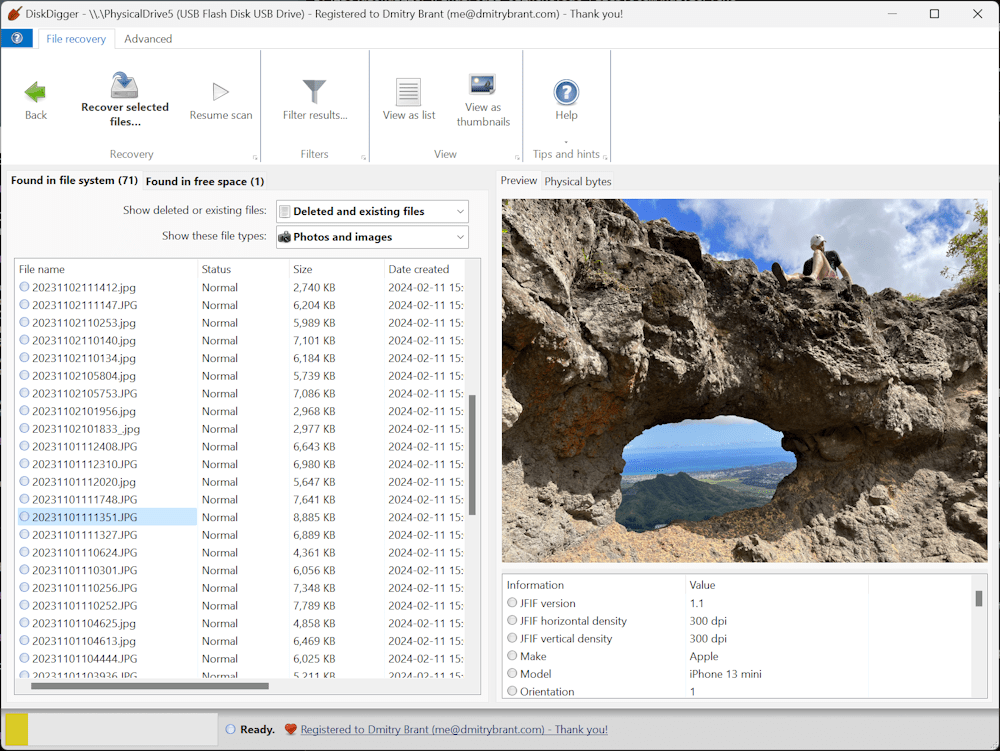
Diskdigger 2.0.13.4139 Multilingual
File size: 3.9 MB
DiskDigger® is a tool that undeletes and recovers lost files from your hard drive, memory cards, USB flash drives — you name it! Whether you accidentally deleted some documents or photos from your computer, reformatted your camera's memory card, or want to see what files are lurking on an old USB drive, DiskDigger is here for you. See the complete list of features to learn more.
DiskDigger can recover deleted files from most types of media that your computer can read: hard disks, USB flash drives, memory cards, CDs, DVDs, and even floppy disks. (Note: DiskDigger cannot recover data directly from Android or iOS devices plugged into a USB port on your PC. To recover data from an Android device, please use the DiskDigger app for Android. And if your Android device uses a microSD card for storing the data, please remove the card and connect it directly to your PC using a card reader, so that you can scan it directly using DiskDigger for Windows.)
Main features
Simple and intuitive interface, to help you find exactly the files you're looking for, as easily as possible.
Works in Windows 11, Windows 10, Windows 8, Windows 7, Windows Vista, and Windows XP. Both 32-bit and 64-bit versions of Windows are supported.
View recoverable files as a list, or as thumbnail previews.
Thumbnails will show previews of photos and image files, album art from MP3 and WMA files, icons from executable files, and any other image that can represent a file.
Highlighting a recoverable file brings up a full preview of the file (insofar as possible). For photos and images, it will show the image (with pan and zoom). For document files, it will show a text-only preview of the document. For certain audio files, it will allow you to play back the sound.
Previews of JPG and TIFF files will show EXIF information (camera model, date taken, sensor settings, etc.).
Previews of MP3 files will show ID3 information (artist, album, genre, etc.).
Previews of ZIP files will show a list of files contained in the archive.
Advanced features
Scan virtual disk image files
E01 and EWF files (Expert Witness Format)
VMDK files (VMware disk image)
VHD and VHDX files (Microsoft Virtual Hard Disk)
VDI files (VirtualBox disk image)
QCOW2 disk images
Direct binary disk images (acquired with dd or similar tools)
download
We need your support!
Make a donation to help us stay online

Bitcoin (BTC)
bc1q08g9d22cxkawsjlf8etuek2pc9n2a3hs4cdrld

Bitcoin Cash (BCH)
qqvwexzhvgauxq2apgc4j0ewvcak6hh6lsnzmvtkem

Ethereum (ETH)
0xb55513D2c91A6e3c497621644ec99e206CDaf239

Litecoin (LTC)
ltc1qt6g2trfv9tjs4qj68sqc4uf0ukvc9jpnsyt59u

USDT (ERC20)
0xb55513D2c91A6e3c497621644ec99e206CDaf239

USDT (TRC20)
TYdPNrz7v1P9riWBWZ317oBgJueheGjATm
Information |
|||
 |
Users of GUESTS are not allowed to comment this publication. | ||