


BytesMorph Duplicate Image Finder 2.0 Enterprise Edition
Category: Apps (SEO/Marketing/Design)
- views: 100
- date: 18 October 2025
- posted by: mitsumi
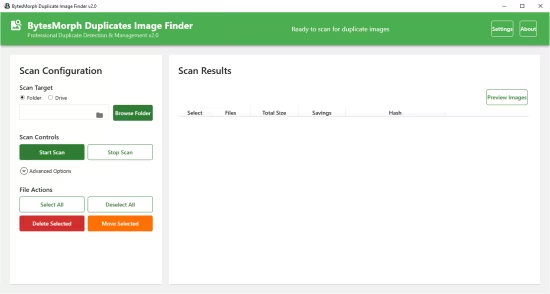
BytesMorph Duplicate Image Finder 2.0 Enterprise Edition
Languages: English
File Size: 334.67 MB
BytesMorph Duplicates Image Finder is an enterprise-level Windows application designed to help you reclaim valuable storage space by efficiently finding and managing duplicate images across your entire system. With its powerful scanning engine and intuitive interface, cleaning up your photo library has never been easier.
Advanced Duplicate Detection
- Multiple hash algorithms (MD5, SHA256, SHA1, XXHash, CRC32) for accurate detection
- Content-based hashing ensures identical files are always found
- Fuzzy detection for near-duplicate images with adjustable similarity thresholds
- EXIF data analysis for comprehensive metadata comparison
Flexible Scanning Options
- Scan entire drives or specific folders
- Recursive subdirectory scanning
- Smart handling of restricted system folders
- Support for all major image formats (JPEG, PNG, BMP, GIF, TIFF, WebP)
- Customizable file size and date filters
Modern Professional Interface
- Beautiful Material Design UI with intuitive layout
- Real-time progress tracking with visual feedback
- Comprehensive statistics dashboard
- Live results preview as scanning progresses
- Responsive design that adapts to your screen
Safe & Smart File Management
- Automatic original file protection (oldest files are kept safe)
- Preview images before deletion with side-by-side comparison
- Zoom, swap, and compare duplicate images
- Bulk delete or move operations
- Detailed operation results with success/failure counts
Advanced Settings & Customization
- Multiple auto-selection rules (keep newest, oldest, largest, smallest, highest resolution)
- Master folder designation for organized archives
- Chunked hashing for large files to optimize memory usage
- Configurable performance settings (threads, memory limits)
- Skip hidden, system, or read-only files
Performance Optimized
- Multi-threaded scanning for maximum speed
- Memory-efficient processing for large drives
- Batch processing to prevent UI freezing
- Cancellable operations - stop scans anytime
- Handles millions of files with ease
Comprehensive Results
- Grouped duplicate sets for easy review
- File count, total size, and potential savings calculations
- Hash verification for each duplicate group
- Sortable and filterable results
- Export capabilities for record-keeping
Perfect For
- Photographers managing large photo libraries
- System administrators maintaining server storage
- Digital archivists organizing media collections
- Home users cleaning up downloads and backups
- Content creators managing asset libraries
- Anyone looking to reclaim valuable disk space
Release Notes
System Requirements
- OS: Windows 10 version 17763.0 or higher
- Memory: 2 GB (Minimum), 4 GB (Recommended)
Microsoft Store - Full Version
HOMEPAGE
https://apps.microsoft.com/detail/9n835btd43h1?hl=en-US&gl=US
DOWNLOAD
We need your support!
Make a donation to help us stay online

Bitcoin (BTC)
bc1q08g9d22cxkawsjlf8etuek2pc9n2a3hs4cdrld

Bitcoin Cash (BCH)
qqvwexzhvgauxq2apgc4j0ewvcak6hh6lsnzmvtkem

Ethereum (ETH)
0xb55513D2c91A6e3c497621644ec99e206CDaf239

Litecoin (LTC)
ltc1qt6g2trfv9tjs4qj68sqc4uf0ukvc9jpnsyt59u

USDT (ERC20)
0xb55513D2c91A6e3c497621644ec99e206CDaf239

USDT (TRC20)
TYdPNrz7v1P9riWBWZ317oBgJueheGjATm
Information |
|||
 |
Users of GUESTS are not allowed to comment this publication. | ||