


Clean Media Player 2025.9.8.1
Category: Apps (SEO/Marketing/Design)
- views: 193
- date: 9 September 2025
- posted by: voska89
Free Download Clean Media Player 2025.9.8.1 | 123.7 Mb
If you ever found yourself annoyed by profanity in movies, there's a high chance that you'd wish for a censored version of these. However, until the director decides on releasing it, you're left with the choice of either muting the unwanted sequences or manually editing subtitles, if you have the option to do that. And even cutting out video bits... Too complicated.
But not if you rely on Clean Media Player. This app, just as its name might suggest, will enable you a far more facile resolution for such issues. It will enable you to apply profanity filter to subtitles, and have the foul bits removed automatically, and even skip scenes, based on timestamps.
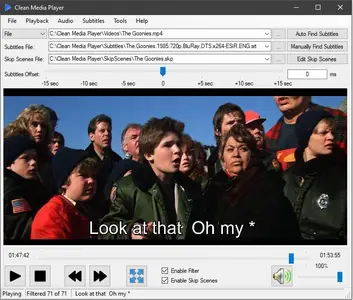
Right from the start, I enjoyed the design of Clean Media Player. Not only does it provide an accessible take on adding your video files, but also features decent playback controls and capabilities, and easy toggles for implementing filtering and skip scenes.
One detail worth mentioning is that despite being outside its scope, the app also comes equipped with on-screen controls for setting subtitle offset, both using a slider, as well as manual value input. Nice.
When it comes to the main attraction of the app - namely the profanity removal filter, things are pretty simple and efficient. It comes equipped with an ample, built-in library of words and replacements, which will be automatically included. However, you can also define your own terms, which will be used when generating the final, clean video.
Regarding skipping scenes, you will basically need to set the required timestamps, and the app will automatically remove them for you, and perform the subtitle mods in accordance with the defined filters. Pretty simple and efficient.
Not only does Clean Media Player offer an accessible solution for filtering profanity and foul language in videos, but it also manages to provide efficient ways of automatically censoring subtitles and skipping scenes, leaving you only with the preferred content, in just a few simple clicks.
Home Page-
https://cleanmediaplayer.com/DOWNLOAD LINK
Links are Interchangeable - No Password - Single Extraction
We need your support!
Make a donation to help us stay online

Bitcoin (BTC)
bc1q08g9d22cxkawsjlf8etuek2pc9n2a3hs4cdrld

Bitcoin Cash (BCH)
qqvwexzhvgauxq2apgc4j0ewvcak6hh6lsnzmvtkem

Ethereum (ETH)
0xb55513D2c91A6e3c497621644ec99e206CDaf239

Litecoin (LTC)
ltc1qt6g2trfv9tjs4qj68sqc4uf0ukvc9jpnsyt59u

USDT (ERC20)
0xb55513D2c91A6e3c497621644ec99e206CDaf239

USDT (TRC20)
TYdPNrz7v1P9riWBWZ317oBgJueheGjATm
Information |
|||
 |
Users of GUESTS are not allowed to comment this publication. | ||