


AutoSmith Openings Builder 1.0.1
Category: Apps (SEO/Marketing/Design)
- views: 77
- date: 24 August 2025
- posted by: voska89
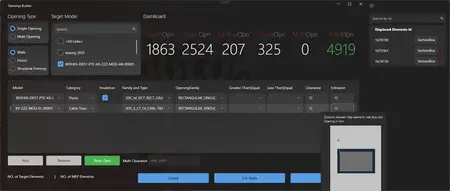
Free Download AutoSmith Openings Builder 1.0.1 | 19.9 Mb
Introducing Openings Builder - the ultimate Autodesk® Revit® add-in designed to transform the way your team manages MEP coordination and structural openings. No more tedious manual void placements or error-prone workflows. Openings Builder empowers engineers, architects, and BIM specialists to streamline their coordination process with precision, speed, and confidence.
Why Choose Openings Builder?
In every MEP project, coordinating penetrations for pipes, ducts, and cable trays is a critical task that often slows down project progress. Openings Builder changes that by intelligently automating the creation of wall and floor openings, saving countless hours and reducing coordination errors.
Whether you're working in complex high-rise developments or fast-paced industrial facilities, Openings Builder ensures your models stay coordinated and clash-free, without the manual hassle.
Key Features
Automated Opening Creation:
Detects MEP elements hosted in linked models and generates perfectly placed and sized wall and floor openings automatically - maintaining alignment with your design intent.
Supports Linked & Host Models:
Whether your MEP systems are inside linked models or the host project itself, Openings Builder detects them seamlessly.
Precision Void Placement:
Openings are placed exactly where needed, respecting the geometry and orientation of MEP elements, even for sloped or rotated pipes and ducts.
Smart Orientation Matching:
Automatically rotates and orients void families to match sleeve directions, ensuring consistency across all penetrations.
Real-Time Performance:
Handles complex models efficiently with high-performance detection algorithms, helping teams maintain workflow speed even in large-scale projects.
Customizable Workflows:
Adapt the tool to your project standards. Use your preferred void families and set size tolerances as needed.
Error Reporting:
Tracks elements that couldn't be processed and notifies you with clear, actionable insights - ensuring full control over the process.
Simplified User Interface:
Designed with usability in mind, even non-expert Revit users can deploy the tool effectively after a short introduction.
Continuous Updates:
With regular feature enhancements and user-driven improvements, Openings Builder evolves to match the needs of modern BIM coordination.
Who Should Use Openings Builder?
BIM Coordinators seeking automated, accurate opening generation.
MEP Designers looking to streamline void placement.
Structural Teams needing coordinated penetration data for accurate construction modelling.
Architects managing multi-discipline federated models.
Real-World Benefits
Save Hours of Manual Work:
Eliminate manual modelling of hundreds or thousands of penetrations.
Reduce Coordination Errors:
Minimize missed or incorrect openings that lead to clashes during construction.
Improve Model Consistency:
Ensure standardized, parametric voids across all projects.
Enhance Project Collaboration:
Keep models aligned across MEP, structural, and architectural teams effortlessly.
See Openings Builder in Action
Curious how Openings Builder can transform your workflow? Stay tuned - a detailed video demonstration will soon showcase the full capabilities of the add-in, from installation to deployment in live projects.
Boost Productivity. Enhance Accuracy. Simplify Coordination.
With Openings Builder, you're not just installing another Revit add-in - you're unlocking a smarter way to coordinate your models, avoid costly field clashes, and deliver higher-quality BIM outputs.
Home Page-
https://apps.autodesk.com/DOWNLOAD LINK
Links are Interchangeable - No Password - Single Extraction
We need your support!
Make a donation to help us stay online

Bitcoin (BTC)
bc1q08g9d22cxkawsjlf8etuek2pc9n2a3hs4cdrld

Bitcoin Cash (BCH)
qqvwexzhvgauxq2apgc4j0ewvcak6hh6lsnzmvtkem

Ethereum (ETH)
0xb55513D2c91A6e3c497621644ec99e206CDaf239

Litecoin (LTC)
ltc1qt6g2trfv9tjs4qj68sqc4uf0ukvc9jpnsyt59u

USDT (ERC20)
0xb55513D2c91A6e3c497621644ec99e206CDaf239

USDT (TRC20)
TYdPNrz7v1P9riWBWZ317oBgJueheGjATm
Information |
|||
 |
Users of GUESTS are not allowed to comment this publication. | ||