


Lazesoft Disk Image and Clone 5.0.1.1 Professional / Server Edition
Category: Apps (SEO/Marketing/Design)
- views: 88
- date: 16 August 2025
- posted by: mitsumi
File size: 159.40 MB
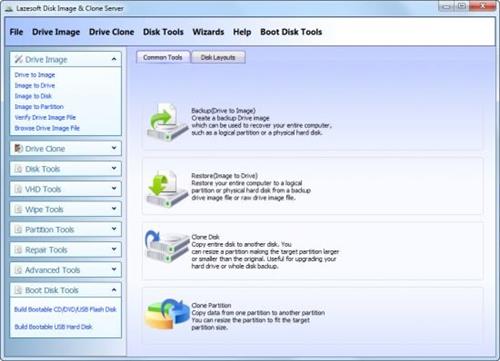
Lazesoft Disk Image & Clone may be used for backups, hard disk upgrades or disk duplication purposes. Your hard disk is full, you need to upgrade to a new hard disk? You think you are facing a large re-installation project which is likely to take several days of tedious work. With Lazesoft Disk Image & Clone, Clone/copy entire disk including Windows, programs, files and personal settings to a new disk/partition in several clicks. Never need to reinstall Windows and programs.
Need to backup your System safely?
With Lazesoft Disk Image & Clone, your can backup your entire system or disk to image files safely on offline, or clone your entire disk to another for backup.
Has options to create WinPE 3.5, 4.0, 5.0, 10 32 and 64 bit PE Recovery Disk
Added Start Menu on boot disk
Options to set screen resolution in the boot disk
Add Network Interface Card Drivers in the boot disk
Upgrade, Clone disk/Partition.
• Clone an old hard disk drive to a new large one.
• copy system partition to a new SSD drive.
• Easy to use wizard-driven interface.
• Partitions can be copy either with original sizes and locations, or Resizes transferred partitions to match new hard disk size.
• Clone with fast mode (Only copy used blocks) or complete mode (sector by sector copy).
• Support any types of hard disks like SATA, IDE, SSD, SAS, RAID, USB.
• Support FAT, FAT32, NTFS file systems.
• Includes special sector-by-sector support for other partitions and corrupted file systems.
• When partitions are copied an original hard disk remains unchanged.
Backup and Restore
• Create Backup Disk Image (occupied clusters only)
• Create Raw Disk Image (sector by sector copy)
• Image files compression
• Support Incremental image backup
• Options to encrypt the backup image with different options
• Command line interface (only for the paid versions)
• Supports FAT16, FAT32, NTFS file systems
• Other partitions and corrupted file systems can be backup with sector-by-sector.
• Auto splitting into 4GB size chunks for FAT32 destination partition.
• Exclude pagefile.sys, hiberfil.sys, swapfile.sys when backup a system disk/volume to a file
Partition Management
• Creates FAT, FAT32, NTFS partitions.
• deletes any types of partitions.
• Format FAT, FAT32, NTFS partitions.
• Hide/unhide partition.
• Set active partition.
Wipe Disk or Partition
• Securely wipe entire disk.
• Wipe multiple partitions even if system partition.
• Has quick mode and deep mode.
• Wipe any types of partitions.
• Support GPT, MBR and Dynamic volumes.
Repair Tools
• Backup/Restore/Rebuild MBR
• Backup/Restore/Rebuild MBR boot sector
• Rebuild Boot Menu
• Lost Partition Recovery
• Added Lazesoft BCD Doctor
VHD Management
• Create VHD
• Attach VHD
• Detach VHD
• Install Windows 7/8/10 on VHD
• Install Windows 8/8.1/10 on USB disk
https://www.lazesoft.com/blog/Homepage:
https://www.lazesoft.com/Download link
rapidgator.net:
nitroflare.com:
We need your support!
Make a donation to help us stay online

Bitcoin (BTC)
bc1q08g9d22cxkawsjlf8etuek2pc9n2a3hs4cdrld

Bitcoin Cash (BCH)
qqvwexzhvgauxq2apgc4j0ewvcak6hh6lsnzmvtkem

Ethereum (ETH)
0xb55513D2c91A6e3c497621644ec99e206CDaf239

Litecoin (LTC)
ltc1qt6g2trfv9tjs4qj68sqc4uf0ukvc9jpnsyt59u

USDT (ERC20)
0xb55513D2c91A6e3c497621644ec99e206CDaf239

USDT (TRC20)
TYdPNrz7v1P9riWBWZ317oBgJueheGjATm
Information |
|||
 |
Users of GUESTS are not allowed to comment this publication. | ||