


Windows Firewall Control 6.15 Multilingual
Category: Apps (SEO/Marketing/Design)
- views: 119
- date: 11 May 2025
- posted by: oaxino
File size: 3.0 MB
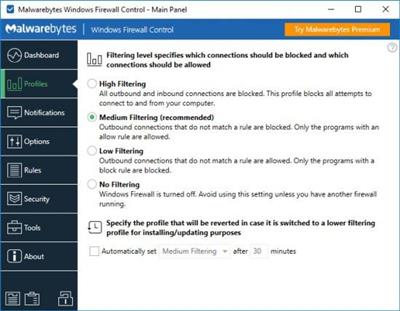
Windows Firewall Control is a powerful software which extends the functionality of Windows Firewall and provides new extra features which makes Windows Firewall even better. It runs in the system tray and allows the user to control the native firewall easily without having to waste time by navigating to the specific part of the firewall. This is the best tool to manage the native firewall from Windows 10, 8.1, 8, 7, Vista, Server 2008, Server 2012.
Quick access from the tray icon
Once initialized, the app creates an icon in the system tray area and allows you to select the security profile, ranging from no filtering (turns off Windows Firewall) to high filtering mode (blocks all inbound and outbound connections).
Thorough management of application connections
When it comes to rules management, you can allow or deny access to any application, disable, delete it from the list or create a duplicate. The list shows names, groups, programs, locations, statuses, actions, directions, locate and remote ports, remote addresses, protocols, and services.
Populate permission lists with custom apps
It is possible to sort items by status or direction (inbound, outbound, all, user-created), use a search function, view recently blocked programs, as well as switch to a simplified viewing mode for enabling and disabling program access, as well as for adding a new app to the list.
Rich settings to work with
Windows Firewall Control features a control panel where you can make additional tweaks. You can integrate the tool into the Explorer context menu, set it to autorun at startup, disable other programs from adding firewall rules, activate global hotkeys for the control panel and rules management area, adjust the frame's hue, import and export rules, as well as access some Windows tools (Firewall with Advanced Security, Command Prompt, Event Viewer, Resource Monitor, Windows Registry).
To end with
All in all, the application has a fair reaction speed and works smoothly, without causing any problems to the OS. It quickly applies rule changes. Windows Firewall Control is an excellent utility for a better control over Windows Firewall options, especially when it comes to setting up rules for each program.
https://www.binisoft.org/changelog.txtHomepage:
https://www.binisoft.orgDownload link
rapidgator.net:
nitroflare.com:
We need your support!
Make a donation to help us stay online

Bitcoin (BTC)
bc1q08g9d22cxkawsjlf8etuek2pc9n2a3hs4cdrld

Bitcoin Cash (BCH)
qqvwexzhvgauxq2apgc4j0ewvcak6hh6lsnzmvtkem

Ethereum (ETH)
0xb55513D2c91A6e3c497621644ec99e206CDaf239

Litecoin (LTC)
ltc1qt6g2trfv9tjs4qj68sqc4uf0ukvc9jpnsyt59u

USDT (ERC20)
0xb55513D2c91A6e3c497621644ec99e206CDaf239

USDT (TRC20)
TYdPNrz7v1P9riWBWZ317oBgJueheGjATm
Information |
|||
 |
Users of GUESTS are not allowed to comment this publication. | ||