


Auslogics Windows Slimmer Professional 5.0.1 Multilingual
Category: Apps (SEO/Marketing/Design)
- views: 98
- date: 6 May 2025
- posted by: oaxino
Auslogics Windows Slimmer Professional 5.0.1 Multilingual
File size: 17 MB
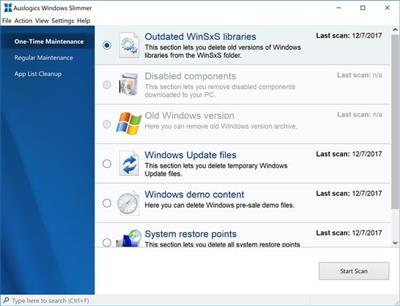
Auslogics Windows Slimmer is a full-service option to clean up useless data, uninstall software including obsolete Windows versions.The goal here is to slim down non-essential data that is taking up precious space to help improve your machine's performance and speed. Over time your PC accumulates items that are no longer needed (or ever needed) including some non-optimal settings, unused system apps, in the background data transmitting options, etc., these take up space that waste resources and are detrimental to the overall efficiency of your machine.
You need to periodically perform a clean up of these junk items to allow your machine to operate at its best. Items such as old System Restore points, Windows Update files, outdated Windows libraries or disabled system components can take up a large amount of disk space over time and reduce performance.
Windows Slimmer is designed to enable any user a simple option to remove unneeded Windows components, uninstall obsolete or unused apps and tweak your machine's settings to reduce the footprint of your OS on your drive smaller, and also reduce the amount of memory and CPU power needed for privacy protection by blocking unnecessary data transmissions. You have a choice for the type of maintenance you wish to perform; one-time maintenance which allows you to target specific files and data like disabled components, the Windows.old folder. The other is regular maintenance which as the name implies is to clean up those areas that need constant attention like memory dump files, the recycle bin, temp and cache folders, etc. Lastly, you have the app list clean up where you can uninstall any app from your machine. This option also includes an app rating key providing you with an at-a-glance indicator to the trustworthiness of the app, but we are not sure exactly where the rating was compiled. That said, it is another nice option for cleaning out junk and providing some always needed space.
https://www.auslogics.com/en/software/windows-slimmer/popup/history/Homepage:
https://www.auslogics.com/Download link
rapidgator.net:
nitroflare.com:
We need your support!
Make a donation to help us stay online

Bitcoin (BTC)
bc1q08g9d22cxkawsjlf8etuek2pc9n2a3hs4cdrld

Bitcoin Cash (BCH)
qqvwexzhvgauxq2apgc4j0ewvcak6hh6lsnzmvtkem

Ethereum (ETH)
0xb55513D2c91A6e3c497621644ec99e206CDaf239

Litecoin (LTC)
ltc1qt6g2trfv9tjs4qj68sqc4uf0ukvc9jpnsyt59u

USDT (ERC20)
0xb55513D2c91A6e3c497621644ec99e206CDaf239

USDT (TRC20)
TYdPNrz7v1P9riWBWZ317oBgJueheGjATm
Information |
|||
 |
Users of GUESTS are not allowed to comment this publication. | ||