


VovSoft Auto Change Screensavers 1.7
Category: Apps (SEO/Marketing/Design)
- views: 113
- date: 21 December 2024
- posted by: voska89
Free Download VovSoft Auto Change Screensavers 1.7 | 4.1 Mb
Vovsoft Auto Change Screensavers is a desktop tool that will change your screensavers. Forget about setting different screensavers manually and use this compact app that will automatically run screensavers for you in whichever order you prefer.
Change your screensavers automatically
Selecting a screensaver can sometimes take ages and there are some who spend a considerable amount of time searching and testing different screensavers. Finding the one to your liking can be difficult, but, this is what Auto Change Screensavers excels at, and it will help users find, select and run screensavers with different settings and in a preferred order.
Do you have lots of screen savers installed? Sometimes people spend lots of time trying to choose which one to make the default. This screen saver manager solves that problem. This application is a screensaver rotator that allows you to automatically rotate your screensavers.
How to change your screensavers automatically
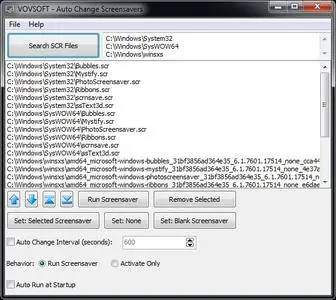
Selecting the disk path where users wish to find .SCR files can be made by pasting the location in the entry field. Once the directory paths have been added, the app will identify the screensaver files. Once a screensaver file search has been performed, users can then proceed to selecting the preferred .SCR files to be run, as well as in which order. The file list supports rearranging, and users can do so by resorting to the on-screen controls that will allow them to move the preferred files up or down.
Set preferred screensaver duration and select a run order that best fits your preferences. The "Randomize" button in the software allows users to quickly shuffle through their collection of screensavers. A cool feature is the "Auto Change Interval" timer, which will allow one to set the preferred duration for each screensaver to be active. The screensavers can either be run or just simply activated, and the app does allow "Auto Run at Startup".
Operating System:Windows 11/10/8.1/8/7/Vista/XP (32-bit and 64-bit)
Home Page-
https://vovsoft.com/DOWNLOAD LINK
Links are Interchangeable - No Password - Single Extraction
We need your support!
Make a donation to help us stay online

Bitcoin (BTC)
bc1q08g9d22cxkawsjlf8etuek2pc9n2a3hs4cdrld

Bitcoin Cash (BCH)
qqvwexzhvgauxq2apgc4j0ewvcak6hh6lsnzmvtkem

Ethereum (ETH)
0xb55513D2c91A6e3c497621644ec99e206CDaf239

Litecoin (LTC)
ltc1qt6g2trfv9tjs4qj68sqc4uf0ukvc9jpnsyt59u

USDT (ERC20)
0xb55513D2c91A6e3c497621644ec99e206CDaf239

USDT (TRC20)
TYdPNrz7v1P9riWBWZ317oBgJueheGjATm
Information |
|||
 |
Users of GUESTS are not allowed to comment this publication. | ||