


Actual Virtual Desktops 8.15.2 Multilingual
Category: Apps (SEO/Marketing/Design)
- views: 101
- date: 14 November 2024
- posted by: mitsumi
Actual Virtual Desktops 8.15.2 Multilingual
File size: 9.0 MB
As a multi-tasking OS, Windows allows you running multiple programs simultaneously. As a result, you have a few windows open at any time. But when working with lots of applications, your desktop can easily become overcrowded. Actual Virtual Desktops will help you resolve this problem - you can allocate and classify all of your windows by moving them to virtual desktops.
Actual Virtual Desktops provides a "virtual" space - as if you have several logical monitors instead of a single physical one. You can extend the real estate of the workspace and move a window from virtual desktop 1 to virtual desktop 2 etc. The actual number of virtual desktops is not limited!
Easily configure more desktops
Right from the start, the application throws a quick guide at you to view a few general settings you can manage to get an idea of the purpose. You can go through with it, even though it's mostly text and pictures, with no interactive options to at least create a sample virtual desktop.
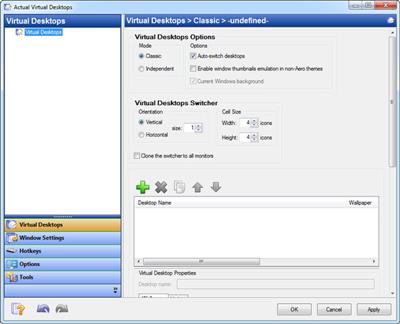
Sooner or later you end up in the configurations screen, because it's the only way you'll be able to have access to more desktops. It's the only window you get to work with and it's pretty well-organized, with several tabs piled up in a side panel to configure virtual desktops, window settings and hotkeys, each spreading a whole bunch of options in the main area.
Enhanced navigation with hotkeys
All new entries you create can be given a different name, so you can easily use a screen for entertainment and the other for personal projects. Accessing one is done through custom hotkeys, the system tray icon, or a compact window that also displays all programs active in each desktop.
For an enhanced overall experience, you can configure window and other program behaviors. Several commonly used applications are enlisted, with the possibility to have them launched or setting rules to prevent you from running them.
Hotkeys play an important role and are not only used to switch to new environments. General settings let you configure easy navigation, through elements, start or stop services, as well as bringing up the configuration window. In case a hotkey is used, the application lets you know so you can change it.
A few last words
Taking everything into consideration, we can say that Actual Virtual Desktops is a handy application when day-to-day activities you perform on a computer have you work with a lot of different windows. It spends most of its time in the system tray to let you benefit from all space, further extending it with customizable desktops, easy hotkey navigation and more.
https://www.actualtools.com/virtualdesktops/whatsnewHomepage:
https://www.actualtools.com/Download link
Say "Thank You"
rapidgator.net:
k2s.cc:
We need your support!
Make a donation to help us stay online

Bitcoin (BTC)
bc1q08g9d22cxkawsjlf8etuek2pc9n2a3hs4cdrld

Bitcoin Cash (BCH)
qqvwexzhvgauxq2apgc4j0ewvcak6hh6lsnzmvtkem

Ethereum (ETH)
0xb55513D2c91A6e3c497621644ec99e206CDaf239

Litecoin (LTC)
ltc1qt6g2trfv9tjs4qj68sqc4uf0ukvc9jpnsyt59u

USDT (ERC20)
0xb55513D2c91A6e3c497621644ec99e206CDaf239

USDT (TRC20)
TYdPNrz7v1P9riWBWZ317oBgJueheGjATm
Information |
|||
 |
Users of GUESTS are not allowed to comment this publication. | ||