


Installed Software 1.3
Category: Apps (SEO/Marketing/Design)
- views: 83
- date: 31 October 2024
- posted by: mitsumi
Installed Software 1.3
File Size : 17.6 Mb
A software uninstaller specifically designed for Windows PE, which allows you to manage and remove software from a personal computer.
While Windows PE cannot be used as a primary operating system, a WinPE disk image ca be created to carry out system diagnostics, testing and troubleshooting.
One of the most important tools on a WinPE disk is the software uninstaller, since it allows you to explore the list of installed software and quickly remove or, at least try to remove the ones that might cause malfunctions or affect the system's performance or its security.
Although designed specifically for use on Windows PE, Installed Software (PE) can also be used as a standalone application for the regular Windows OS. As a plus, it does not require installation and it has a very small footprint, so as to be used on WinPE disks. In other words, you get a simple, portable and lightweight software uninstaller, whether you load it on a WinPE disk or use it in Windows directly.
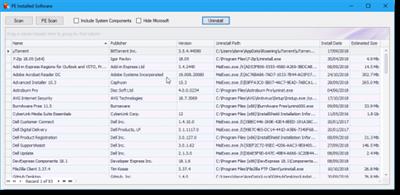
The application's main window features a simple table containing the sets of data that are usually found in uninstallers. You get to see the name of the software, its publisher, the installed version and its path, as well as the installation date and the estimated size.
To populate this list, you simply have to hit the "Scan" button. If you are on a Windows PE environment, know that there is a dedicated button for initiating the analysis. System components and Microsoft-signed programs can be optionally excluded from this list.
With a name that could not be more simple and suggestive, Installed Software (PE) allows you to browse the list of installed applications on a PC and, eventually, get rid of the ones you no longer need. The list of installed applications can also be exported to file and used further for computer diagnostics.
Whats New
Various updates and bug fixes
Homepage:
https://www.pcassistsoftware.co.uk/Download link
Say "Thank You"
rapidgator.net:
nitroflare.com:
ddownload.com:
We need your support!
Make a donation to help us stay online

Bitcoin (BTC)
bc1q08g9d22cxkawsjlf8etuek2pc9n2a3hs4cdrld

Bitcoin Cash (BCH)
qqvwexzhvgauxq2apgc4j0ewvcak6hh6lsnzmvtkem

Ethereum (ETH)
0xb55513D2c91A6e3c497621644ec99e206CDaf239

Litecoin (LTC)
ltc1qt6g2trfv9tjs4qj68sqc4uf0ukvc9jpnsyt59u

USDT (ERC20)
0xb55513D2c91A6e3c497621644ec99e206CDaf239

USDT (TRC20)
TYdPNrz7v1P9riWBWZ317oBgJueheGjATm
Information |
|||
 |
Users of GUESTS are not allowed to comment this publication. | ||