


CaptureWiz 8.00
Category: Apps (SEO/Marketing/Design)
- views: 105
- date: 2 October 2024
- posted by: oaxino
CaptureWiz 8.00
File Size: 9.1 MB
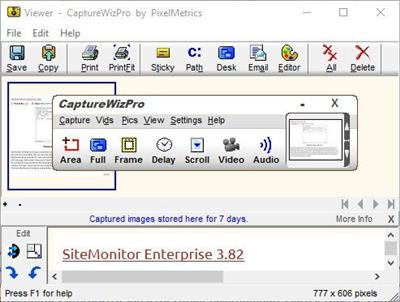
Capture it all - screen images, Windows Store apps (using touch), scrolling areas, video and audio with CaptureWizPro. Start captures from a small capture bar that hides at the edge of your screen. Or use hot keys or the taskbar icon. Simple tools, visible over any background, guide you through the three quick steps. Capture anything, even tricky items like open menus, mouse pointers and screen savers. This new version is compatible with Windows 10 and touch screen input!
Taking a screenshot can be tricky from time to time, since some applications react differently when trying to capture them. Some programs cannot be captured, while others have menus that disappear when trying to capture them.
CaptureWizPro is a handy tool that can help you capture portions of your screen with ease, including troublesome drop-down lists, scrolling pages and screensavers, that cannot always be captured by the classic PrintScreen function.
Flexible area focusing software
The application can capture any part of your screen, then save it as a preferred format, such as PNG, JPG, GIF or BMP, whilst offering indications for each format. This way, you can choose wisely what format to use, as JPG can be a poor choice for text images, whilst BMP could be troublesome for Internet use because of its large uncompressed content.
Furthermore, you can select what you want to capture, so that the program will know how to react. You can capture a certain desktop area, fullscreen applications, scroll-down pages, videos and audio files, as well as Metro-style programs. CaptureWizPro will act accordingly and automatically select the best settings in order to capture the preferred area or window.
Intuitive image editor
The application features a lightweight image editor that you can use to tweak your images before saving them. You can rotate images and flip them vertically or horizontally. In addition, you can invert colors or resize the image, so that the output file will have a smaller size. Any captured image can be easily printed or sent via email.
An overall good screen capturing application
CaptureWizPro allows you to take snapshots of certain areas of your screen, then edit and save them to a preferred format. Using the application, you can grab screenshots of any window or menu, no matter how troublesome they can be to capture regularly.
http://www.pixelmetrics.com/CapWizPro/History.htmHomepage:
http://www.pixelmetrics.comDownload link
Say "Thank You"
rapidgator.net:
ddownload.com:
We need your support!
Make a donation to help us stay online

Bitcoin (BTC)
bc1q08g9d22cxkawsjlf8etuek2pc9n2a3hs4cdrld

Bitcoin Cash (BCH)
qqvwexzhvgauxq2apgc4j0ewvcak6hh6lsnzmvtkem

Ethereum (ETH)
0xb55513D2c91A6e3c497621644ec99e206CDaf239

Litecoin (LTC)
ltc1qt6g2trfv9tjs4qj68sqc4uf0ukvc9jpnsyt59u

USDT (ERC20)
0xb55513D2c91A6e3c497621644ec99e206CDaf239

USDT (TRC20)
TYdPNrz7v1P9riWBWZ317oBgJueheGjATm
Information |
|||
 |
Users of GUESTS are not allowed to comment this publication. | ||