


OneNoteGem Mind Map for OneNote 2024 v12.3.0.76
Category: Apps (SEO/Marketing/Design)
- views: 85
- date: 19 August 2024
- posted by: voska89
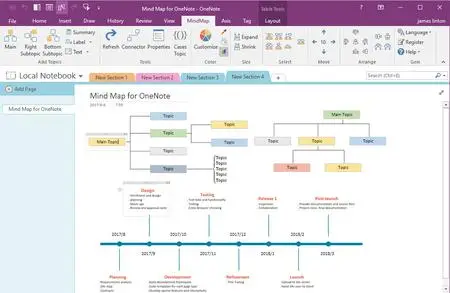
Free Download OneNoteGem Mind Map for OneNote 2024 v12.3.0.76 | 8.9 Mb
Using native elements to create Mind Map in Windows Office OneNote 2024, 2021, 2016, 2013, 2010. Time Axis, All OneNote 138 Tags.
Add Main Topic
Insert a Main Topic into current OneNote page.
Put the cursor in OneNote page, click on this "Main" feature to insert a main topic in cursor position.
Add Right Subtopic
Insert a Subtopic on right side of the selected topic.
Select a topic at first, then click on "Right Subtopic" to insert a subtopic on right side of the selected topic.
Add Bottom Subtopic
Insert a Subtopic at bottom of the selected topic.
Select a topic at first, then click on "Bottom Subtopic" to insert a subtopic at bottom of the selected topic.
Vertical Text
Display vertical topic text. Select a topic, click this feature to change the text to vertical text.(Use for branch topic)
Horizontal Text
Display horizontal topic text. If the selected topic text is vertical text, you can use this feature change the text to horizontal text.
System Requirements:
Windows 11, 10
OneNote: 2021 (32-bit, 64-bit )
Home Page-
https://www.onenotegem.com/a/addins/mind-map-for-onenote.htmlDOWNLOAD LINK
Links are Interchangeable - No Password - Single Extraction
We need your support!
Make a donation to help us stay online

Bitcoin (BTC)
bc1q08g9d22cxkawsjlf8etuek2pc9n2a3hs4cdrld

Bitcoin Cash (BCH)
qqvwexzhvgauxq2apgc4j0ewvcak6hh6lsnzmvtkem

Ethereum (ETH)
0xb55513D2c91A6e3c497621644ec99e206CDaf239

Litecoin (LTC)
ltc1qt6g2trfv9tjs4qj68sqc4uf0ukvc9jpnsyt59u

USDT (ERC20)
0xb55513D2c91A6e3c497621644ec99e206CDaf239

USDT (TRC20)
TYdPNrz7v1P9riWBWZ317oBgJueheGjATm
Information |
|||
 |
Users of GUESTS are not allowed to comment this publication. | ||