


HoRNet VUMeter MK4 v4.2.5
Category: Apps (SEO/Marketing/Design)
- views: 75
- date: 18 July 2024
- posted by: voska89
Free Download HoRNet VUMeter MK4 v4.2.5 | 3.9 Mb
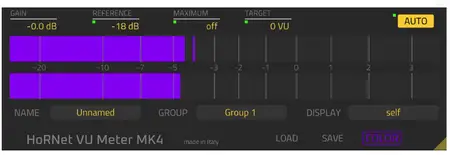
The HoRNet VU Meter MK4 is a digital VU meter plugin with automatic gain setting and grouping functions, the new GUI is now scalable and has been optimised to take less space than the previous version and let you focus on the meter bars. In addition to the GUI VU Meter MK4 also allows you to give names to your tracks and groups, send every parameter change to any instance of VU Meter MK4 (not just the ones in the same group) and display the level of any of the other instances in the project without closing the GUI and choosing a new track.
Know your levels before it's too late
Monitoring the signal level coming into your DAW is crucial for a correct mixing, VU meter helps you both in recording and mixing stage.
When recording your tracks it's useful to have a loudness indicator like the VU meter that with its 300ms of integration time gives you a helpful view of the perceived loudness of your signal. Used in conjunction with peak meters it can help you to improve your miking technique since it's always desirable to have loudness and peak value as close as possibile. VU Meter MK4 has a calibration setting that will allow you to set the 0VU point to the best level for your A/D converters (by default is set to -18dBFS but you should read the spec of your A/D and set the calibration to the specified internal headroom). This is because every A/D converter has an analog front-end and if you record too hot (close to 0dBFS) you risk to overload that analog stage.
Auto gain for quick mixing preparation
In mixing VU Meter plugin is even more useful, used in conjunction with the peak meter of your DAW can help you identify critical tracks that have too much energy in the transients and not enough loudness, but the single most useful feature is the auto gain. Gain staging is a crucial part of every mix, especially if you use analog emulating plugins, hitting them too high means creating too much distortion that then adds up in the mix.
To avoid this you can simply engage the automatic gain function of VU Meter MK4 that will adjust the internal gain to make the signal peak at your desired level (between -3 and +3 VU). With transient heavy sounds it may happen that auto gain boosts too much your tracks and drive them into clipping, to avoid this we have provided a max. peak ceiling that will prevent your signal from going higher than the set value.
The grouping function allows you to group instances of vu meters together (say your Drums group) and apply auto gain, reference and color settings to every instance belonging to the same group with just one click, choosing the "Send to all" option of any parameter, you can copy that value to every other VU Meter MK4 in your project, even if they don't belong to the same group.
Home Page -
https://www.hornetplugins.com/plugins/hornet-vu-meter-mk4/DOWNLOAD LINK
Links are Interchangeable - No Password - Single Extraction
We need your support!
Make a donation to help us stay online

Bitcoin (BTC)
bc1q08g9d22cxkawsjlf8etuek2pc9n2a3hs4cdrld

Bitcoin Cash (BCH)
qqvwexzhvgauxq2apgc4j0ewvcak6hh6lsnzmvtkem

Ethereum (ETH)
0xb55513D2c91A6e3c497621644ec99e206CDaf239

Litecoin (LTC)
ltc1qt6g2trfv9tjs4qj68sqc4uf0ukvc9jpnsyt59u

USDT (ERC20)
0xb55513D2c91A6e3c497621644ec99e206CDaf239

USDT (TRC20)
TYdPNrz7v1P9riWBWZ317oBgJueheGjATm
Information |
|||
 |
Users of GUESTS are not allowed to comment this publication. | ||