


SimpleSYN Business 6.7.18321.0
Category: Apps (SEO/Marketing/Design)
- views: 93
- date: 28 March 2024
- posted by: voska89
Free Download SimpleSYN Business 6.7.18321.0 | 28.1 Mb
Synchronize Outlook between Windows PCs over the internet. With the SimpleSYN Business-Edition, you can synchronize Outlook automatically and cloudless between several computers in the local network or over the Internet, regardless of location.
The Business-Edition is ideally to use a common Outlook calendar in a team, to access a central Outlook contact database or to synchronize important e-mails and contacts with the office PC with the laptop while on the way.
The powerful filter function makes it child's play for you to decide which Outlook items should be exchanged. SimpleSYN is ideal for excluding privately marked appointments from the synchronization process, or only allowing the synchronization of certain e-mails sorted by size, attachments or recipient. To make it easier to work on a shared calendar in everyday office life, reminders or categories can be excluded from synchronization. The reading status of e-mails can also be set to a specified value during synchronization.
The Business-Edition is also optimized for use on server systems and can be started automatically via Windows service.
Whether in the office, in the home office, at the customer or on the way, your emails, appointments, notes and contacts are always up to date. Choose a cost-effective synchronization solution that eliminates the need for an Exchange server, cloud services, or other external servers and enhances collaboration within your organization.
Synchronize Outlook via the Internet
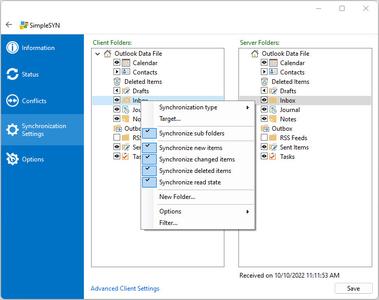
Synchronizes emails (POP3), appointments, contacts, notes and tasks between multiple computers via local network or independent of location through Internet synchronization.
Optimal data exchange
After the initial synchronization SimpleSYN only synchronizes changes to the Outlook database.
Completely flexible synchronization
Direction and type of Outlook synchronization (new, altered and deleted items) can be individually set up for each folder.
Additional features
Delete Outlook duplicates with the duplicate finder and backup function.
Powerful business functionality
Like a filter function, advanced synchronization settings or starting via Windows service.
Perfect teamwork
Use shared project folders, a central contact database or a team calendar.
Maximum security
Through digital encryption (uses SSL or TLS respectively). Cloudless syncing, no cloud-service necessary.
Highly satisfied customer feedback
Our customers are highly satisfied with SimpleSYN. SimpleSYN also managed to convince the trade press.
Lifetime license
With no monthly or annual fees. From only 79.90 Euro (incl. 19% VAT) for 2 computers.
Optimized for Outlook 2021 and Windows 11
Compatible with Outlook 2021 (Microsoft/Office 365 with Outlook).
Home Page-
https://www.simplesyn.net/en-US/simplesyn-businessDOWNLOAD LINK
Links are Interchangeable - No Password - Single Extraction
We need your support!
Make a donation to help us stay online

Bitcoin (BTC)
bc1q08g9d22cxkawsjlf8etuek2pc9n2a3hs4cdrld

Bitcoin Cash (BCH)
qqvwexzhvgauxq2apgc4j0ewvcak6hh6lsnzmvtkem

Ethereum (ETH)
0xb55513D2c91A6e3c497621644ec99e206CDaf239

Litecoin (LTC)
ltc1qt6g2trfv9tjs4qj68sqc4uf0ukvc9jpnsyt59u

USDT (ERC20)
0xb55513D2c91A6e3c497621644ec99e206CDaf239

USDT (TRC20)
TYdPNrz7v1P9riWBWZ317oBgJueheGjATm
Information |
|||
 |
Users of GUESTS are not allowed to comment this publication. | ||