


Abyssmedia HEIC Converter Plus 3.3.0.0
Category: Apps (SEO/Marketing/Design)
- views: 74
- date: 24 December 2023
- posted by: oaxino
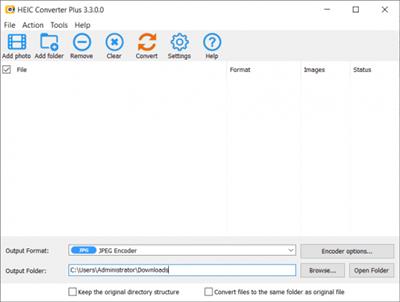
Abyssmedia HEIC Converter Plus 3.3.0.0
File Size: 5.6 MB
File Size: 5.6 MB
High Efficiency Image Formats allows you to create and store photos at a much smaller size without losing image quality. But not all users can open and view HEIC and AVIF images due to compatibility issues. With HEIC Converter Plus you can simply convert HEIF (.heic) and AVIF (.avif) images to JPEG or PNG on Windows without any limitations. After that, your live photos will be viewable anywhere. You can upload all your photos for conversion at one time, which means a decent saving of time if you have a lot of photos. At the same time, you can adjust the image quality according to your needs. Exif data will also be saved during the conversion process.
HEIC and AVIF support
HEIC is the next generation format for storing photos on iOS. This format saves a lot of space without compromising image quality. It is considered a replacement for the JPEG image format, adding the ability to store multiple photos and thumbnails in a single file. AVIF format is an open and royalty-free image format which has a better compression efficiency and detail preservation that WebP.
JPEG and PNG output formats
JPG is the most common format for storing photos. JPG files are highly compressed by removing small parts of the image. Because JPG tends to compress with losses, this image format may not be the ideal way to store digital photos or other art files. PNG stands for Portable Network Graphics. It was developed for internet graphics because it supports a large number of colours and lossless compression.
Great performance
One of the most important advantages of our software is the flexible conversion speed. At its maximum setting it can use 100% of your computer's resources for lightning-fast results. If you want to continue working, you can run conversion in the background when it will use only idle resources.
High Quality
With support for both JPEG and PNG formats, you can choose the best balance between quality and file size. Use the PNG format to avoid loss and keep the full color range, or adjust the JPEG quality setting to reduce the file size.
Batch Conversion
Unlike other converters, HEIC Converter Plus not only allows you to process all your photos at once, but is also able to extract all the images stored inside a single file. In this case, the file names will be formed using continuous numbering.
Metadata
All metadata from the original file is saved with the utmost care. In addition to the regular metadata in EXIF format, color profile and alpha channel information are also saved.
Keep the directory structure
When processing well-organized photo collections, the ability to save the directory structure comes in handy. Alternatively, you can save the files in the same folder as the original photo.
https://www.abyssmedia.com/heic-converter/history.shtmlHomepage:
https://www.abyssmedia.com/heic-converter/Download link
rapidgator.net:
uploadgig.com:
nitroflare.com:
We need your support!
Make a donation to help us stay online

Bitcoin (BTC)
bc1q08g9d22cxkawsjlf8etuek2pc9n2a3hs4cdrld

Bitcoin Cash (BCH)
qqvwexzhvgauxq2apgc4j0ewvcak6hh6lsnzmvtkem

Ethereum (ETH)
0xb55513D2c91A6e3c497621644ec99e206CDaf239

Litecoin (LTC)
ltc1qt6g2trfv9tjs4qj68sqc4uf0ukvc9jpnsyt59u

USDT (ERC20)
0xb55513D2c91A6e3c497621644ec99e206CDaf239

USDT (TRC20)
TYdPNrz7v1P9riWBWZ317oBgJueheGjATm
Information |
|||
 |
Users of GUESTS are not allowed to comment this publication. | ||