


Kiive Audio S-Quick Strip v1.0.6 Win Mac
Category: Apps (SEO/Marketing/Design)
- views: 133
- date: 7 November 2023
- posted by: oaxino
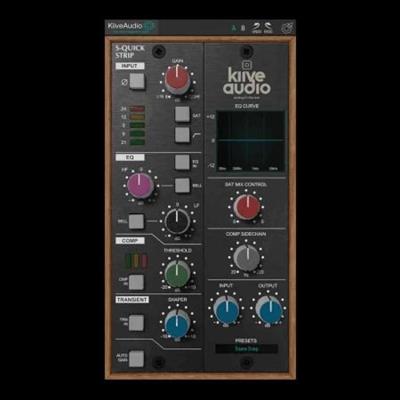
Kiive Audio S-Quick Strip v1.0.6 Win Mac
MOCHA | VST3/AAX/AU | 402 MB
MOCHA | VST3/AAX/AU | 402 MB
"I can get a snare going in like 20 seconds with this thing and the compressor is SICK on this!"
SAM GUAIANA
Silverstein, The Devil Wears Prada, Intervals, Neck Deep
The S-Quick strip is easy to use, making it the perfect plugin to throw on a track if you're in a hurry. Use it as a console-style insert to quickly add saturation, EQ, compression, and transient manipulation to any mix!
The S-Quick Includes a polarity flip button, two circuits of saturation, a highpass filter, a two band EQ with shelf and bell options, one knob compressor with auto makeup gain, a transient designer, saturation wet and dry mix, and a compressor sidechain.
Module Overview
INPUT
The Preamp section gives you a Polarity Flip button, a Gain knob to dial in the amount of saturation, a saturation button to switch between two circuits of saturation.
When off, the saturation will be subtle. When on, the saturation will be dense and heavy with a slightly brighter tone!
This section also includes a highpass filter button which when on engages a filter at 75Hz.
EQ
The EQ section contains two knobs and two buttons. The two buttons switch between a bell curve and a shelf.
For the high-frequency section, the bell is at 2kHz and the shelf is at 8kHz.
For the low-frequency section, the bell is at 200Hz and the shelf is at 120Hz.
COMP
The compressor section contains just one knob (threshold).
Use this knob to dial in compression from the fixed settings.
You can also engage auto makeup to compensate for the drop in signal when using extreme settings.
The fixed compressor settings are Attack - 5ms, Release - 300ms, Ratio - 4:1.
TRANSIENT DESIGNER
The Transient Designer section is another knob module.
Turning the knob clockwise will enhance the transients leading to a punchier sound.
Turning the knob counter-clockwise will remove some of the attack and punch of the transients and soften the sound.
EXTRA CONTROLS
The Extra Controls section includes
Saturation knob to control the level of harmonic saturation in the strip.
Sidechain Filter for the compressor to allow the low-end frequencies to pass through untouched.
Input and Output knobs to control the gain going in and out of the plugin.
Changelog
Updates: official site does not provide any info about changes in this version.
Homepage:
https://www.kiiveaudio.com/products/s-quickDownload link
rapidgator.net:
uploadgig.com:
nitroflare.com:
We need your support!
Make a donation to help us stay online

Bitcoin (BTC)
bc1q08g9d22cxkawsjlf8etuek2pc9n2a3hs4cdrld

Bitcoin Cash (BCH)
qqvwexzhvgauxq2apgc4j0ewvcak6hh6lsnzmvtkem

Ethereum (ETH)
0xb55513D2c91A6e3c497621644ec99e206CDaf239

Litecoin (LTC)
ltc1qt6g2trfv9tjs4qj68sqc4uf0ukvc9jpnsyt59u

USDT (ERC20)
0xb55513D2c91A6e3c497621644ec99e206CDaf239

USDT (TRC20)
TYdPNrz7v1P9riWBWZ317oBgJueheGjATm
Information |
|||
 |
Users of GUESTS are not allowed to comment this publication. | ||