


Bitvaerk File Juggler 3.0.9
Category: Apps (SEO/Marketing/Design)
- views: 118
- date: 25 October 2023
- posted by: oaxino
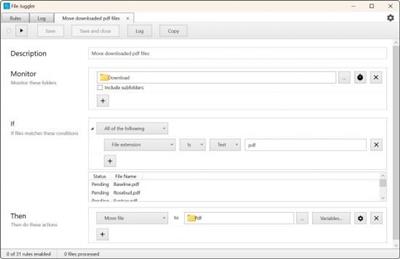
Bitvaerk File Juggler 3.0.9
File size: 7.0 MB
File size: 7.0 MB
File Juggler is a handy software utility that allows you to manage and organize files based on a set of rules which you can define. With this application, you can monitor a single folder or multiple ones and decide which files you want to move, rename, copy, open or delete.
Watch your files fly magically in place
Create powerful file automation rules, and sit back and watch as your files are renamed, moved, deleted as you want. Instantly and automatically.
Automatic document organizing
Save hours of boring manual document organization. File Juggler reads the contents of your files and puts them in the right spot while you do your real job.
Set rules by creating if-then statements
Rules are created based on conditional if-then statements that decide which file actions should be taken. Consequently, you can create both simple and complex conditions or combine them in any way you want. Also, you are not restricted to any number of if-structures, so you can create as many as you need. Besides manually creating rules, you can create a list of actions that orderly run with each completed step.
Another method of executing or creating rules for files is by using the File Explorer's right-click menu.
An alternative to Windows Search Service
Instead of using the Windows search function which gives you the possibility to handle only one file at a time, File Juggler allows you to perform various operations on multiple files automatically.
By creating rules, you instruct the application to perform various file actions that include moving, renaming, extracting, copying or deleting files.
Other functions enable you to verify the contents of Word documents, PDF and text files, as well as organize music files into categories using artist, album and title information.
Most photos captured with cameras and mobile phones are represented by meaningless numbers, to assign significant names, File Juggler offers you the possibility to rename them with the time and date when they were taken.
Fully-featured file manager
All in all, File Juggler is a comprehensive file manager that features many unique functions which allow you to maintain a clean and organized system. Apart from executing basic file operations, File Jugger sorts downloads automatically by file type, notifies you when performing an action, runs commands, uploads contents of text files to Evernote and sends documents to Recycle Bin.
https://www.filejuggler.com/news/Homepage
https://www.filejuggler.com/Download link
rapidgator.net:
uploadgig.com:
nitroflare.com:
We need your support!
Make a donation to help us stay online

Bitcoin (BTC)
bc1q08g9d22cxkawsjlf8etuek2pc9n2a3hs4cdrld

Bitcoin Cash (BCH)
qqvwexzhvgauxq2apgc4j0ewvcak6hh6lsnzmvtkem

Ethereum (ETH)
0xb55513D2c91A6e3c497621644ec99e206CDaf239

Litecoin (LTC)
ltc1qt6g2trfv9tjs4qj68sqc4uf0ukvc9jpnsyt59u

USDT (ERC20)
0xb55513D2c91A6e3c497621644ec99e206CDaf239

USDT (TRC20)
TYdPNrz7v1P9riWBWZ317oBgJueheGjATm
Information |
|||
 |
Users of GUESTS are not allowed to comment this publication. | ||