


Infopulse PACE Suite Enterprise 6.0.0.30
Category: Apps (SEO/Marketing/Design)
- views: 109
- date: 8 October 2023
- posted by: oaxino
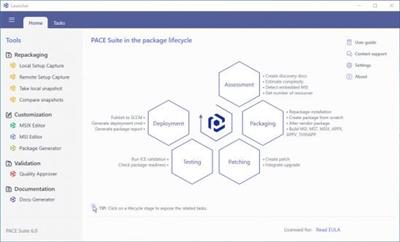
Infopulse PACE Suite Enterprise 6.0.0.30
File size: 180.8 MB
File size: 180.8 MB
PACE Suite is an intelligent and simple application packaging tool with a wide range of features for all application packaging tasks.
PACE Suite Key Features
Simple conversion of existing installers
Wizards will help to convert your existing installation to MSI, MSIX or any other supported package format with minimal effort and time.
Advanced MSI and MSIX authoring
Edit content and settings of your packages with the help of comprehensive editing tools with multiple wizards.
Packages of different formats from a single project
Build MSI, MST, MSIX, APPX, APPV, THINAPP from the same project and use that project to change resource and generate a new version of the package.
Automated and manual repackaging on VM
Intelligent capturing engine in manual or fully automatic modes; locally and on any number of parallel running virtual machines without license restrictions.
Built-in support of PSF
Quickly integrate required PSF fixups into MSIX packages of legacy applications to run in an MSIX container.
IntuneWin wrapper
Convert your installation files into IntuneWin format before adding an application to Microsoft Intune.
Command-line for automation
Use the command-line interface to automate packaging tasks with your batch scripts.
Intuitive and friendly UI
The product UI is designed to meet expectations of both newbies and experts, and usually doesn't require reading tons of documentation.
Repackaging
Capture on localhost
Capture on remote VM (VMware ESX, Microsoft Hyper-V, Oracle VirtualBox)
Run repackaging in automated or manual mode
Continue repackaging after system restart
Capture permission changes
Automatically filter out the captured system noise
Manage custom user-defined exclusion filters
Configuration of scanned areas
Detect hidden or wrapped MSI installations
Run repackaging functions from the batch script
Include/exclude captured resources at any time
Create and reuse system snapshots
https://pacesuite.com/release/6.0.0/PACE-Suite-6.0.0-Release-notes.pdfHomepage
https://pacesuite.com/Download link
rapidgator.net:
uploadgig.com:
nitroflare.com:
We need your support!
Make a donation to help us stay online

Bitcoin (BTC)
bc1q08g9d22cxkawsjlf8etuek2pc9n2a3hs4cdrld

Bitcoin Cash (BCH)
qqvwexzhvgauxq2apgc4j0ewvcak6hh6lsnzmvtkem

Ethereum (ETH)
0xb55513D2c91A6e3c497621644ec99e206CDaf239

Litecoin (LTC)
ltc1qt6g2trfv9tjs4qj68sqc4uf0ukvc9jpnsyt59u

USDT (ERC20)
0xb55513D2c91A6e3c497621644ec99e206CDaf239

USDT (TRC20)
TYdPNrz7v1P9riWBWZ317oBgJueheGjATm
Information |
|||
 |
Users of GUESTS are not allowed to comment this publication. | ||